FabCon is coming to Atlanta
Join us at FabCon Atlanta from March 16 - 20, 2026, for the ultimate Fabric, Power BI, AI and SQL community-led event. Save $200 with code FABCOMM.
Register now!- Power BI forums
- Get Help with Power BI
- Desktop
- Service
- Report Server
- Power Query
- Mobile Apps
- Developer
- DAX Commands and Tips
- Custom Visuals Development Discussion
- Health and Life Sciences
- Power BI Spanish forums
- Translated Spanish Desktop
- Training and Consulting
- Instructor Led Training
- Dashboard in a Day for Women, by Women
- Galleries
- Data Stories Gallery
- Themes Gallery
- Contests Gallery
- QuickViz Gallery
- Quick Measures Gallery
- Visual Calculations Gallery
- Notebook Gallery
- Translytical Task Flow Gallery
- TMDL Gallery
- R Script Showcase
- Webinars and Video Gallery
- Ideas
- Custom Visuals Ideas (read-only)
- Issues
- Issues
- Events
- Upcoming Events
The Power BI Data Visualization World Championships is back! Get ahead of the game and start preparing now! Learn more
- Power BI forums
- Forums
- Get Help with Power BI
- Desktop
- Check first and lasttime of ID-Occurence
- Subscribe to RSS Feed
- Mark Topic as New
- Mark Topic as Read
- Float this Topic for Current User
- Bookmark
- Subscribe
- Printer Friendly Page


- Mark as New
- Bookmark
- Subscribe
- Mute
- Subscribe to RSS Feed
- Permalink
- Report Inappropriate Content
Check first and lasttime of ID-Occurence
Hello Dear PowerBI Community
I would be very grateful, if you could help me.
As can be seen in the table, there are different transports with IDs.
I would like to check chronologically which message per transport ID is sent first and which last.
The result should be in a calculated table as in the example.
| transportID | created | CheckOccurence |
| 123 | 22.10.2019 01:45 | FirstTime |
| 123 | 23.10.2019 03:15 | x |
| 123 | 24.10.2019 21:45 | x |
| 456 | 24.10.2019 22:11 | FirstTime |
| 456 | 24.10.2019 23:32 | LastTime |
| 789 | 24.10.2019 23:50 | FirstTime |
| 789 | 25.10.2019 03:30 | x |
| 789 | 25.10.2019 05:20 | LastTime |
| 123 | 25.10.2019 16:30 | x |
| 123 | 25.10.2019 19:12 | LastTime |
Cheers!
qwertzuiop
Solved! Go to Solution.


- Mark as New
- Bookmark
- Subscribe
- Mute
- Subscribe to RSS Feed
- Permalink
- Report Inappropriate Content
no problem, it should work as column. set as solution if it will help
Column =
var _first = calculate(MIN(Table1[created]);ALLEXCEPT(Table1;Table1[transportID]))
var _last = calculate(MAX(Table1[created]);ALLEXCEPT(Table1;Table1[transportID]))
var _trID = [transportID]

RETURN
SWITCH(TRUE();
[created] = _first && [transportID] =_trID; "FirstTime";
[created] = _last && [transportID] =_trID; "LastTime";
"x"
)
do not hesitate to give a kudo to useful posts and mark solutions as solution
- Mark as New
- Bookmark
- Subscribe
- Mute
- Subscribe to RSS Feed
- Permalink
- Report Inappropriate Content
Hi @qwertzuiop
try a measure
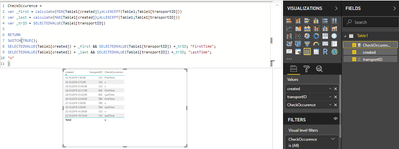
CheckOccurence =
var _first = calculate(MIN(Table1[created]);ALLEXCEPT(Table1;Table1[transportID]))
var _last = calculate(MAX(Table1[created]);ALLEXCEPT(Table1;Table1[transportID]))
var _trID = SELECTEDVALUE(Table1[transportID])

RETURN
SWITCH(TRUE();
SELECTEDVALUE(Table1[created]) = _first && SELECTEDVALUE(Table1[transportID]) =_trID; "FirstTime";
SELECTEDVALUE(Table1[created]) = _last && SELECTEDVALUE(Table1[transportID]) =_trID; "LastTime";
"x"
)
do not hesitate to give a kudo to useful posts and mark solutions as solution
- Mark as New
- Bookmark
- Subscribe
- Mute
- Subscribe to RSS Feed
- Permalink
- Report Inappropriate Content
thanks a lot.
Unfortunatelly it doesn't work.
Could you please send your work in a powerBI-File so I can check and unterstand it?
- Mark as New
- Bookmark
- Subscribe
- Mute
- Subscribe to RSS Feed
- Permalink
- Report Inappropriate Content
do not hesitate to give a kudo to useful posts and mark solutions as solution
- Mark as New
- Bookmark
- Subscribe
- Mute
- Subscribe to RSS Feed
- Permalink
- Report Inappropriate Content
Thank you so much for your fast answers.
Couls you upload the file directly in here.
I'm in a secure network which not allows to visit your url.
- Mark as New
- Bookmark
- Subscribe
- Mute
- Subscribe to RSS Feed
- Permalink
- Report Inappropriate Content
There is no such option in the Community
do not hesitate to give a kudo to useful posts and mark solutions as solution
- Mark as New
- Bookmark
- Subscribe
- Mute
- Subscribe to RSS Feed
- Permalink
- Report Inappropriate Content

Very strange.
To help you visualize my problem: I only have an x everywhere.
- Mark as New
- Bookmark
- Subscribe
- Mute
- Subscribe to RSS Feed
- Permalink
- Report Inappropriate Content
I got it. YOu create a column, but need a measure. try measure
do not hesitate to give a kudo to useful posts and mark solutions as solution
- Mark as New
- Bookmark
- Subscribe
- Mute
- Subscribe to RSS Feed
- Permalink
- Report Inappropriate Content
it could be problem with delimiter. try use "," instead of my ";"
do not hesitate to give a kudo to useful posts and mark solutions as solution
- Mark as New
- Bookmark
- Subscribe
- Mute
- Subscribe to RSS Feed
- Permalink
- Report Inappropriate Content
Does not work when changing ; to ,
https://community.powerbi.com/t5/Desktop/Find-first-occurence-of-value/m-p/850429#M408093
please check this post.
Are you sure you can't do this as well?
- Mark as New
- Bookmark
- Subscribe
- Mute
- Subscribe to RSS Feed
- Permalink
- Report Inappropriate Content
try a New Measure, not column. it should work 🙂
do not hesitate to give a kudo to useful posts and mark solutions as solution
- Mark as New
- Bookmark
- Subscribe
- Mute
- Subscribe to RSS Feed
- Permalink
- Report Inappropriate Content
Thank you very much @az38
Now i could solve the problem and it works.
But is there a way for a calculated column too?
Would be better for me 😕
- Mark as New
- Bookmark
- Subscribe
- Mute
- Subscribe to RSS Feed
- Permalink
- Report Inappropriate Content
no problem, it should work as column. set as solution if it will help
Column =
var _first = calculate(MIN(Table1[created]);ALLEXCEPT(Table1;Table1[transportID]))
var _last = calculate(MAX(Table1[created]);ALLEXCEPT(Table1;Table1[transportID]))
var _trID = [transportID]

RETURN
SWITCH(TRUE();
[created] = _first && [transportID] =_trID; "FirstTime";
[created] = _last && [transportID] =_trID; "LastTime";
"x"
)
do not hesitate to give a kudo to useful posts and mark solutions as solution
- Mark as New
- Bookmark
- Subscribe
- Mute
- Subscribe to RSS Feed
- Permalink
- Report Inappropriate Content
Thank you so much - you did a great job 🙂

Helpful resources

Power BI Dataviz World Championships
The Power BI Data Visualization World Championships is back! Get ahead of the game and start preparing now!

Power BI Monthly Update - December 2025
Check out the December 2025 Power BI Holiday Recap!

FabCon Atlanta 2026
Join us at FabCon Atlanta, March 16-20, for the ultimate Fabric, Power BI, AI and SQL community-led event. Save $200 with code FABCOMM.

| User | Count |
|---|---|
| 40 | |
| 38 | |
| 36 | |
| 29 | |
| 28 |


| User | Count |
|---|---|
| 127 | |
| 88 | |
| 78 | |
| 66 | |
| 64 |


