Join us at FabCon Atlanta from March 16 - 20, 2026, for the ultimate Fabric, Power BI, AI and SQL community-led event. Save $200 with code FABCOMM.
Register now!The Power BI Data Visualization World Championships is back! Get ahead of the game and start preparing now! Learn more
Hi all,
I found that Charticulator is an excellent tool for customizing charts. However, when I created charts using Charticulator, the charts were not changing if I selected "Highlight" as the way of interaction, "Filter" works, but not "Highlight". Is this a limitation of the Charticulator's charts currently? or did I miss something?
Thanks!
I'm having the same issue with charticulator charts. Anyone figure this out yet?
Hi @IWallis ,
Could you please provide some screenshots to show the problem you are talking about? What kind of visual are you building? Since Charticulator is a custom visual, you might consider contacting the related team for more professional support.
Announcing the new Charticulator visual
Using Charticulator To Conditionally Highlight Bar Chart
Best Regards
Hi,
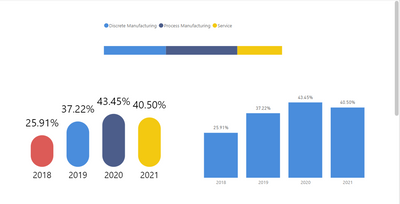
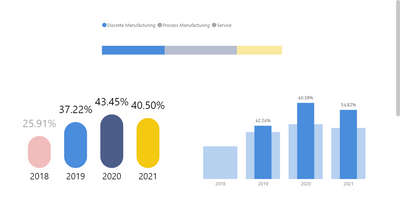
For example below, as you can see both charts in the bottom are the same data, and I used charticulator to chart the left one and power BI chart for the right one
and if I select one of the bars on the top, I can see the chart on the right highlighted the data but the chart on the left is not reacting to the selection.
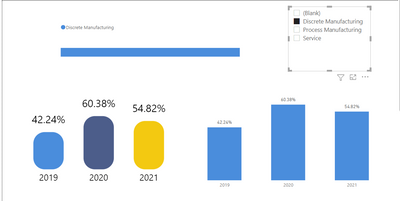
But if I use filter, both charts react to that
so I am just wondering if this is a limitation of charticulator's charts?
The Power BI Data Visualization World Championships is back! Get ahead of the game and start preparing now!
Check out the November 2025 Power BI update to learn about new features.
| User | Count |
|---|---|
| 59 | |
| 46 | |
| 42 | |
| 23 | |
| 17 |
| User | Count |
|---|---|
| 190 | |
| 122 | |
| 96 | |
| 66 | |
| 47 |