cancel
Showing results for 
Search instead for 
Did you mean: 

Get Fabric Certified for FREE during Fabric Data Days. Don't miss your chance! Request now

Reply
Anonymous
Not applicable

Chart with goal line with different measures

Hi,

I have two tables that have this structure:
Feedback Table

Year      Month    Person     Sector   Year-Month-Status    
2022    1JackB2022-1-Z
20221EllenA2022-1-T
20222DavidD2022-2-Z
20223AliceC2022-3-A
...............


Objectives Table

Year     Month     Sector   Goal    Year-Month-Status  
20221A152022-1-A
20221B112022-1-B
20221C172022-1-C
20221D202022-1-D
20222A242022-2-A
20222B332022-2-B
20222C452022-2-C
20222D362022-2-D
...............


I want to create a chart that shows the COUNT of feedbacks for each Sector in each month of the year, with the objective line adapting to the objective of each month and sector of the Objectives table.
I would also like that if the Sector objective for the month was reached, the bar would turn green, if not, the bar would turn red.

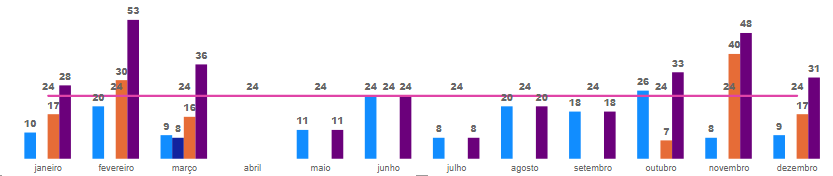
I created a column that concatenates Year, Month and Sector in the two tables (Year-Month-Status column), to be able to generate a kind of ID and related the two tables by that ID, but I don't know what else to do. I've already created the chart that shows the count of feedbacks per Sector and per month, but when I enter the Objective value for the goal line (from the Objective table), the line appears straight, indicating "objective count", as in the image below:
inn1.PNG

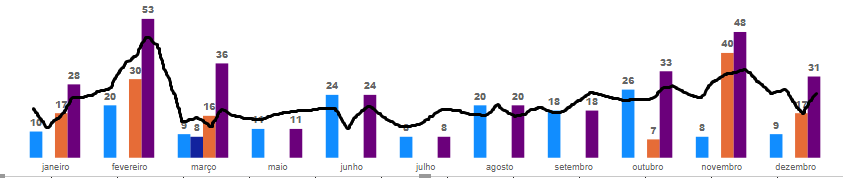
When actually I wanted my chart to look something like this:
inn2.PNG

Can someone help me?

1 ACCEPTED SOLUTION
v-henryk-mstf
Community Support
Community Support

Hi @Anonymous ,


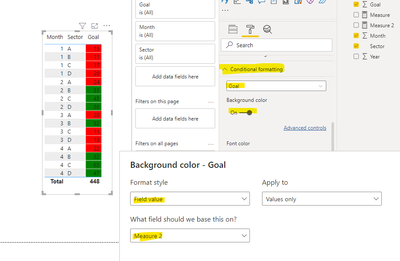
The line and clustered column chart does not support adding a conditional judgment condition based on column. You can try to use table visual, create measure, and use format->conditional formatting function, refer to the following.

Measure 2 = IF(MAX('Table'[Goal   ])>=25,"green","red")

vhenrykmstf_1-1649125493571.png

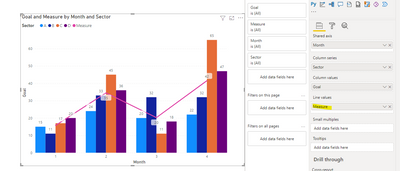
In addition you can create measures as trend lines (e.g. averages) to be placed in the visual counterpart.

Measure = AVERAGE('Table'[Goal   ])

vhenrykmstf_2-1649125728631.png


If the problem is still not resolved, please provide detailed error information and let me know immediately. Looking forward to your reply.


Best Regards,
Henry


If this post helps, then please consider Accept it as the solution to help the other members find it more quickly.

View solution in original post

2 REPLIES 2
v-henryk-mstf
Community Support
Community Support

Hi @Anonymous ,


The line and clustered column chart does not support adding a conditional judgment condition based on column. You can try to use table visual, create measure, and use format->conditional formatting function, refer to the following.

Measure 2 = IF(MAX('Table'[Goal   ])>=25,"green","red")

vhenrykmstf_1-1649125493571.png

In addition you can create measures as trend lines (e.g. averages) to be placed in the visual counterpart.

Measure = AVERAGE('Table'[Goal   ])

vhenrykmstf_2-1649125728631.png


If the problem is still not resolved, please provide detailed error information and let me know immediately. Looking forward to your reply.


Best Regards,
Henry


If this post helps, then please consider Accept it as the solution to help the other members find it more quickly.

Anonymous
Not applicable

No one? 😞 

Helpful resources

Announcements
November Power BI Update Carousel

Power BI Monthly Update - November 2025

Check out the November 2025 Power BI update to learn about new features.

Fabric Data Days Carousel

Fabric Data Days

Advance your Data & AI career with 50 days of live learning, contests, hands-on challenges, study groups & certifications and more!

FabCon Atlanta 2026 carousel

FabCon Atlanta 2026

Join us at FabCon Atlanta, March 16-20, for the ultimate Fabric, Power BI, AI and SQL community-led event. Save $200 with code FABCOMM.

Top Solution Authors
Top Kudoed Authors