cancel
Showing results for 
Search instead for 
Did you mean: 

View all the Fabric Data Days sessions on demand. View schedule

Reply
Anonymous
Not applicable

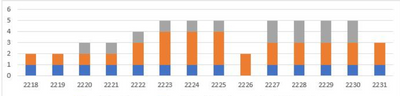
Chart to show the total amount of issues open

Hi everyone 


So I got a dataset which looks like the following: 


Raised date                raised week                responsibility                Closed date                closed week
02/05/2022                2218                A                20/05/2022                2220
03/05/2022                2218                B                20/05/2022                2220
16/05/2022                2220                A                30/06/2022                2226
17/05/2022                2220                C                30/06/2022                2226
18/05/2022                2220                B  
03/06/2022                2222                B                30/06/2022 
10/06/2022                2223                B                30/06/2022                2226
06/07/2022                2227                C                01/08/2022                2231
07/07/2022                2227                C                01/08/2022                2231
08/07/2022                2227                A  


Now the goal is to check how many issues have been open like this: 
SSSTE_0-1663321648413.png

(Legend for the colors is the responsible team) 


Initially I was planning to do open issues - count of closed issues, but this is not working as I expected it would. I've created a caculated column 


Amount Raised = 
VAR UpdationDate = Sheet1[Raised date]
RETURN
COUNTROWS(
    FILTER(Sheet1, Sheet1[Raised date] <= UpdationDate))
    // FILTER(Sheet1, Sheet1[Raised date] <= UpdationDate))


Which works as expected, the second calculated column does not 

I tried creating a similar for closed date, but the numbers never match. My end goal was to create a third calculated column subtracting those 2 from each other & putting it in a visual


Anyone that can support? Or has a better idea on how to proceed? 


Thanks in advanced! 

1 ACCEPTED SOLUTION
Greg_Deckler
Community Champion
Community Champion

@Anonymous 
Take a look at these two Quick Measures as I think you want something like them.

https://community.powerbi.com/t5/Quick-Measures-Gallery/Open-Tickets/m-p/409364
https://community.powerbi.com/t5/Quick-Measures-Gallery/Periodic-Billing/m-p/409365


Follow on LinkedIn
@ me in replies or I'll lose your thread!!!
Instead of a Kudo, please vote for this idea
Become an expert!: Enterprise DNA
External Tools: MSHGQM
YouTube Channel!: Microsoft Hates Greg
Latest book!:
DAX For Humans

DAX is easy, CALCULATE makes DAX hard...

View solution in original post

2 REPLIES 2
Anonymous
Not applicable

Indeed this looks exactly what I need, I didn't test it yet but it really looks good. Thanks a lot Greg!

Greg_Deckler
Community Champion
Community Champion

@Anonymous 
Take a look at these two Quick Measures as I think you want something like them.

https://community.powerbi.com/t5/Quick-Measures-Gallery/Open-Tickets/m-p/409364
https://community.powerbi.com/t5/Quick-Measures-Gallery/Periodic-Billing/m-p/409365


Follow on LinkedIn
@ me in replies or I'll lose your thread!!!
Instead of a Kudo, please vote for this idea
Become an expert!: Enterprise DNA
External Tools: MSHGQM
YouTube Channel!: Microsoft Hates Greg
Latest book!:
DAX For Humans

DAX is easy, CALCULATE makes DAX hard...

Helpful resources

Announcements
November Power BI Update Carousel

Power BI Monthly Update - November 2025

Check out the November 2025 Power BI update to learn about new features.

Fabric Data Days Carousel

Fabric Data Days

Advance your Data & AI career with 50 days of live learning, contests, hands-on challenges, study groups & certifications and more!

FabCon Atlanta 2026 carousel

FabCon Atlanta 2026

Join us at FabCon Atlanta, March 16-20, for the ultimate Fabric, Power BI, AI and SQL community-led event. Save $200 with code FABCOMM.

Top Solution Authors
Top Kudoed Authors