cancel
Showing results for 
Search instead for 
Did you mean: 

The Power BI Data Visualization World Championships is back! Get ahead of the game and start preparing now! Learn more

Reply
Anonymous
Not applicable

Chart help please

Capture.GIF


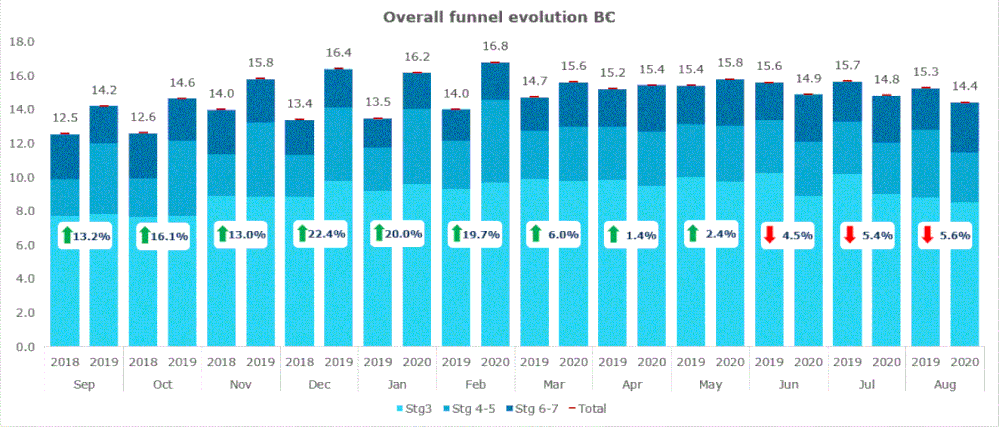
Hi all, does anyone have any idea whether/how I could replicate this chart in Power BI please? Currently we are doing it on EXcel and c+p ing it as an image, and I would love to automate it, but so far I have not been able to. Thanks, Andrew

2 REPLIES 2
v-lionel-msft
Community Support
Community Support

Hi @Anonymous ,


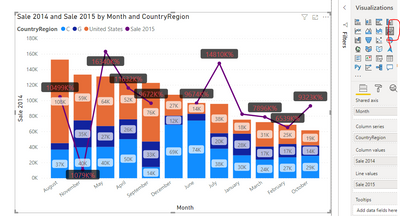
You can use 'Line and stacked column chart' if you can't find such a custom visual.

v-lionel-msft_2-1600657302162.png


Best regards,
Lionel Chen

If this post helps, then please consider Accept it as the solution to help the other members find it more quickly.

amitchandak
Super User
Super User

@Anonymous , I doubt you can replicate as is. You need to have a line for the red dot on the top and change %.


Sorting I see as another challenge. For that, you can first use the month and then a year.


You can explore custom visuals

https://appsource.microsoft.com/en-us/product/power-bi-visuals/

or

https://xviz.com/blogs/latest-features-of-multi-axis-chart-in-power-bi/


Share with Power BI Enthusiasts: Full Power BI Video (20 Hours) YouTube
Microsoft Fabric Series 60+ Videos YouTube
Microsoft Fabric Hindi End to End YouTube

Helpful resources

Announcements
November Power BI Update Carousel

Power BI Monthly Update - November 2025

Check out the November 2025 Power BI update to learn about new features.

Fabric Data Days Carousel

Fabric Data Days

Advance your Data & AI career with 50 days of live learning, contests, hands-on challenges, study groups & certifications and more!

FabCon Atlanta 2026 carousel

FabCon Atlanta 2026

Join us at FabCon Atlanta, March 16-20, for the ultimate Fabric, Power BI, AI and SQL community-led event. Save $200 with code FABCOMM.

Top Kudoed Authors