Join us at FabCon Atlanta from March 16 - 20, 2026, for the ultimate Fabric, Power BI, AI and SQL community-led event. Save $200 with code FABCOMM.
Register now!The Power BI Data Visualization World Championships is back! It's time to submit your entry. Live now!
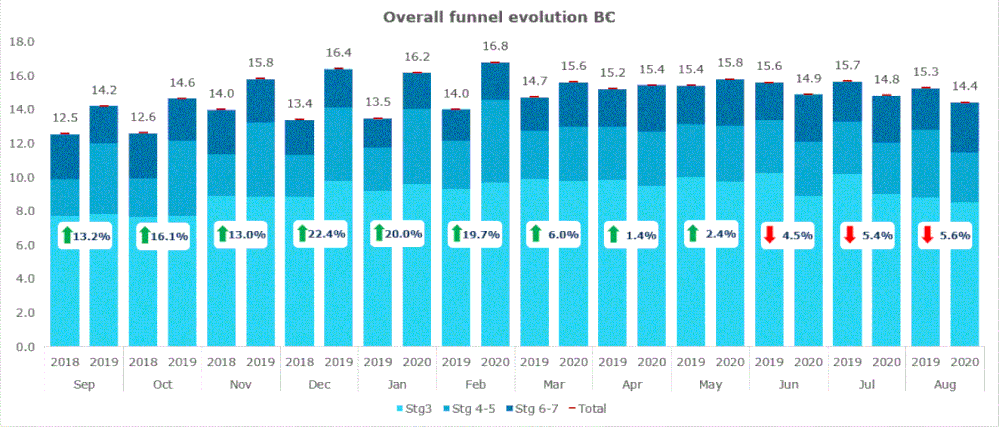
Hi all, does anyone have any idea whether/how I could replicate this chart in Power BI please? Currently we are doing it on EXcel and c+p ing it as an image, and I would love to automate it, but so far I have not been able to. Thanks, Andrew
Hi @Anonymous ,
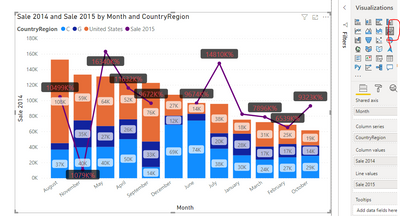
You can use 'Line and stacked column chart' if you can't find such a custom visual.
Best regards,
Lionel Chen
If this post helps, then please consider Accept it as the solution to help the other members find it more quickly.
@Anonymous , I doubt you can replicate as is. You need to have a line for the red dot on the top and change %.
Sorting I see as another challenge. For that, you can first use the month and then a year.
You can explore custom visuals
https://appsource.microsoft.com/en-us/product/power-bi-visuals/
or
https://xviz.com/blogs/latest-features-of-multi-axis-chart-in-power-bi/
The Power BI Data Visualization World Championships is back! It's time to submit your entry.
Check out the January 2026 Power BI update to learn about new features.
| User | Count |
|---|---|
| 61 | |
| 48 | |
| 35 | |
| 25 | |
| 23 |
| User | Count |
|---|---|
| 134 | |
| 110 | |
| 59 | |
| 39 | |
| 32 |