Share feedback directly with Fabric product managers, participate in targeted research studies and influence the Fabric roadmap.
Sign up nowGet Fabric certified for FREE! Don't miss your chance! Learn more
Hello,
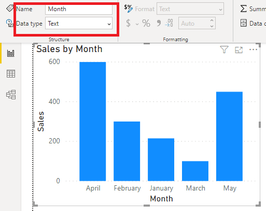
I am putting together a chart that has months on one axis, and numbers on the other. However, it looks like the months on the chart are sorted alphabetically instead of in date order (Jan, Feb, Mar; etc). How would I go about getting these sorted so they go in the actual order?
Thanks!
Solved! Go to Solution.
Hi @BrandonP2121 ,
If you enter the month directly without date, your month column is just a text type column, it will not sort like Jan, Feb, Mar..
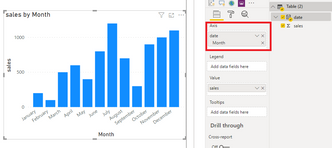
You need to create a date table and set the date hierarchy as Month to sort by month normally.
Best Regards,
Yingjie Li
If this post helps then please consider Accept it as the solution to help the other members find it more quickly.
Hi @BrandonP2121 ,
If you enter the month directly without date, your month column is just a text type column, it will not sort like Jan, Feb, Mar..
You need to create a date table and set the date hierarchy as Month to sort by month normally.
Best Regards,
Yingjie Li
If this post helps then please consider Accept it as the solution to help the other members find it more quickly.
Hello, how do I got about creating a date table?
If you are using a date table create a column for month number using the formula Month No. = Month(Date)
Click on the month column then in the column tools tab under sort sort the column by Month No.
Share feedback directly with Fabric product managers, participate in targeted research studies and influence the Fabric roadmap.
If you love stickers, then you will definitely want to check out our Community Sticker Challenge!
Check out the January 2026 Power BI update to learn about new features.
| User | Count |
|---|---|
| 63 | |
| 62 | |
| 42 | |
| 20 | |
| 18 |