FabCon is coming to Atlanta
Join us at FabCon Atlanta from March 16 - 20, 2026, for the ultimate Fabric, Power BI, AI and SQL community-led event. Save $200 with code FABCOMM.
Register now!- Power BI forums
- Get Help with Power BI
- Desktop
- Service
- Report Server
- Power Query
- Mobile Apps
- Developer
- DAX Commands and Tips
- Custom Visuals Development Discussion
- Health and Life Sciences
- Power BI Spanish forums
- Translated Spanish Desktop
- Training and Consulting
- Instructor Led Training
- Dashboard in a Day for Women, by Women
- Galleries
- Data Stories Gallery
- Themes Gallery
- Contests Gallery
- QuickViz Gallery
- Quick Measures Gallery
- Visual Calculations Gallery
- Notebook Gallery
- Translytical Task Flow Gallery
- TMDL Gallery
- R Script Showcase
- Webinars and Video Gallery
- Ideas
- Custom Visuals Ideas (read-only)
- Issues
- Issues
- Events
- Upcoming Events
The Power BI Data Visualization World Championships is back! Get ahead of the game and start preparing now! Learn more
- Power BI forums
- Forums
- Get Help with Power BI
- Desktop
- Re: Chart by last value of month
- Subscribe to RSS Feed
- Mark Topic as New
- Mark Topic as Read
- Float this Topic for Current User
- Bookmark
- Subscribe
- Printer Friendly Page


- Mark as New
- Bookmark
- Subscribe
- Mute
- Subscribe to RSS Feed
- Permalink
- Report Inappropriate Content
Chart by last value of month
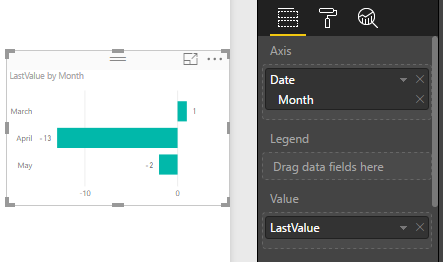
Hi, I want to know how I can get the last data of each month and show it in a bar graph. For example in March you must show me 1, on April -13, on May -2.
| 8/3/2017 | -1 |
| 9/3/2017 | -1 |
| 10/3/2017 | 0 |
| 11/3/2017 | 0 |
| 12/3/2017 | 1 |
| 13/3/2017 | 10 |
| 14/3/2017 | 2 |
| 15/3/2017 | 0 |
| 16/3/2017 | 0 |
| 17/3/2017 | 0 |
| 18/3/2017 | 0 |
| 19/3/2017 | 0 |
| 20/3/2017 | 0 |
| 21/3/2017 | 0 |
| 22/3/2017 | 0 |
| 23/3/2017 | 0 |
| 24/3/2017 | 0 |
| 25/3/2017 | 0 |
| 26/3/2017 | 0 |
| 27/3/2017 | 1 |
| 28/3/2017 | 0 |
| 29/3/2017 | 0 |
| 30/3/2017 | -1 |
| 31/3/2017 | 1 |
| 1/4/2017 | 0 |
| 2/4/2017 | 0 |
| 3/4/2017 | 0 |
| 4/4/2017 | 5 |
| 5/4/2017 | 8 |
| 6/4/2017 | -2 |
| 7/4/2017 | -11 |
| 8/4/2017 | -6 |
| 9/4/2017 | -11 |
| 10/4/2017 | -29 |
| 11/4/2017 | -29 |
| 12/4/2017 | -14 |
| 13/4/2017 | -19 |
| 14/4/2017 | -2 |
| 15/4/2017 | -7 |
| 16/4/2017 | -9 |
| 17/4/2017 | -9 |
| 18/4/2017 | -27 |
| 19/4/2017 | -20 |
| 20/4/2017 | -20 |
| 21/4/2017 | -28 |
| 22/4/2017 | -17 |
| 23/4/2017 | -6 |
| 24/4/2017 | 2 |
| 25/4/2017 | 0 |
| 26/4/2017 | -17 |
| 27/4/2017 | -23 |
| 28/4/2017 | -21 |
| 29/4/2017 | -17 |
| 30/4/2017 | -13 |
| 1/5/2017 | -11 |
| 2/5/2017 | 5 |
| 3/5/2017 | -9 |
| 4/5/2017 | -26 |
| 5/5/2017 | -12 |
| 6/5/2017 | -9 |
| 7/5/2017 | -22 |
| 8/5/2017 | -18 |
| 9/5/2017 | -7 |
| 10/5/2017 | -14 |
| 11/5/2017 | -38 |
| 12/5/2017 | -20 |
| 13/5/2017 | -30 |
| 14/5/2017 | -22 |
| 15/5/2017 | -14 |
| 16/5/2017 | -39 |
| 17/5/2017 | -30 |
| 18/5/2017 | -22 |
| 19/5/2017 | 1 |
| 20/5/2017 | -7 |
| 21/5/2017 | -20 |
| 22/5/2017 | -21 |
| 23/5/2017 | -8 |
| 24/5/2017 | -20 |
| 25/5/2017 | -16 |
| 26/5/2017 | -19 |
| 27/5/2017 | -14 |
| 28/5/2017 | -8 |
| 29/5/2017 | -18 |
| 30/5/2017 | -18 |
| 31/5/2017 | -2 |
Solved! Go to Solution.


- Mark as New
- Bookmark
- Subscribe
- Mute
- Subscribe to RSS Feed
- Permalink
- Report Inappropriate Content
Hi, you can use this measure:
LastValue =
CALCULATE ( MAX ( Table1[Value] ), LASTDATE ( Table1[Date] ) )
Regards
Victor
Lima - Peru
Lima - Peru
- Mark as New
- Bookmark
- Subscribe
- Mute
- Subscribe to RSS Feed
- Permalink
- Report Inappropriate Content
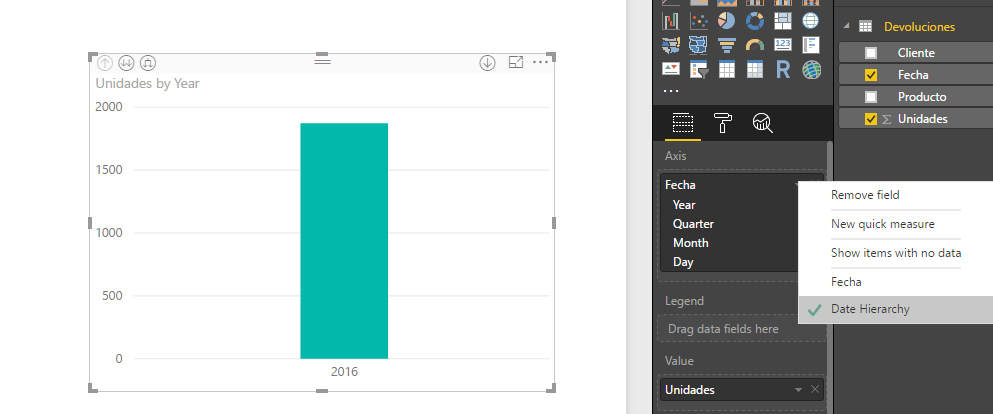
Fíjate en el panel de formato de tu gráfico el campo fecha si es que está en jerarquia.
Look in the format panel of the chart and review if the Date Column is in Hierarchy Option.
Lima - Peru
- Mark as New
- Bookmark
- Subscribe
- Mute
- Subscribe to RSS Feed
- Permalink
- Report Inappropriate Content
Replace this measure:
Este Año2 =
CALCULATE (
    MAX ( 'Mi Tigo App'[Active Users] ),
    FILTER (
        'Mi Tigo App',
        'Mi Tigo App'[Active Users] <> BLANK ()
            && 'Mi Tigo App'[Date] = LASTDATE ( 'Mi Tigo App'[Date] )
    )
)
Lima - Peru
- Mark as New
- Bookmark
- Subscribe
- Mute
- Subscribe to RSS Feed
- Permalink
- Report Inappropriate Content
Hi, you can use this measure:
LastValue =
CALCULATE ( MAX ( Table1[Value] ), LASTDATE ( Table1[Date] ) )
Regards
Victor
Lima - Peru
Lima - Peru
- Mark as New
- Bookmark
- Subscribe
- Mute
- Subscribe to RSS Feed
- Permalink
- Report Inappropriate Content
Hablas español?
- Mark as New
- Bookmark
- Subscribe
- Mute
- Subscribe to RSS Feed
- Permalink
- Report Inappropriate Content
- Mark as New
- Bookmark
- Subscribe
- Mute
- Subscribe to RSS Feed
- Permalink
- Report Inappropriate Content
Veras soy nuevo en esto de Power BI necesito ayuda creando un filtro para los mismos datos que te mostre. El filtro debe ser por rango de fechas: "Año Anterior", "Este Año", "Mes Pasado", "Ultimos 30 dias", "Este Mes". Por favor si eres tan amable. Gracias
- Mark as New
- Bookmark
- Subscribe
- Mute
- Subscribe to RSS Feed
- Permalink
- Report Inappropriate Content
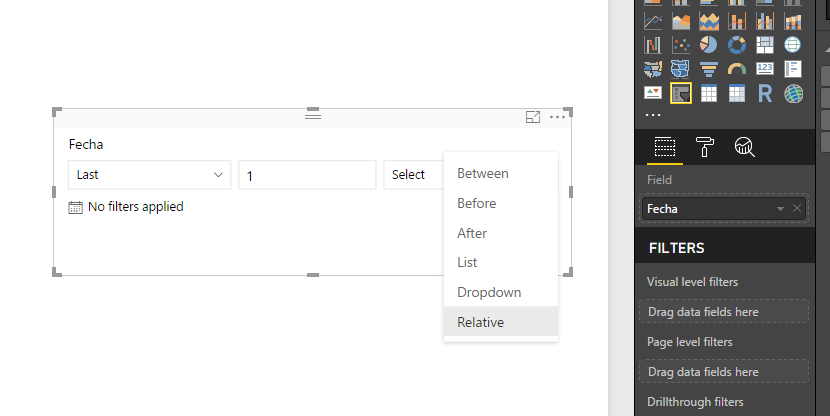
You can try using relative option in slicer.
Puedes tratar usando la opción relative en el slicer.
Lima - Peru
- Mark as New
- Bookmark
- Subscribe
- Mute
- Subscribe to RSS Feed
- Permalink
- Report Inappropriate Content
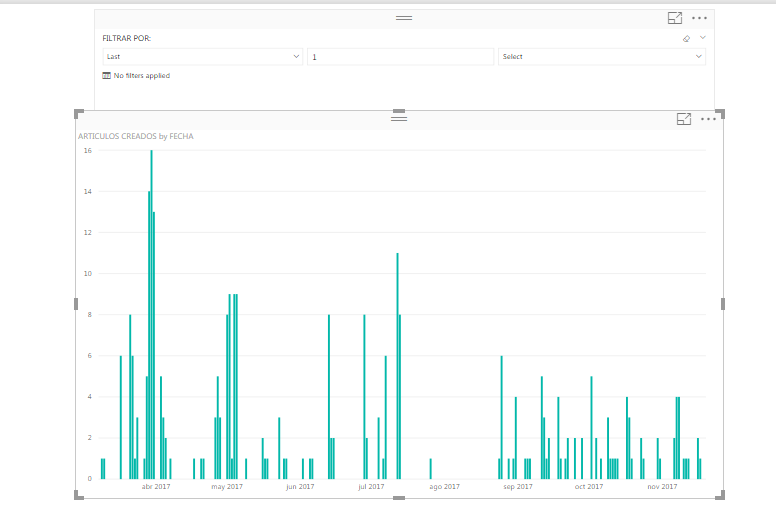
Una ultima cosita, como hago para que me muestre la suma de cada mes, en vez de mostrarme dia por dia.
- Mark as New
- Bookmark
- Subscribe
- Mute
- Subscribe to RSS Feed
- Permalink
- Report Inappropriate Content
Fíjate en el panel de formato de tu gráfico el campo fecha si es que está en jerarquia.
Look in the format panel of the chart and review if the Date Column is in Hierarchy Option.
Lima - Peru
- Mark as New
- Bookmark
- Subscribe
- Mute
- Subscribe to RSS Feed
- Permalink
- Report Inappropriate Content
Pero no me aparece noviembre, solo hasta octubre
- Mark as New
- Bookmark
- Subscribe
- Mute
- Subscribe to RSS Feed
- Permalink
- Report Inappropriate Content
Si puedes compartir tu archivo sin las columnas confidenciales o anonimizadas (Vía dropbox, drive or onedrive) para revisarlo y dar una solución.
If you can share your file (PBIX) without confidencial data to review it and bring a solution.
Regards
Victor
Lima - Peru
- Mark as New
- Bookmark
- Subscribe
- Mute
- Subscribe to RSS Feed
- Permalink
- Report Inappropriate Content
- Mark as New
- Bookmark
- Subscribe
- Mute
- Subscribe to RSS Feed
- Permalink
- Report Inappropriate Content
Replace this measure:
Este Año2 =
CALCULATE (
    MAX ( 'Mi Tigo App'[Active Users] ),
    FILTER (
        'Mi Tigo App',
        'Mi Tigo App'[Active Users] <> BLANK ()
            && 'Mi Tigo App'[Date] = LASTDATE ( 'Mi Tigo App'[Date] )
    )
)
Lima - Peru
- Mark as New
- Bookmark
- Subscribe
- Mute
- Subscribe to RSS Feed
- Permalink
- Report Inappropriate Content
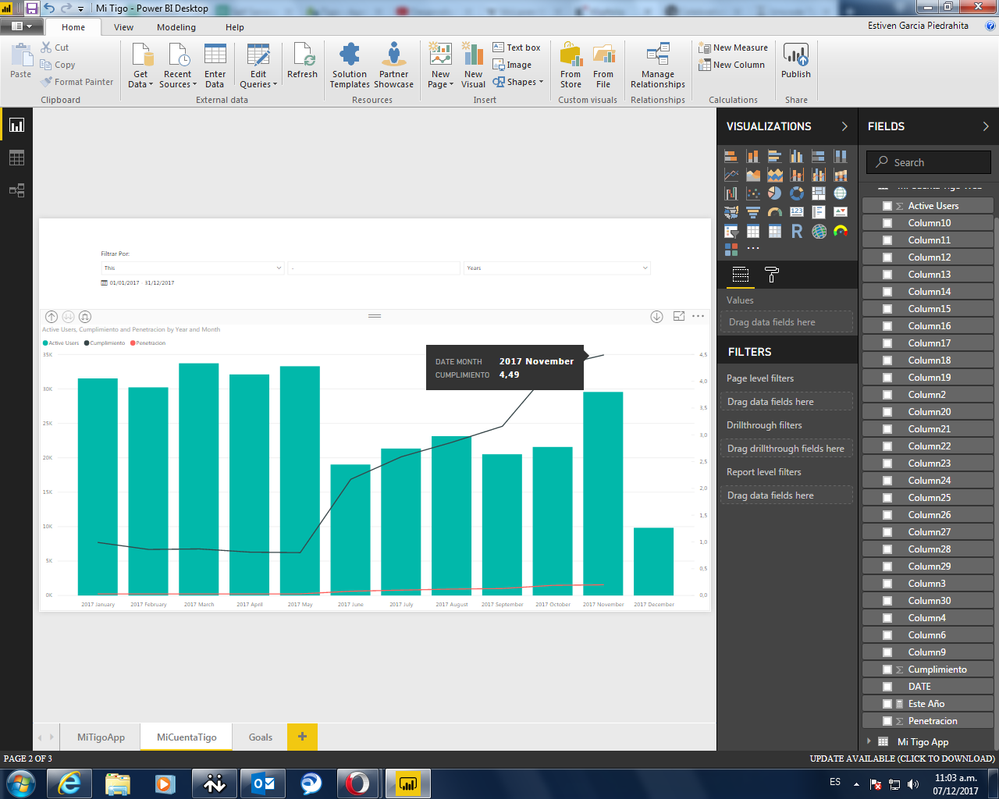
Una ultima cosita tengo dos lineas llmadas cumplimiento y penetracion, son pórcentajes pero se muestran como un decimal.
Saludos
- Mark as New
- Bookmark
- Subscribe
- Mute
- Subscribe to RSS Feed
- Permalink
- Report Inappropriate Content
Gracias amigo eres genial

Helpful resources

Power BI Dataviz World Championships
The Power BI Data Visualization World Championships is back! Get ahead of the game and start preparing now!

Power BI Monthly Update - November 2025
Check out the November 2025 Power BI update to learn about new features.

FabCon Atlanta 2026
Join us at FabCon Atlanta, March 16-20, for the ultimate Fabric, Power BI, AI and SQL community-led event. Save $200 with code FABCOMM.

| User | Count |
|---|---|
| 59 | |
| 46 | |
| 42 | |
| 23 | |
| 17 |


| User | Count |
|---|---|
| 190 | |
| 122 | |
| 96 | |
| 66 | |
| 47 |


