

cancel
Showing results for 
Search instead for 
Did you mean: 

The Power BI Data Visualization World Championships is back! Get ahead of the game and start preparing now! Learn more

Reply
KeithNeedsHelp
Frequent Visitor

Chart Display Units

Hi, I have data ranging from a few hundred thousand to a few million.  In one chart I would like my display units to show for example 200K, 400K, 600K, 800K, then switch to 1M, 1.2M, 1.4M, etc.  Possible?


thanks,


Keith

2 ACCEPTED SOLUTIONS
TotunG
Resolver I
Resolver I

Not sure on your exact data layout but could potentially look into dynamic string formats? 


https://learn.microsoft.com/en-us/power-bi/create-reports/desktop-dynamic-format-strings

View solution in original post

Dhairya
Solution Supplier
Solution Supplier

Hey @KeithNeedsHelp 
Yes it is possible with the new Dynamic string format
I recreated your scenario please follow below step to achieve your requiremnet

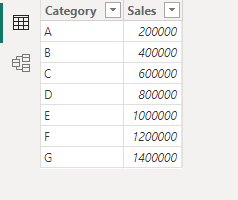
Input Data

Dhairya_0-1694692479734.png


Step 1: Create a simple measure 

Dhairya_1-1694692512044.png


Step 2: Go to Dynamic format

Dhairya_2-1694692543713.png


Step 3: Now type the condition in the format you want the end output

Dhairya_3-1694692610531.png


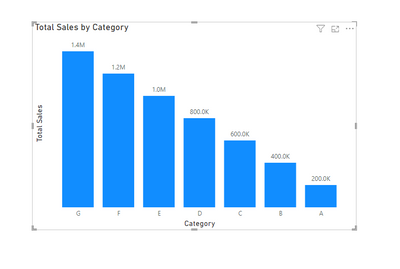
Now you will get your expected output as below

Dhairya_4-1694692646256.png

If this helps ypu then please kudo this post and mark it as a solution so that others can find it quickly while facing the similar issue. Thank You!

View solution in original post

4 REPLIES 4
Dhairya
Solution Supplier
Solution Supplier

Hey @KeithNeedsHelp 
Yes it is possible with the new Dynamic string format
I recreated your scenario please follow below step to achieve your requiremnet

Input Data

Dhairya_0-1694692479734.png


Step 1: Create a simple measure 

Dhairya_1-1694692512044.png


Step 2: Go to Dynamic format

Dhairya_2-1694692543713.png


Step 3: Now type the condition in the format you want the end output

Dhairya_3-1694692610531.png


Now you will get your expected output as below

Dhairya_4-1694692646256.png

If this helps ypu then please kudo this post and mark it as a solution so that others can find it quickly while facing the similar issue. Thank You!

Could I re-visit this issue briefly?  I have dynamic formatting working fine in a line chart, but want it to work on the y axis only and not on data labels.  It does not change to millions on the axis.  Here's the formula:  

IF([MSPriceMax] < 1000000, "$#,.K", "$#,,.00M").  Here's how it looks:
KeithNeedsHelp_0-1697572429272.png


KeithNeedsHelp
Frequent Visitor

Yes this is the right direction for me thanks!

TotunG
Resolver I
Resolver I

Not sure on your exact data layout but could potentially look into dynamic string formats? 


https://learn.microsoft.com/en-us/power-bi/create-reports/desktop-dynamic-format-strings

Helpful resources

Announcements
Power BI DataViz World Championships

Power BI Dataviz World Championships

The Power BI Data Visualization World Championships is back! Get ahead of the game and start preparing now!

December 2025 Power BI Update Carousel

Power BI Monthly Update - December 2025

Check out the December 2025 Power BI Holiday Recap!

FabCon Atlanta 2026 carousel

FabCon Atlanta 2026

Join us at FabCon Atlanta, March 16-20, for the ultimate Fabric, Power BI, AI and SQL community-led event. Save $200 with code FABCOMM.