cancel
Showing results for 
Search instead for 
Did you mean: 

Next up in the FabCon + SQLCon recap series: The roadmap for Microsoft SQL and Maximizing Developer experiences in Fabric. All sessions are available on-demand after the live show. Register now

Reply
dia612
Helper IV
Helper IV

Changing the application language

Hello,

Can't we change the application language when we published to web??

I have a report which I published to service and changed the application language to portuguese from settings. But when I Publish to Web, it is showing in the default language which is English .


How to change the language when publishing to web??

7 REPLIES 7
TimoRiikonen
Advocate V
Advocate V

Default setting is browser language.

You change this for Chrome in chrome://settings/languages
You have to restart the whole Chrome after changing the setting before these settings work. Or you can change report settings from Power BI settings to something else and back again to browser language.

v-kelly-msft
Community Support
Community Support

Hi  @dia612 ,


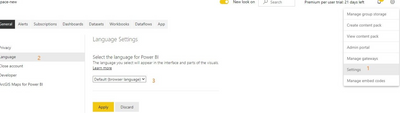
Please set your language in Power BI Service through the following way.

vkellymsft_0-1623918441378.png

If you choose Default (browser language), you will need to check the language settings in the browser settings. You could also select a language in the drop-down list and click Apply, it will be applied right away.

The language showing is based on your setting in Service.


For more guides on language settings, please refer to below link.

Supported languages and countries/regions for Power BI - Power BI | Microsoft Docs


Best Regards,
Kelly

Did I answer your question? Mark my post as a solution!


Hello,

The dashboard is in the respective lanaguage in my system but when opened in different system it is again showing in the default language (English).

Are any other settings need to be done in new system to get the dashboard in that respective language???

Hi  @dia612 ,


Have you tried to open in an incognito mode while you are opening in another system?There may be some caches left in the browser.


Best Regards,
Kelly

Did I answer your question? Mark my post as a solution!

Hi @v-kelly-msft ,

I have deleted the cache in new system and tried both in normal window and also in incognito mode, in both it is showing in the defaulf language (English) only.

I need the dashboard to be seen in respective application language(portuguese)..

Are there any other settings/ changes to be done to achieve that?

Hi @dia612 ,


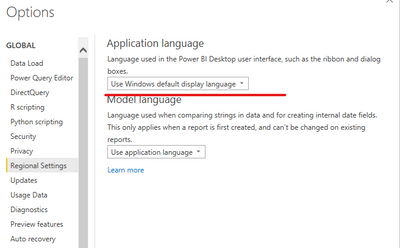
Have you set the language in power bi desktop before publishing to Service?

vkellymsft_0-1624269343915.png


Best Regards,
Kelly

Did I answer your question? Mark my post as a solution!

amitchandak
Super User
Super User

@dia612 , check this for power bi service

https://docs.microsoft.com/en-us/power-bi/fundamentals/supported-languages-countries-regions

Share with Power BI Enthusiasts: Full Power BI Video (20 Hours) YouTube
Microsoft Fabric Series 60+ Videos YouTube
Microsoft Fabric Hindi End to End YouTube

Helpful resources

Announcements
New to Fabric survey Carousel

New to Fabric Survey

If you have recently started exploring Fabric, we'd love to hear how it's going. Your feedback can help with product improvements.

Power BI DataViz World Championships carousel

Power BI DataViz World Championships - June 2026

A new Power BI DataViz World Championship is coming this June! Don't miss out on submitting your entry.

Join our Fabric User Panel

Join our Fabric User Panel

Share feedback directly with Fabric product managers, participate in targeted research studies and influence the Fabric roadmap.

March Power BI Update Carousel

Power BI Community Update - March 2026

Check out the March 2026 Power BI update to learn about new features.