cancel
Showing results for 
Search instead for 
Did you mean: 

Data Days is here! Join us now for 60+ days of learning, challenges, and connection. Learn more

Reply
Anonymous
Not applicable

Changing the Power query SQL Server database settings when moving an Excel workbook

HIi


I'm working on creating an excel report that collects data from a local copy of a SQL Server database on my maschine, where I use Power Query to retrieve the data. These are then loaded into a PowerPivot data model. Now I'm finished with the development and on my way to put this into production on another server on the customer's server. The Excel workbook must change database settings using sql server database user Connection (not integrated). I had hoped that I could change the database Connection Properties at the Data tab, but there are not any easy way to change the connection string to the new server. Now I can't see any option that going through every Power Query query and change them manually. I have great hope that you Power Query experts have a Nice explaination and an example how I can solve this.

Regards Geir F

1 ACCEPTED SOLUTION
Anonymous
Not applicable

Hi @Anonymous,


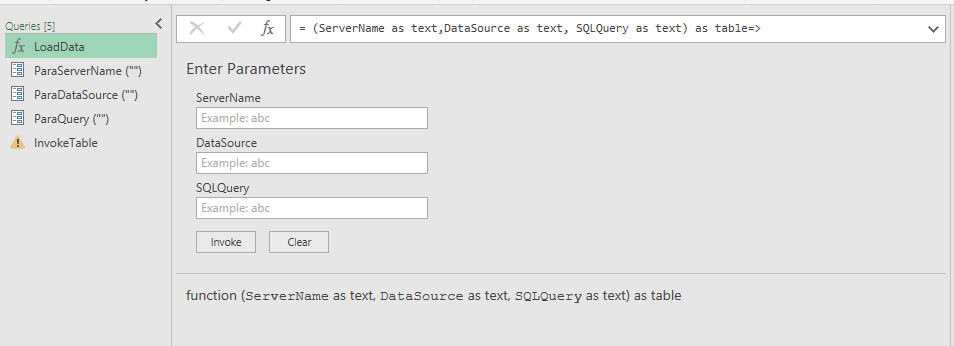
You can refer to below method: use custom function and query parameters to load data.


Custom function:


let
    Custom= (ServerName as text,DataSource as text, SQLQuery as text) as table=>
    let
        Source = Sql.Database(ServerName, DataSource,[Query=SQLQuery])
    in
        Source
in
    Custom


Parameters:


Capture.PNG


Use:

let
    Source = LoadData(ParaServerName,ParaDataSource,ParaQuery)
in
    Source


Capture2.PNG


After above steps, you can modify the parameters to change the datasource.


Regards,

Xiaoxin Sheng

View solution in original post

2 REPLIES 2
Anonymous
Not applicable

Hi @Anonymous,


You can refer to below method: use custom function and query parameters to load data.


Custom function:


let
    Custom= (ServerName as text,DataSource as text, SQLQuery as text) as table=>
    let
        Source = Sql.Database(ServerName, DataSource,[Query=SQLQuery])
    in
        Source
in
    Custom


Parameters:


Capture.PNG


Use:

let
    Source = LoadData(ParaServerName,ParaDataSource,ParaQuery)
in
    Source


Capture2.PNG


After above steps, you can modify the parameters to change the datasource.


Regards,

Xiaoxin Sheng

Anonymous
Not applicable

Hello again.


Take a look at suggested method above. If I want to set a SQL SERver authentication together with servername, user name and password, how will these 3 parameters look like?


regards GEir F

Helpful resources

Announcements
Fabric Data Days is here Carousel

Fabric Data Days 2026

Don't miss out on Data Days, June 15 through August 7. Learn Fabric, Power BI, SQL, AI and more.

May Power BI Update Carousel

Power BI Monthly Update - May 2026

Check out the May 2026 Power BI update to learn about new features.

Power BI DataViz World Championships carousel

Power BI DataViz World Championships - June 2026

A new Power BI DataViz World Championship is coming this June! Don't miss out on submitting your entry.