
cancel
Showing results for 
Search instead for 
Did you mean: 

Get Fabric certified for FREE! Don't miss your chance! Learn more

Reply
Treyson
Advocate I
Advocate I

Changing the Order on Tree Map

Hello,


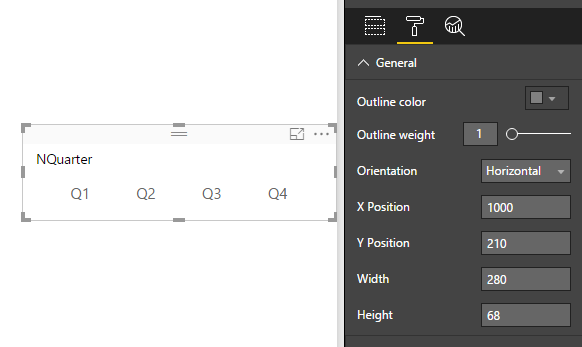
I am using a tree map to act as a filter. They are all equally filled but I want to have the order start at Q1 and move to Q4. If this isn't possible, I would like to know if there is anyway to create a slicer and have the options display horizonally rather than vertically.

Tree Map.png


1 ACCEPTED SOLUTION
Vvelarde
Community Champion
Community Champion

@Treyson

there is anyway to create a slicer and have the options display horizonally rather than vertically.?


Yes , in a slicer select orientation.


ss.png


Lima - Peru

View solution in original post

1 REPLY 1
Vvelarde
Community Champion
Community Champion

@Treyson

there is anyway to create a slicer and have the options display horizonally rather than vertically.?


Yes , in a slicer select orientation.


ss.png


Lima - Peru

Helpful resources

Announcements
Sticker Challenge 2026 Carousel

Join our Community Sticker Challenge 2026

If you love stickers, then you will definitely want to check out our Community Sticker Challenge!

January Power BI Update Carousel

Power BI Monthly Update - January 2026

Check out the January 2026 Power BI update to learn about new features.

FabCon Atlanta 2026 carousel

FabCon Atlanta 2026

Join us at FabCon Atlanta, March 16-20, for the ultimate Fabric, Power BI, AI and SQL community-led event. Save $200 with code FABCOMM.