cancel
Showing results for 
Search instead for 
Did you mean: 

Next up in the FabCon + SQLCon recap series: The roadmap for Microsoft SQL and Maximizing Developer experiences in Fabric. All sessions are available on-demand after the live show. Register now

Reply
Matthias93
Helper III
Helper III

Changing text string to values

Hi,


I'm trying to make a graph from SharePoint data. In these SharePoint data there are answers to certain questions that look like this: Strongly Disagree, Disagree, Neutral, Agree, Strongly Agree. For lay-out reasons I cannot change these answers to values within SharePoint. For my graph however I would like to be able to calculate average values to each question. So StronglyDisagree should equal 1, Disagree 2,... What function will let me do this?


Thank you in advance.


Kind regards,

Matthias

Capture.PNG

1 ACCEPTED SOLUTION

hello @Matthias93


You can do it with a conditional column:


Go to Edit Query--Add Column - Conditional Column


Select each Value (Agree,Disagree, etc)  and put the Numeric Value that you assign.


Lima - Peru

View solution in original post

3 REPLIES 3
mtmcd
Frequent Visitor

How would you plot those on a chart?  Say you want the parameters (Strongly Agree, Agree, Neutral, etc) on the Y-axis and the count on the X-axis.  How do you plot it such that the parameter names are used as the Y-axis labels?  I have a very similar problem in that my string values can't be used as axis labels.

Matthias93
Helper III
Helper III

Edit:


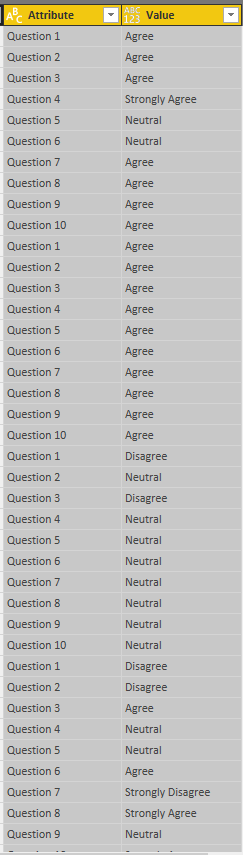
After pivoting my columns for the questions. My data now looks like this


Capture.PNG

hello @Matthias93


You can do it with a conditional column:


Go to Edit Query--Add Column - Conditional Column


Select each Value (Agree,Disagree, etc)  and put the Numeric Value that you assign.


Lima - Peru

Helpful resources

Announcements
New to Fabric survey Carousel

New to Fabric Survey

If you have recently started exploring Fabric, we'd love to hear how it's going. Your feedback can help with product improvements.

Power BI DataViz World Championships carousel

Power BI DataViz World Championships - June 2026

A new Power BI DataViz World Championship is coming this June! Don't miss out on submitting your entry.

Join our Fabric User Panel

Join our Fabric User Panel

Share feedback directly with Fabric product managers, participate in targeted research studies and influence the Fabric roadmap.

March Power BI Update Carousel

Power BI Community Update - March 2026

Check out the March 2026 Power BI update to learn about new features.