This time we’re going bigger than ever. Fabric, Power BI, SQL, AI and more. We're covering it all. You won't want to miss it.
Learn moreDid you hear? There's a new SQL AI Developer certification (DP-800). Start preparing now and be one of the first to get certified. Register now
Hi,
I'm trying to make a graph from SharePoint data. In these SharePoint data there are answers to certain questions that look like this: Strongly Disagree, Disagree, Neutral, Agree, Strongly Agree. For lay-out reasons I cannot change these answers to values within SharePoint. For my graph however I would like to be able to calculate average values to each question. So StronglyDisagree should equal 1, Disagree 2,... What function will let me do this?
Thank you in advance.
Kind regards,
Matthias
Solved! Go to Solution.
hello @Matthias93
You can do it with a conditional column:
Go to Edit Query--Add Column - Conditional Column
Select each Value (Agree,Disagree, etc) and put the Numeric Value that you assign.
How would you plot those on a chart? Say you want the parameters (Strongly Agree, Agree, Neutral, etc) on the Y-axis and the count on the X-axis. How do you plot it such that the parameter names are used as the Y-axis labels? I have a very similar problem in that my string values can't be used as axis labels.
Edit:
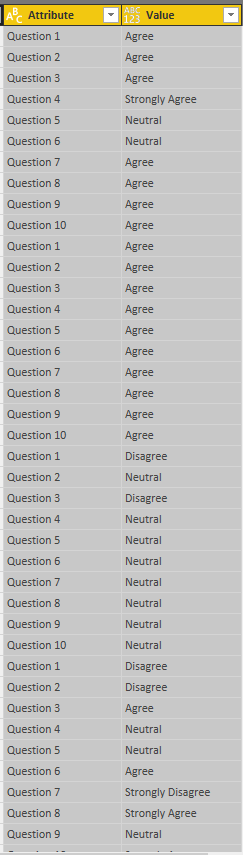
After pivoting my columns for the questions. My data now looks like this
hello @Matthias93
You can do it with a conditional column:
Go to Edit Query--Add Column - Conditional Column
Select each Value (Agree,Disagree, etc) and put the Numeric Value that you assign.
Check out the April 2026 Power BI update to learn about new features.
If you have recently started exploring Fabric, we'd love to hear how it's going. Your feedback can help with product improvements.
| User | Count |
|---|---|
| 36 | |
| 32 | |
| 31 | |
| 21 | |
| 15 |
| User | Count |
|---|---|
| 67 | |
| 56 | |
| 31 | |
| 27 | |
| 22 |