cancel
Showing results for 
Search instead for 
Did you mean: 

The Power BI Data Visualization World Championships is back! Get ahead of the game and start preparing now! Learn more

Reply
Anonymous
Not applicable

Changing results from a table into a measure

Hi, I've created a table using the summarize function below

powerbi dax from this table, how do i add a new measure that shows each value as


DevicesPct = SUMMARIZE('Devices',
          'Devices'[Device],
         "DeviceVisits",Sum(Devices[Visits]),
        "DeviceAvg",Average(Devices[Visits])/100
         )

So the results look like this (After i change it on the table as % of grand total)

MRUry7_1-1708520084499.png

My question is, how do i create a card where i can drop in the details above into separate cards, but formatted in a way such as 
Mobile - 56.19%
Desktop - 42.91%
So i can drop each of these into separate cards?

Any help is appreciated.
Thanks, Steve


1 ACCEPTED SOLUTION
Anonymous
Not applicable

Hi @Anonymous ,


Hope all is going well.


Please follow these steps:


1. This is the raw data I created and the corresponding calculation sheet based on your description.
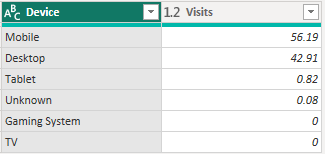
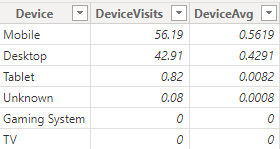
vhuijieymsft_0-1708570151646.png

vhuijieymsft_1-1708570151647.png


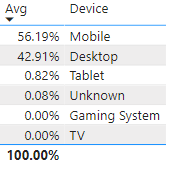
2. I created a calculated column to format "DeviceAvg" as a percentage, with the following syntax:


Avg = FORMAT( 'DevicesPct'[DeviceAvg], "Percent") 


3. Then there is your need to "Mobile - 56.19%   Desktop - 42.91%" format display data, I have two methods:


1)Create a measure directly. The DAX syntax is as follows. This method is simpler.


merged0 = COMBINEVALUES("-", MAX('DevicesPct'[Device]), MAX('DevicesPct'[Avg]))
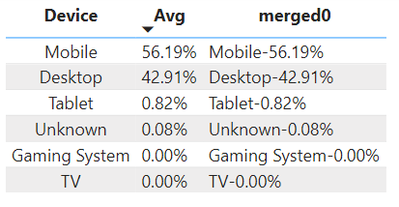
 

vhuijieymsft_0-1708570287056.png


 2)Create a measure for each Device. The measure created by this method can be displayed through cards, but it is more troublesome.


merged1 = CALCULATE(COMBINEVALUES("-", MAX('DevicesPct'[Device]), MAX('DevicesPct'[Avg])),'DevicesPct'[Device]="Mobile")

merged2 = CALCULATE(COMBINEVALUES("-", MAX('DevicesPct'[Device]), MAX('DevicesPct'[Avg])),'DevicesPct'[Device]="Desktop")

merged3 = CALCULATE(COMBINEVALUES("-", MAX('DevicesPct'[Device]), MAX('DevicesPct'[Avg])),'DevicesPct'[Device]="Tablet")

merged4 = CALCULATE(COMBINEVALUES("-", MAX('DevicesPct'[Device]), MAX('DevicesPct'[Avg])),'DevicesPct'[Device]="Unknown")

merged5 = CALCULATE(COMBINEVALUES("-", MAX('DevicesPct'[Device]), MAX('DevicesPct'[Avg])),'DevicesPct'[Device]="Gaming System")

merged6 = CALCULATE(COMBINEVALUES("-", MAX('DevicesPct'[Device]), MAX('DevicesPct'[Avg])),'DevicesPct'[Device]="TV")
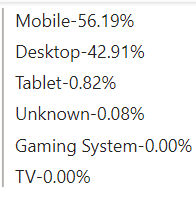
 

vhuijieymsft_1-1708570305028.png


Please select the method you want according to your needs.


pbix file is attached.


If you have any further questions please feel free to contact me.


Best Regards,
Yang
Community Support Team


If there is any post helps, then please consider Accept it as the solution  to help the other members find it more quickly.
If I misunderstand your needs or you still have problems on it, please feel free to let us know. Thanks a lot!

View solution in original post

2 REPLIES 2
Anonymous
Not applicable

Hi @Anonymous ,


Hope all is going well.


Please follow these steps:


1. This is the raw data I created and the corresponding calculation sheet based on your description.

vhuijieymsft_0-1708570151646.png

vhuijieymsft_1-1708570151647.png


2. I created a calculated column to format "DeviceAvg" as a percentage, with the following syntax:


Avg = FORMAT( 'DevicesPct'[DeviceAvg], "Percent") 


3. Then there is your need to "Mobile - 56.19%   Desktop - 42.91%" format display data, I have two methods:


1)Create a measure directly. The DAX syntax is as follows. This method is simpler.


merged0 = COMBINEVALUES("-", MAX('DevicesPct'[Device]), MAX('DevicesPct'[Avg]))


vhuijieymsft_0-1708570287056.png


 2)Create a measure for each Device. The measure created by this method can be displayed through cards, but it is more troublesome.


merged1 = CALCULATE(COMBINEVALUES("-", MAX('DevicesPct'[Device]), MAX('DevicesPct'[Avg])),'DevicesPct'[Device]="Mobile")

merged2 = CALCULATE(COMBINEVALUES("-", MAX('DevicesPct'[Device]), MAX('DevicesPct'[Avg])),'DevicesPct'[Device]="Desktop")

merged3 = CALCULATE(COMBINEVALUES("-", MAX('DevicesPct'[Device]), MAX('DevicesPct'[Avg])),'DevicesPct'[Device]="Tablet")

merged4 = CALCULATE(COMBINEVALUES("-", MAX('DevicesPct'[Device]), MAX('DevicesPct'[Avg])),'DevicesPct'[Device]="Unknown")

merged5 = CALCULATE(COMBINEVALUES("-", MAX('DevicesPct'[Device]), MAX('DevicesPct'[Avg])),'DevicesPct'[Device]="Gaming System")

merged6 = CALCULATE(COMBINEVALUES("-", MAX('DevicesPct'[Device]), MAX('DevicesPct'[Avg])),'DevicesPct'[Device]="TV")


vhuijieymsft_1-1708570305028.png


Please select the method you want according to your needs.


pbix file is attached.


If you have any further questions please feel free to contact me.


Best Regards,
Yang
Community Support Team


If there is any post helps, then please consider Accept it as the solution  to help the other members find it more quickly.
If I misunderstand your needs or you still have problems on it, please feel free to let us know. Thanks a lot!
Anonymous
Not applicable

Thanks very much. This seems to be what i was looking for.

Helpful resources

Announcements
November Power BI Update Carousel

Power BI Monthly Update - November 2025

Check out the November 2025 Power BI update to learn about new features.

Fabric Data Days Carousel

Fabric Data Days

Advance your Data & AI career with 50 days of live learning, contests, hands-on challenges, study groups & certifications and more!

FabCon Atlanta 2026 carousel

FabCon Atlanta 2026

Join us at FabCon Atlanta, March 16-20, for the ultimate Fabric, Power BI, AI and SQL community-led event. Save $200 with code FABCOMM.

Top Solution Authors
Top Kudoed Authors