Join us at FabCon Atlanta from March 16 - 20, 2026, for the ultimate Fabric, Power BI, AI and SQL community-led event. Save $200 with code FABCOMM.
Register now!The Power BI Data Visualization World Championships is back! Get ahead of the game and start preparing now! Learn more
I would like to display data on the same graph but change the filter to display individual rows of data. Some rows may have values as numbers and some as percents. Is there a way to tell PowerBI to display the Y-axis as a percent or a value, depending perhaps a column that has a "P" for percent or "V" for value? I realize I can create a calculated column that multiplies the percent by 100 for "P" and just returns the value for "V", but then the % symbol is not included in the graph...
Solved! Go to Solution.
Hi @bruleyn,
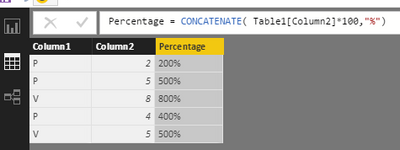
We can not set the same column in different format, if you want to add the % in the column using the formula below, the type will be text. You can not use text data type in value field.
Percentage = CONCATENATE( Table1[Column2]*100,"%")
So for your requirement, we can not displysame column in different format.
Best Regards,
Angelia
Hi @bruleyn,
We can not set the same column in different format, if you want to add the % in the column using the formula below, the type will be text. You can not use text data type in value field.
Percentage = CONCATENATE( Table1[Column2]*100,"%")
So for your requirement, we can not displysame column in different format.
Best Regards,
Angelia
The Power BI Data Visualization World Championships is back! Get ahead of the game and start preparing now!
| User | Count |
|---|---|
| 40 | |
| 37 | |
| 35 | |
| 31 | |
| 28 |
| User | Count |
|---|---|
| 137 | |
| 102 | |
| 71 | |
| 67 | |
| 65 |