Join us at FabCon Atlanta from March 16 - 20, 2026, for the ultimate Fabric, Power BI, AI and SQL community-led event. Save $200 with code FABCOMM.
Register now!The Power BI Data Visualization World Championships is back! Get ahead of the game and start preparing now! Learn more
Hello,
I have 5-6 reports in one .pbix file where data belongs to particular country.
Now I want another .pbix file with same reports but the data belongs to another country.
I can get new table that belongs to new country > go to advanced editor>copy the code
then go to old table that contains previous country data > goto advanced editor> paste the new country code previously copied there...
But I need to do that for each and every table(for me there are like more than 20 tables)
Is there a way where we can change the data source for the entire .pbix file to change at a tym???
Solved! Go to Solution.
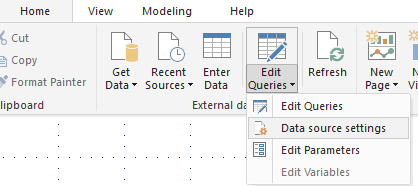
@dia612 , You can change source connection using edit data source setting under Data Transformations
https://docs.microsoft.com/en-us/power-bi/connect-data/desktop-data-sources
@dia612 , You can change source connection using edit data source setting under Data Transformations
https://docs.microsoft.com/en-us/power-bi/connect-data/desktop-data-sources
The Power BI Data Visualization World Championships is back! Get ahead of the game and start preparing now!
| User | Count |
|---|---|
| 65 | |
| 43 | |
| 41 | |
| 32 | |
| 22 |
| User | Count |
|---|---|
| 200 | |
| 126 | |
| 103 | |
| 71 | |
| 54 |