cancel
Showing results for 
Search instead for 
Did you mean: 

The Power BI Data Visualization World Championships is back! Get ahead of the game and start preparing now! Learn more

Reply
Mohanad-Mustafa
Advocate III
Advocate III

Change% year over year , negative sales amount returns wrong result

Hello Team,


I have this code below that calculates the change of sales percentage between three years, it works very well but I have an issue where if there is a credit or in other words negative sales amount, the change % returns negative value even which is not right.


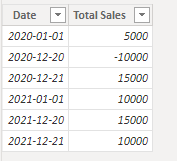
For example, lets stay on Dec 20th 2020, we had -$10,000 and in 2021, we have $15,000. The change in percantage formula returns this result -33.3% but we acutally made more sales in 2021 so why is it showin negative value?


Code: 

Change% =
IF(
    ISFILTERED('Calendar'[Date]),
    VAR __PREV_YEAR =
        CALCULATE(
            SUM('Sales'[Total Sales]),
            DATEADD('Calendar'[Date], -1, YEAR)
        )
    RETURN
        DIVIDE(SUM('Sales'[Total Sales]) - __PREV_YEAR,__PREV_YEAR)
)
 
Any help is highly appreciated, thanks a lot
 
Mohanad 
6 REPLIES 6
amitchandak
Super User
Super User

@Mohanad-Mustafa , if year is not in context, then it means full data vs 1year less data


You can try options like


YTD Sales = CALCULATE(SUM(Sales[Sales Amount]),DATESYTD('Date'[Date],"12/31"))
Last YTD Sales = CALCULATE(SUM(Sales[Sales Amount]),DATESYTD(dateadd('Date'[Date],-1,Year),"12/31"))
This year Sales = CALCULATE(SUM(Sales[Sales Amount]),DATESYTD(ENDOFYEAR('Date'[Date]),"12/31"))
Last year Sales = CALCULATE(SUM(Sales[Sales Amount]),DATESYTD(ENDOFYEAR(dateadd('Date'[Date],-1,Year)),"12/31"))


//Only year vs Year, not a level below

This Year = CALCULATE(sum('Table'[Qty]),filter(ALL('Date'),'Date'[Year]=max('Date'[Year])))
Last Year = CALCULATE(sum('Table'[Qty]),filter(ALL('Date'),'Date'[Year]=max('Date'[Year])-1))


Share with Power BI Enthusiasts: Full Power BI Video (20 Hours) YouTube
Microsoft Fabric Series 60+ Videos YouTube
Microsoft Fabric Hindi End to End YouTube

@amitchandak , thanks for your reply. I am trying to calcualte the percentage change , thats why I used variables and division to get the percentage, now do you think if I use the absolute function, that should get rid of the - sign in my code?

Anonymous
Not applicable

Hi @Mohanad-Mustafa ,


I think absolute function can help you get rid of the - sign.

Try this code.

Change% =
IF (
    ISFILTERED ( 'Calendar'[Date] ),
    VAR __PREV_YEAR =
        CALCULATE (
            SUM ( 'Sales'[Total Sales] ),
            DATEADD ( 'Calendar'[Date], -1, YEAR )
        )
    RETURN
        ABS ( DIVIDE ( SUM ( 'Sales'[Total Sales] ) - __PREV_YEAR, __PREV_YEAR ) )
)


Best Regards,
Rico Zhou


If this post helps, then please consider Accept it as the solution to help the other members find it more quickly.


Thanks for your reply, yes it did but the problem its not showing the negative sign when we have less sales year over year and the team wants to see the negative sign when the result it less. So unfortuatnetly, the abs sign doesn't help me in this case

Anonymous
Not applicable

Hi @Mohanad-Mustafa ,


I think you can add a If function to show negative result if sales in current year is less than sales in previous year.

My Sample:

1.png

New Measure:

Change% = 
IF (
    ISFILTERED ( 'Calendar'[Date] ),
    VAR __PREV_YEAR =
        CALCULATE (
            SUM ( 'Sales'[Total Sales] ),
            DATEADD ( 'Calendar'[Date], -1, YEAR )
        )
    VAR _CUR_YEAR =
        SUM ( 'Sales'[Total Sales] )
    VAR _DIFF = _CUR_YEAR - __PREV_YEAR
    VAR _DIVIDE =
        DIVIDE ( _DIFF, __PREV_YEAR )
    RETURN
        IF ( _DIFF > 0, ABS ( _DIVIDE ), ABS ( _DIVIDE )*-1)
)

Result is as below.

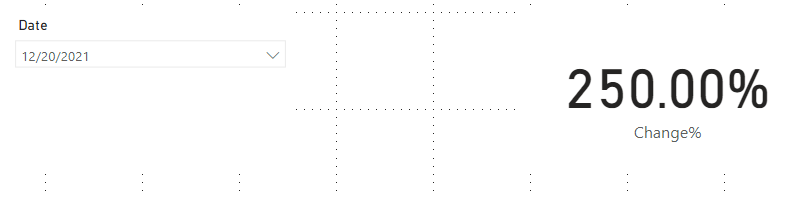
Current Year: 2021/12/20 15000, Previous Year: 2021/12/21 10000

2.png

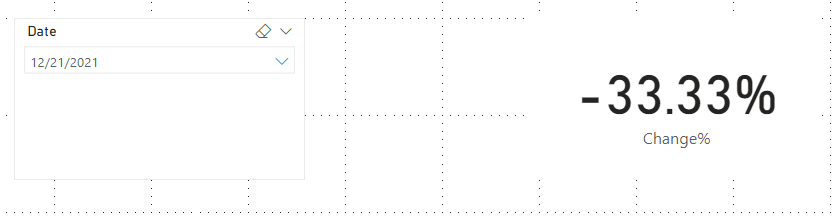
Current Year: 2021/12/21 10000, Previous Year: 2021/12/21 15000

1.png


Best Regards,
Rico Zhou


If this post helps, then please consider Accept it as the solution to help the other members find it more quickly.

Thanks for the effort and your kind reply, but this is didn'twork for me unfortuantely, when I used your code, I don't get any results. Unfortuantely, I can't share the data with you as it is sensitive. 


So the result is empty when I use your code, I am showing the sales over three years using Matrix visual dashboard in Power BI so the user can see the sales year over year easily in a simple table where the client accounts are in rows and the sales amounts and years in columns. 

Helpful resources

Announcements
Power BI DataViz World Championships

Power BI Dataviz World Championships

The Power BI Data Visualization World Championships is back! Get ahead of the game and start preparing now!

December 2025 Power BI Update Carousel

Power BI Monthly Update - December 2025

Check out the December 2025 Power BI Holiday Recap!

FabCon Atlanta 2026 carousel

FabCon Atlanta 2026

Join us at FabCon Atlanta, March 16-20, for the ultimate Fabric, Power BI, AI and SQL community-led event. Save $200 with code FABCOMM.