Join us at FabCon Atlanta from March 16 - 20, 2026, for the ultimate Fabric, Power BI, AI and SQL community-led event. Save $200 with code FABCOMM.
Register now!The Power BI Data Visualization World Championships is back! Get ahead of the game and start preparing now! Learn more
Hello guys,
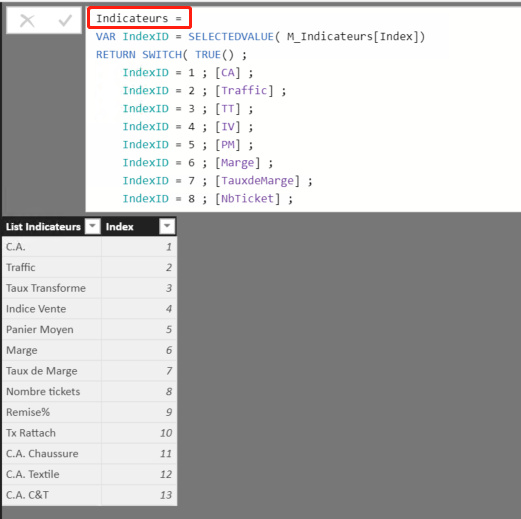
I have now a list of business indicators :
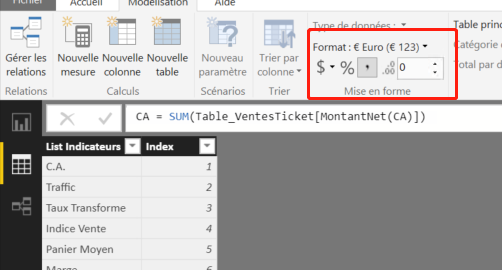
each of them has his own format, for exemple: [C.A.] is Euro
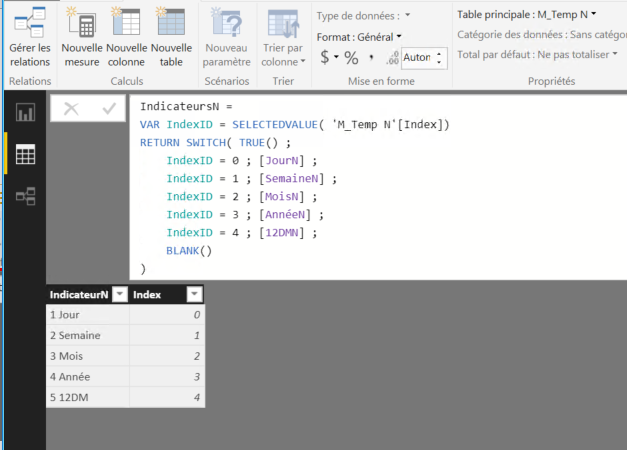
Besides, i have another list of measure in order to show all the indicators in this year :
JourN = CALCULATE([Indicateurs];DATEADD(Dim_Date[DateKey];0;DAY))
MoisN = CALCULATE([Indicateurs];DATESMTD(Dim_Date[DateKey]))
... ...
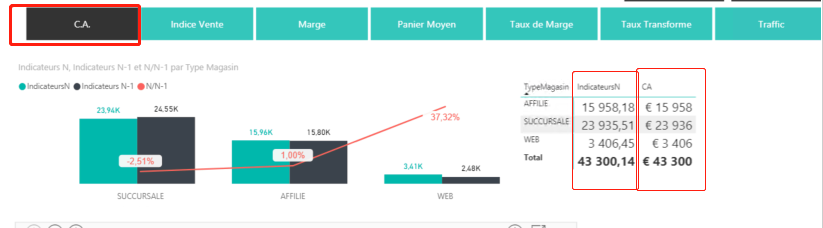
In my report, i have a chart to show all the indicators according to the sales department of each time period, so i create a slicer ([indicateursN)] to choose different indicators, but the data didn't show in their orginal format.
For exemple: I choose C.A. from the slicer, it shows just the number, but i want it to present its orginal format: £15958 ... ...
Is there any way presenting the date in thier orginal format?
Thanks!!!
Chen
Solved! Go to Solution.
I am agree with you, maybe i need to change a way to achieve my wish.
Thank you very much ;).
Best Regards,
Chen
Hi@ C_Jiang
After my research , I'm afraid it couldn't achieve in Power BI for now .when you add a new measure ,you need to change the
Format of it individually, and it will not inherit the format of parent measure.
For your requirement , you could post your new idea in Power BI ideas and make this feature coming sooner .
Best Regards,
Lin
I am agree with you, maybe i need to change a way to achieve my wish.
Thank you very much ;).
Best Regards,
Chen
I am agree with you, maybe i need to change a way to achieve my wish.
Thank you very much ;).
Best Regards,
Chen
The Power BI Data Visualization World Championships is back! Get ahead of the game and start preparing now!
Check out the November 2025 Power BI update to learn about new features.
| User | Count |
|---|---|
| 59 | |
| 46 | |
| 42 | |
| 23 | |
| 18 |
| User | Count |
|---|---|
| 190 | |
| 122 | |
| 96 | |
| 66 | |
| 47 |