Join us at FabCon Atlanta from March 16 - 20, 2026, for the ultimate Fabric, Power BI, AI and SQL community-led event. Save $200 with code FABCOMM.
Register now!The Power BI Data Visualization World Championships is back! Get ahead of the game and start preparing now! Learn more
Hello guys,
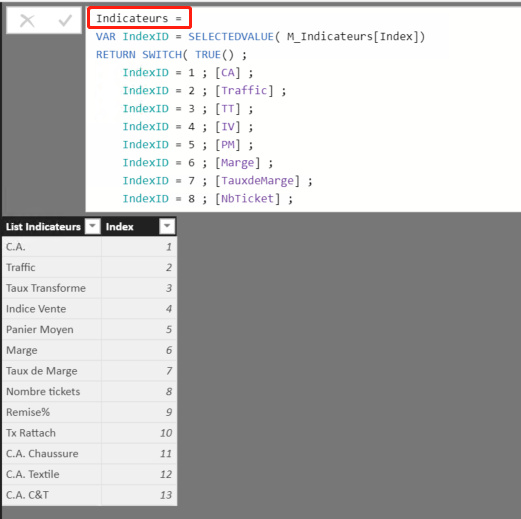
I have now a list of business indicators :
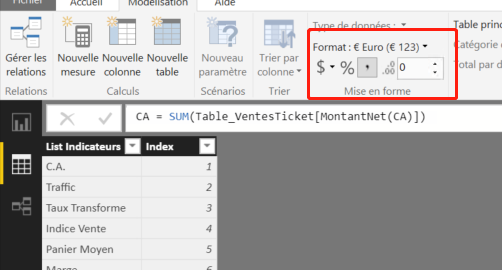
each of them has his own format, for exemple: [C.A.] is Euro
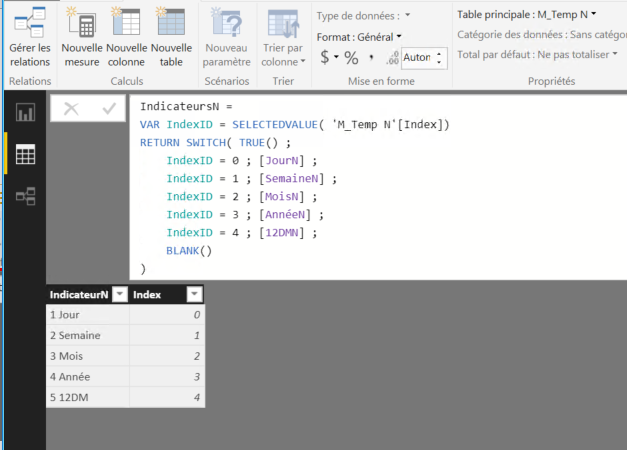
Besides, i have another list of measure in order to show all the indicators in this year :
JourN = CALCULATE([Indicateurs];DATEADD(Dim_Date[DateKey];0;DAY))
MoisN = CALCULATE([Indicateurs];DATESMTD(Dim_Date[DateKey]))
... ...
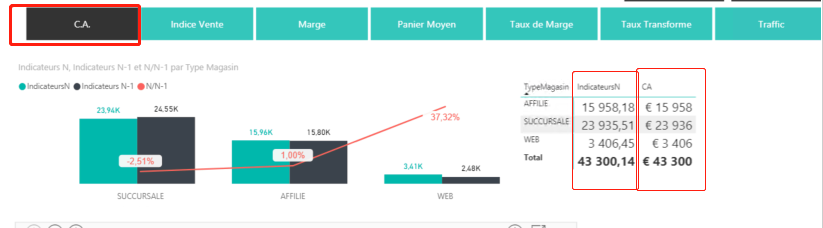
In my report, i have a chart to show all the indicators according to the sales department of each time period, so i create a slicer ([indicateursN)] to choose different indicators, but the data didn't show in their orginal format.
For exemple: I choose C.A. from the slicer, it shows just the number, but i want it to present its orginal format: £15958 ... ...
Is there any way presenting the date in thier orginal format?
Thanks!!!
Chen
Solved! Go to Solution.
I am agree with you, maybe i need to change a way to achieve my wish.
Thank you very much ;).
Best Regards,
Chen
Hi@ C_Jiang
After my research , I'm afraid it couldn't achieve in Power BI for now .when you add a new measure ,you need to change the
Format of it individually, and it will not inherit the format of parent measure.
For your requirement , you could post your new idea in Power BI ideas and make this feature coming sooner .
Best Regards,
Lin
I am agree with you, maybe i need to change a way to achieve my wish.
Thank you very much ;).
Best Regards,
Chen
I am agree with you, maybe i need to change a way to achieve my wish.
Thank you very much ;).
Best Regards,
Chen
The Power BI Data Visualization World Championships is back! Get ahead of the game and start preparing now!
| User | Count |
|---|---|
| 39 | |
| 38 | |
| 38 | |
| 28 | |
| 27 |
| User | Count |
|---|---|
| 124 | |
| 88 | |
| 73 | |
| 66 | |
| 65 |