cancel
Showing results for 
Search instead for 
Did you mean: 

The Power BI Data Visualization World Championships is back! Get ahead of the game and start preparing now! Learn more

Reply
Anonymous
Not applicable

Change the color of measure value & add symbol with conditions

Hi,


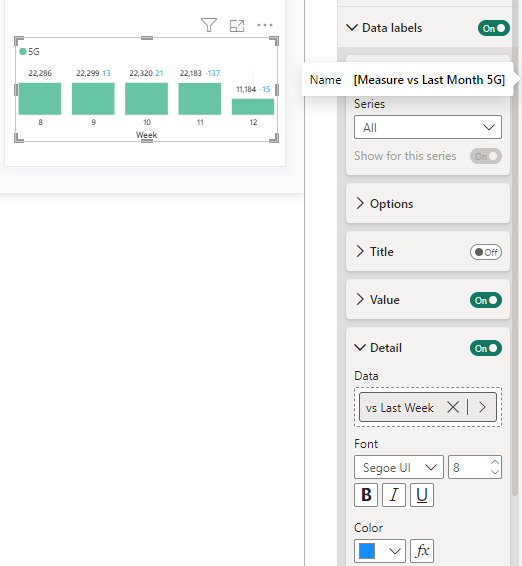
Can we change the color of variance measure in blue(data lable-detail) into Green(#57A46B) for positive and Red(#C13F31) for negative?

But without making dax columns for color codes, just making in one or minimum measure to change the color of value itselt?

Plus, wish to add symbol or +- as well if it is possible.  


e.g.

current: 13 21 -137 -15

desired: +13 +21 -137 -15 or ▲13 ▲21 ▼137 ▼15(prefer)


jeongkim_0-1711441478627.png


4 REPLIES 4
Uzi2019
Super User
Super User

Hi @Anonymous 
Yes. You can change the color code of data label. but you have to write dax for green and red color.
But you dont need to write calculted columns. just simple 2 measures would work for you.


Don't forget to give thumbs up and accept this as a solution if it helped you!!!
Anonymous
Not applicable

Hi,

what is the 2 simple measures?

Idrissshatila
Super User
Super User

Hello @Anonymous ,


check this https://youtu.be/o2jSUHU722w?si=GNIrK-OGGImvSsJu


Did I answer your question? Mark my post as a solution! Appreciate your Kudos
Follow me on LinkedIn linkedIn
Vote for my Community Mobile App Idea

Proud to be a Super User!


Anonymous
Not applicable

Hi,


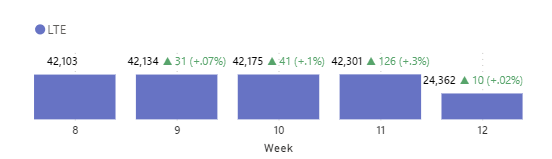
Thanks it helps but can you take a look at my measure a bit more pls?

2 things to improve:


1. percentage format ##.##% shows only after . 
    e.g. +.3% shoud be +0.3%

2. hope to change the text color and size for inside bracket text.

    e.g. ▲10 (+0.15%)


Measure =
    VAR
        _difference = [vs Last Week]
    VAR
        _direction =
            SWITCH(
                TRUE()
                , _difference > 0, "▲"
                , _difference < 0, "▼"
                , "-"
            )

    VAR
        _direction2 =
            SWITCH(
                TRUE()
                , _difference > 0, "+"
                , _difference < 0, "-"
                , "-"
            )
    VAR
        _percentchange =
            _difference / [Last Week Count of $dn]
    RETURN
        _direction & " " & _difference & " (" & _direction2 & FORMAT(_percentchange, "##.##%") & ")"

Measure 2 =
    VAR
        _difference = [vs Last Week]
    RETURN
            SWITCH(
                TRUE()
                , _difference > 0, "#57A46B"
                , _difference < 0, "#C13F31"
                , "#FFFFFF"
            )


jeongkim_0-1711502747788.png


Helpful resources

Announcements
Power BI DataViz World Championships

Power BI Dataviz World Championships

The Power BI Data Visualization World Championships is back! Get ahead of the game and start preparing now!

November Power BI Update Carousel

Power BI Monthly Update - November 2025

Check out the November 2025 Power BI update to learn about new features.

FabCon Atlanta 2026 carousel

FabCon Atlanta 2026

Join us at FabCon Atlanta, March 16-20, for the ultimate Fabric, Power BI, AI and SQL community-led event. Save $200 with code FABCOMM.