Join us at FabCon Atlanta from March 16 - 20, 2026, for the ultimate Fabric, Power BI, AI and SQL community-led event. Save $200 with code FABCOMM.
Register now!The Power BI Data Visualization World Championships is back! It's time to submit your entry. Live now!
Hello
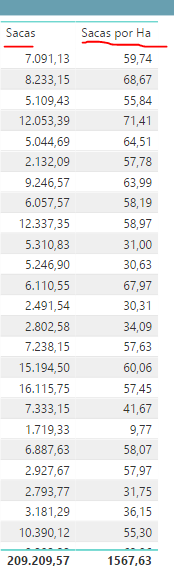
I have a table visualization and i need to change the summarize of certain column to average instead of sum. How can i do this?
I need to change the second column summarize to average total
Solved! Go to Solution.
You may add a measure as shown below.
Measure =
AVERAGEX (
SUMMARIZE ( Table1, Table1[Column1] ),
CALCULATE ( SUM ( Table1[Column2] ) )
)
You may add a measure as shown below.
Measure =
AVERAGEX (
SUMMARIZE ( Table1, Table1[Column1] ),
CALCULATE ( SUM ( Table1[Column2] ) )
)
The Power BI Data Visualization World Championships is back! It's time to submit your entry.
Check out the January 2026 Power BI update to learn about new features.
| User | Count |
|---|---|
| 61 | |
| 47 | |
| 39 | |
| 24 | |
| 23 |
| User | Count |
|---|---|
| 144 | |
| 106 | |
| 63 | |
| 38 | |
| 31 |