cancel
Showing results for 
Search instead for 
Did you mean: 

Learn from the best! Meet the four finalists headed to the FINALS of the Power BI Dataviz World Championships! Register now

Reply
gianmarco
Helper IV
Helper IV

Change table values through parameter

Dear All,

I'm struggling with a simulating scenario issue.
What I have is the following (sample here: https://drive.google.com/drive/folders/1MVy3gaikJeTU0HA9pvtZq503w4BW7b3T?usp=sharing 😞

gianmarco_0-1631630702648.png

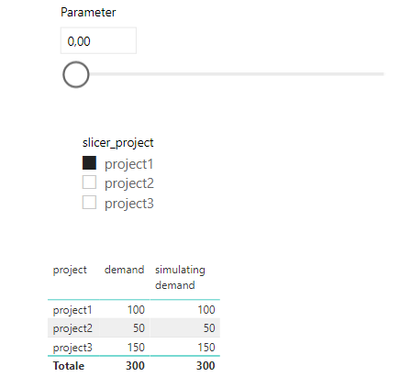
Through the slicer I am able to select a project and vary the values in "simulating demand".

My problem is that, when I select another project, that value comes back to the original, which is the one in "demand".


Is there a way to maintain the simulated values when I'm switching to the other projects?
Maybe the only solution is changing values at the level of source tables, but is there any chance I can do this with a parameter?

Thank you for helping on this.


1 ACCEPTED SOLUTION
Anonymous
Not applicable

Hi @gianmarco ,


According to my understanding,

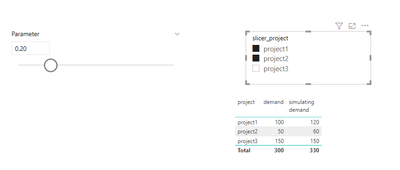
1. Firstly you select Project1 and What-if Parameter =0.2 , then simulating demand =120.

2. When switch to Project2 , Parameter still=0.2, you want to remain Project1 =120 and also show Project2 =60,right?


If the Parameter do not need change, I'd suggest you use multiple selections in slicer at one time and modify you [Measure]:

Measure = IF(MAX(project[project]) in ALLSELECTED(slicer_project[slicer_project]),MAX(demand[demand])*(1+[Parameter Value]),MAX(demand[demand]))

Eyelyn9_0-1631848131080.png


Best Regards,
Eyelyn Qin
If this post helps, then please consider Accept it as the solution to help the other members find it more quickly.


View solution in original post

3 REPLIES 3
Anonymous
Not applicable

Hi @gianmarco ,


According to my understanding,

1. Firstly you select Project1 and What-if Parameter =0.2 , then simulating demand =120.

2. When switch to Project2 , Parameter still=0.2, you want to remain Project1 =120 and also show Project2 =60,right?


If the Parameter do not need change, I'd suggest you use multiple selections in slicer at one time and modify you [Measure]:

Measure = IF(MAX(project[project]) in ALLSELECTED(slicer_project[slicer_project]),MAX(demand[demand])*(1+[Parameter Value]),MAX(demand[demand]))

Eyelyn9_0-1631848131080.png


Best Regards,
Eyelyn Qin
If this post helps, then please consider Accept it as the solution to help the other members find it more quickly.


Thx, Sounds good enough 🙂 

amitchandak
Super User
Super User

@gianmarco , You can have a few independent project slicers and use that in different measures and create a comparison


Need of an Independent Table in Power BI: https://youtu.be/lOEW-YUrAbE


Need of an Independent Date Table:https://www.youtube.com/watch?v=44fGGmg9fHI


Share with Power BI Enthusiasts: Full Power BI Video (20 Hours) YouTube
Microsoft Fabric Series 60+ Videos YouTube
Microsoft Fabric Hindi End to End YouTube

Helpful resources

Announcements
Power BI DataViz World Championships carousel

Power BI DataViz World Championships - June 2026

A new Power BI DataViz World Championship is coming this June! Don't miss out on submitting your entry.

Join our Fabric User Panel

Join our Fabric User Panel

Share feedback directly with Fabric product managers, participate in targeted research studies and influence the Fabric roadmap.

March Power BI Update Carousel

Power BI Community Update - March 2026

Check out the March 2026 Power BI update to learn about new features.