FabCon is coming to Atlanta
Join us at FabCon Atlanta from March 16 - 20, 2026, for the ultimate Fabric, Power BI, AI and SQL community-led event. Save $200 with code FABCOMM.
Register now!- Power BI forums
- Get Help with Power BI
- Desktop
- Service
- Report Server
- Power Query
- Mobile Apps
- Developer
- DAX Commands and Tips
- Custom Visuals Development Discussion
- Health and Life Sciences
- Power BI Spanish forums
- Translated Spanish Desktop
- Training and Consulting
- Instructor Led Training
- Dashboard in a Day for Women, by Women
- Galleries
- Data Stories Gallery
- Themes Gallery
- Contests Gallery
- QuickViz Gallery
- Quick Measures Gallery
- Visual Calculations Gallery
- Notebook Gallery
- Translytical Task Flow Gallery
- TMDL Gallery
- R Script Showcase
- Webinars and Video Gallery
- Ideas
- Custom Visuals Ideas (read-only)
- Issues
- Issues
- Events
- Upcoming Events
The Power BI Data Visualization World Championships is back! Get ahead of the game and start preparing now! Learn more
- Power BI forums
- Forums
- Get Help with Power BI
- Desktop
- Change in value from one row to the next
- Subscribe to RSS Feed
- Mark Topic as New
- Mark Topic as Read
- Float this Topic for Current User
- Bookmark
- Subscribe
- Printer Friendly Page


- Mark as New
- Bookmark
- Subscribe
- Mute
- Subscribe to RSS Feed
- Permalink
- Report Inappropriate Content
Change in value from one row to the next
I have a column called Time Period which is a string. I have a list of merit rankings for a student which is a whole number. How can I get a simple column which gives me the difference from one time period to the next as shown below? I have looked at some solutions that use an index column but I don't have this. As I said - Time Period is a string, not a date.
This data comes from a table where I have used a slicer to filter for a particular student id. I want to see the changes in a particular student's merit ranking over periods of time. Please see below for a link to all the data in the table if this is needed
| Time Period | Merit Ranking | Diff |
| 2015 (T2) | 47 | |
| 2015 (T4) | 51 | 4 |
| 2016 (T2) | 35 | -16 |
| 2016 (T3) | 44 | 9 |
| 2016 (T4) | 47 | 3 |
| 2017 (T2) | 79 | 32 |
| 2017 (T3) | 42 | -37 |
| 2017 (T4) | 50 | 8 |
| 2018 (T2) | 25 | -25 |
Link to full data - Change in Merit Ranking over time.xlsx
Any help would be appreciated. Thanks.
Solved! Go to Solution.


- Mark as New
- Bookmark
- Subscribe
- Mute
- Subscribe to RSS Feed
- Permalink
- Report Inappropriate Content
Hi @dphillips,
I have modified the Measure, you could refer to below measure:
Measure = RANKX(ALLEXCEPT('Max of Merit Ranking by Time Pe','Max of Merit Ranking by Time Pe'[studentid]),FIRSTNONBLANK('Max of Merit Ranking by Time Pe'[Time Period],'Max of Merit Ranking by Time Pe'[Time Period]),,ASC,Dense)
Result:
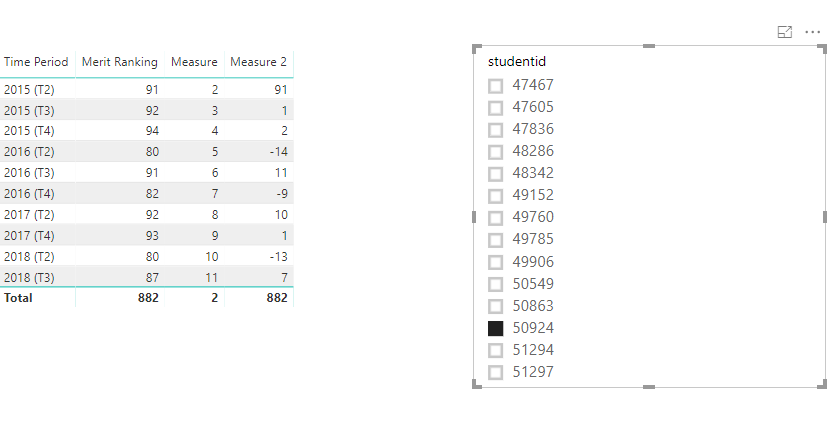
You could download the pbix file to have a test.
Regards,
Daniel He
If this post helps, then please consider Accept it as the solution to help the other members find it more quickly.
- Mark as New
- Bookmark
- Subscribe
- Mute
- Subscribe to RSS Feed
- Permalink
- Report Inappropriate Content
Hi @dphillips,
Based on my test, you could refer to below measures:
Measure = RANKX(ALL('Max of Merit Ranking by Time Pe'),FIRSTNONBLANK('Max of Merit Ranking by Time Pe'[Time Period],'Max of Merit Ranking by Time Pe'[Time Period]),,ASC,Dense)
Measure 2 = var a=[Measure]-1
return CALCULATE(SUM('Max of Merit Ranking by Time Pe'[Merit Ranking]))-CALCULATE(SUM('Max of Merit Ranking by Time Pe'[Merit Ranking]),FILTER(ALLEXCEPT('Max of Merit Ranking by Time Pe','Max of Merit Ranking by Time Pe'[studentid]),'Max of Merit Ranking by Time Pe'[Measure]=a))
Result:
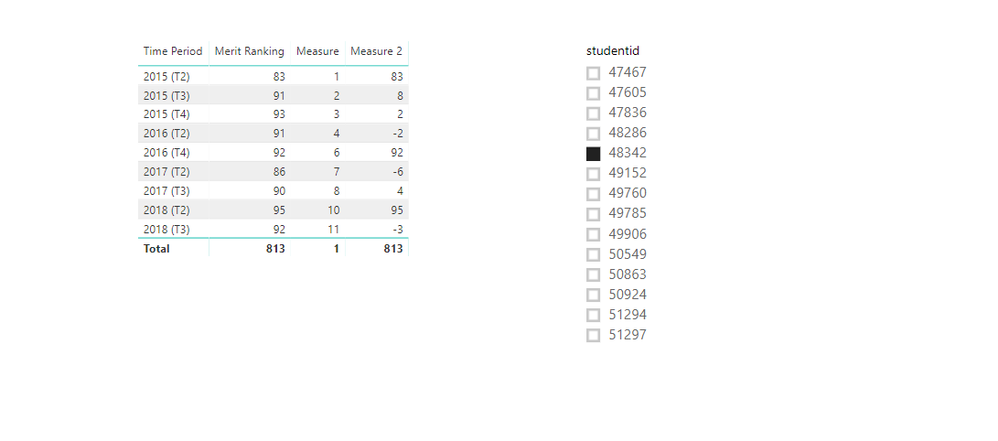
You could also download the pbix file to have a view.
Regards,
Daniel He
If this post helps, then please consider Accept it as the solution to help the other members find it more quickly.
- Mark as New
- Bookmark
- Subscribe
- Mute
- Subscribe to RSS Feed
- Permalink
- Report Inappropriate Content
Hi @v-danhe-msft. Looking at your Measure 2 it looks like this will not work. Note where you skip a rank, then measure 2 has a value of 92 which is clearly not the difference between 91 and 92. This obvioulsy has something to do with the fact that there are gaps from 2016 (T2) to 2016 (T4). Is there any way of fixing this up at all?
- Mark as New
- Bookmark
- Subscribe
- Mute
- Subscribe to RSS Feed
- Permalink
- Report Inappropriate Content
Hi @dphillips,
I have modified the Measure, you could refer to below measure:
Measure = RANKX(ALLEXCEPT('Max of Merit Ranking by Time Pe','Max of Merit Ranking by Time Pe'[studentid]),FIRSTNONBLANK('Max of Merit Ranking by Time Pe'[Time Period],'Max of Merit Ranking by Time Pe'[Time Period]),,ASC,Dense)
Result:
You could download the pbix file to have a test.
Regards,
Daniel He
If this post helps, then please consider Accept it as the solution to help the other members find it more quickly.
- Mark as New
- Bookmark
- Subscribe
- Mute
- Subscribe to RSS Feed
- Permalink
- Report Inappropriate Content
That seems to work well @v-danhe-msft. Just one final thing - is it possible to remove the first value eg 91 for measure 2 as I would only like to see the change and not the actual value for the first time period. Is there a way of making this blank? Thanks so much for your help so far.
- Mark as New
- Bookmark
- Subscribe
- Mute
- Subscribe to RSS Feed
- Permalink
- Report Inappropriate Content
@v-danhe-msft. I adjust things slightly to remove the first row for Measure 2 which was the actual result, not the difference.
Measure 2 = var a=[Measure]-1
return IF([Measure] = 2,BLANK(),CALCULATE(SUM('Results'[Merit Ranking]))-CALCULATE(SUM('Results'[Merit Ranking]),FILTER(ALLEXCEPT('Results','Results'[studentid]),'Results'[Measure]=a)))
Things seems to work as I wanted it to now. Thanks so much for your help
- Mark as New
- Bookmark
- Subscribe
- Mute
- Subscribe to RSS Feed
- Permalink
- Report Inappropriate Content
@v-danhe-msft Spoke too soon. The data I gave you did not have a number of other columns in it. When I use the measure with all the other data, it is very slow to calculate and comes up with the wrong data. Is there any way to take into account and filter out other columns?

- Mark as New
- Bookmark
- Subscribe
- Mute
- Subscribe to RSS Feed
- Permalink
- Report Inappropriate Content
Hi dphillips,
You should to use Power Query in order to order your data.
First by the "studentid" column and second by the "Time Period" column.
Later creat an "index" column.
Finally, creat a measure as show it in image I've attached.
Tell us if works for you.

Helpful resources

Power BI Monthly Update - November 2025
Check out the November 2025 Power BI update to learn about new features.

Fabric Data Days
Advance your Data & AI career with 50 days of live learning, contests, hands-on challenges, study groups & certifications and more!

FabCon Atlanta 2026
Join us at FabCon Atlanta, March 16-20, for the ultimate Fabric, Power BI, AI and SQL community-led event. Save $200 with code FABCOMM.


