cancel
Showing results for 
Search instead for 
Did you mean: 

The Power BI Data Visualization World Championships is back! It's time to submit your entry. Live now!

Reply
Variation_31415
Regular Visitor

Change in Query name

Hello!


I am currently working on a report where I have created a few pages with several measures. All of these measures are linked to different Queries. Now my question is the following:


Assuming I have to change the name of a Query because the Excel Sheet name has changed, do I have to manually adjust all measures on my own or is there any function which I can use to automatically perform this change?


Example: Current Query name is "2023Test" with measure:


Test = SUM('2023Test' [Sales])


Now the excel sheet name changes from "2023Test" to "2023Final"


Do I have to adjust all measures referring to '2023Test' manually to '2023Final'?


Thanks in advance and best regards!

1 ACCEPTED SOLUTION

@Variation_31415 ,

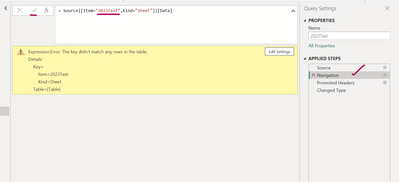
In the applied steps on the right side, got to navigation step then expand the formula after selecting navigation. Next replace "2023Test" with"2023Final" in the formula bar and then click apply.

Arul_0-1676971965727.png

Thanks,

Arul


Did I answer your question? Mark my post as a solution!

Proud to be a Super User!


LinkedIn


View solution in original post

4 REPLIES 4
Arul
Super User
Super User

@Variation_31415 ,

In this case you do not need to do anything, all the measures will be updated automatically with new query/table name.

Thanks,

Arul


Did I answer your question? Mark my post as a solution!

Proud to be a Super User!


LinkedIn


Dear Arul,


thank you very much. However, I have tried this (opened excel, changed name, saved it and refreshed the data). I do get the following error in the Powe Query Editor:


Expression.Error: The key didn't match any rows in the table.
Details:
Key=
Item=2023Test
Kind=Sheet
Table=[Table]

@Variation_31415 ,

In the applied steps on the right side, got to navigation step then expand the formula after selecting navigation. Next replace "2023Test" with"2023Final" in the formula bar and then click apply.

Arul_0-1676971965727.png

Thanks,

Arul


Did I answer your question? Mark my post as a solution!

Proud to be a Super User!


LinkedIn


Thanks a lot! That solved the issue and helped! 

Helpful resources

Announcements
Power BI DataViz World Championships

Power BI Dataviz World Championships

The Power BI Data Visualization World Championships is back! It's time to submit your entry.

January Power BI Update Carousel

Power BI Monthly Update - January 2026

Check out the January 2026 Power BI update to learn about new features.

FabCon Atlanta 2026 carousel

FabCon Atlanta 2026

Join us at FabCon Atlanta, March 16-20, for the ultimate Fabric, Power BI, AI and SQL community-led event. Save $200 with code FABCOMM.