Learn from the best! Meet the four finalists headed to the FINALS of the Power BI Dataviz World Championships! Register now
Hi, I extract data by SQL from ODBC. This is something like financial data that filtering by department number, extracting monthly expenses. I filter in SQL by using WHERE T1.DEPT = 'A00' (assume A00 is department number).
Due to the data is quite huge, I only extract the expenses for a few departments each time. When want to change the filter, I will need to open up the 'change data source' to edit SQL Query. Is there any way or any button to help in changing the filter query where I don't need to open the source each time to change query but can change the filter in a field, as I only want to change department number filter in SQL each time
Solved! Go to Solution.
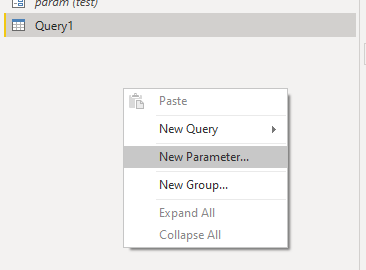
Yes you can add a parameter, right click somewhere on your query viewer and choose new Parameter:
as Current value you can put 'A00' (without the quotes)
now you can use this parameter in your sql query, something like this:
= Sql.Database(".", "AdventureWorks2016", [Query="select AddressID, City from Person.Address where City = '"& param & "'"])
Hi @Anonymous ,
It seems that you want to use parameter in power query, right? If so, you could refer to Pass-parameter-to-SQL-Queries-statement-using-Power-BI and power-bi-introduction-working-with-parameters-in-power-bi-desktop-part-4/ for details.
Best Regards,
Zoe Zhi
If this post helps, then please consider Accept it as the solution to help the other members find it more quickly.
Hi @Anonymous ,
It seems that you want to use parameter in power query, right? If so, you could refer to Pass-parameter-to-SQL-Queries-statement-using-Power-BI and power-bi-introduction-working-with-parameters-in-power-bi-desktop-part-4/ for details.
Best Regards,
Zoe Zhi
If this post helps, then please consider Accept it as the solution to help the other members find it more quickly.
Yes you can add a parameter, right click somewhere on your query viewer and choose new Parameter:
as Current value you can put 'A00' (without the quotes)
now you can use this parameter in your sql query, something like this:
= Sql.Database(".", "AdventureWorks2016", [Query="select AddressID, City from Person.Address where City = '"& param & "'"])
If you have recently started exploring Fabric, we'd love to hear how it's going. Your feedback can help with product improvements.
A new Power BI DataViz World Championship is coming this June! Don't miss out on submitting your entry.
Share feedback directly with Fabric product managers, participate in targeted research studies and influence the Fabric roadmap.
| User | Count |
|---|---|
| 56 | |
| 33 | |
| 32 | |
| 18 | |
| 16 |
| User | Count |
|---|---|
| 68 | |
| 67 | |
| 45 | |
| 30 | |
| 28 |