FabCon is coming to Atlanta
Join us at FabCon Atlanta from March 16 - 20, 2026, for the ultimate Fabric, Power BI, AI and SQL community-led event. Save $200 with code FABCOMM.
Register now!- Power BI forums
- Get Help with Power BI
- Desktop
- Service
- Report Server
- Power Query
- Mobile Apps
- Developer
- DAX Commands and Tips
- Custom Visuals Development Discussion
- Health and Life Sciences
- Power BI Spanish forums
- Translated Spanish Desktop
- Training and Consulting
- Instructor Led Training
- Dashboard in a Day for Women, by Women
- Galleries
- Data Stories Gallery
- Themes Gallery
- Contests Gallery
- QuickViz Gallery
- Quick Measures Gallery
- Visual Calculations Gallery
- Notebook Gallery
- Translytical Task Flow Gallery
- TMDL Gallery
- R Script Showcase
- Webinars and Video Gallery
- Ideas
- Custom Visuals Ideas (read-only)
- Issues
- Issues
- Events
- Upcoming Events
Get Fabric Certified for FREE during Fabric Data Days. Don't miss your chance! Request now
- Power BI forums
- Forums
- Get Help with Power BI
- Desktop
- Re: Change date format on charts
- Subscribe to RSS Feed
- Mark Topic as New
- Mark Topic as Read
- Float this Topic for Current User
- Bookmark
- Subscribe
- Printer Friendly Page

- Mark as New
- Bookmark
- Subscribe
- Mute
- Subscribe to RSS Feed
- Permalink
- Report Inappropriate Content
Change date format on charts
Hello Community,
Am facing trouble on changing the date format on 1 chart of the report am generating.
For some reason, the 1st chart you see was doable to change the date format to: DD MMM YY.
However, for the 2nd chart, it was not possible to implement the same given that am looking for MMM YY format.
Please see below for better illustrations:
1)

2)

Any help is greatly appreciated, thank you all in advance!
Regards,
Mo
Solved! Go to Solution.
- Mark as New
- Bookmark
- Subscribe
- Mute
- Subscribe to RSS Feed
- Permalink
- Report Inappropriate Content
Hi @Anonymous ,
Please refer to my pbix file to see if it helps you.
Create a column.
Column = FORMAT(Targets[Date],"MMM YY")Then create a column to sort.
Column 2 = year(Targets[Date])& FORMAT(Targets[Date],"MM")Then change the column2 type to whole number.
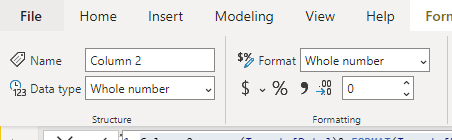
Then sort column by column2.
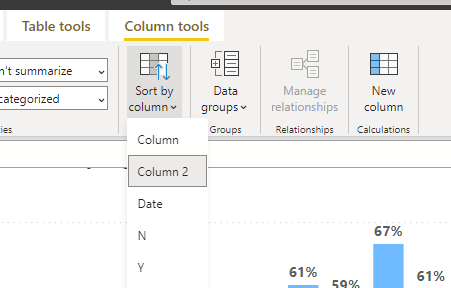
Best Regards
Community Support Team _ Polly
If this post helps, then please consider Accept it as the solution to help the other members find it more quickly.
- Mark as New
- Bookmark
- Subscribe
- Mute
- Subscribe to RSS Feed
- Permalink
- Report Inappropriate Content
Hi @Anonymous ,
Please refer to my pbix file to see if it helps you.
Create a column.
Column = FORMAT(Targets[Date],"MMM YY")Then create a column to sort.
Column 2 = year(Targets[Date])& FORMAT(Targets[Date],"MM")Then change the column2 type to whole number.
Then sort column by column2.
Best Regards
Community Support Team _ Polly
If this post helps, then please consider Accept it as the solution to help the other members find it more quickly.
- Mark as New
- Bookmark
- Subscribe
- Mute
- Subscribe to RSS Feed
- Permalink
- Report Inappropriate Content
Thank you so much, it did work!
- Mark as New
- Bookmark
- Subscribe
- Mute
- Subscribe to RSS Feed
- Permalink
- Report Inappropriate Content
Hi @Anonymous ,
Please have a try.
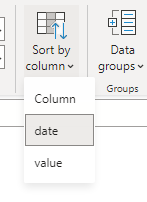
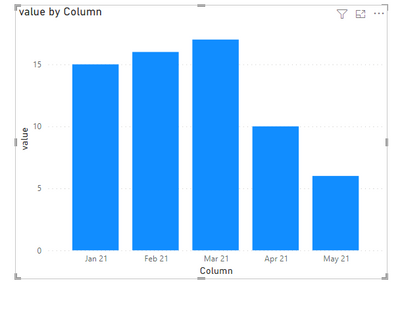
Click the column>> column tools>> sort by column>>drop down to select sort by date.
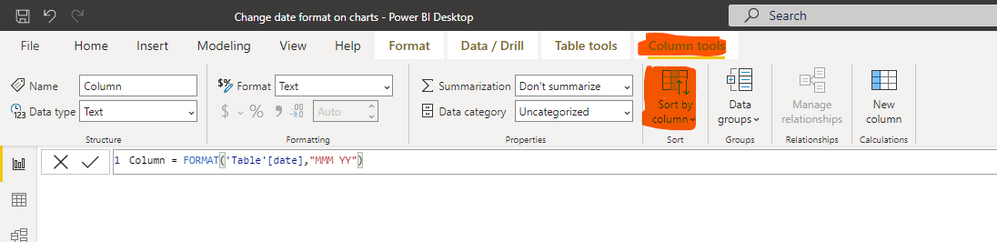
Best Regards
Community Support Team _ Polly
If this post helps, then please consider Accept it as the solution to help the other members find it more quickly.
- Mark as New
- Bookmark
- Subscribe
- Mute
- Subscribe to RSS Feed
- Permalink
- Report Inappropriate Content
Hi @Anonymous ,
Please refer to my pbix file to see if it helps you.
Create a column.
Column = FORMAT('Table'[date],"MMM YY")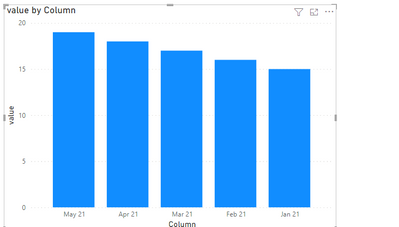
If I have misunderstood your meaning, please provide your pbix file without privacy information and your desired output.
Best Regards
Community Support Team _ Polly
If this post helps, then please consider Accept it as the solution to help the other members find it more quickly.
- Mark as New
- Bookmark
- Subscribe
- Mute
- Subscribe to RSS Feed
- Permalink
- Report Inappropriate Content
Hi @Anonymous
I did sort column by date and an error message came up stating:
"We can't sort the 'Column' column by "Date". There can't be more than one value 'Date' for the same value in 'Column'. Please choose a different column for sorting or update the data in 'Date'. "
Below link is a sharable link for you to review the file w/o privacy info:
https://drive.google.com/file/d/1HtuVfyN7F7uvBp8UZK3BT-voeU942rs2/view
Thank you,
Mo
- Mark as New
- Bookmark
- Subscribe
- Mute
- Subscribe to RSS Feed
- Permalink
- Report Inappropriate Content
Hi There,
It did the trick and now the day format is shrinked. However, there is a little problem with it.
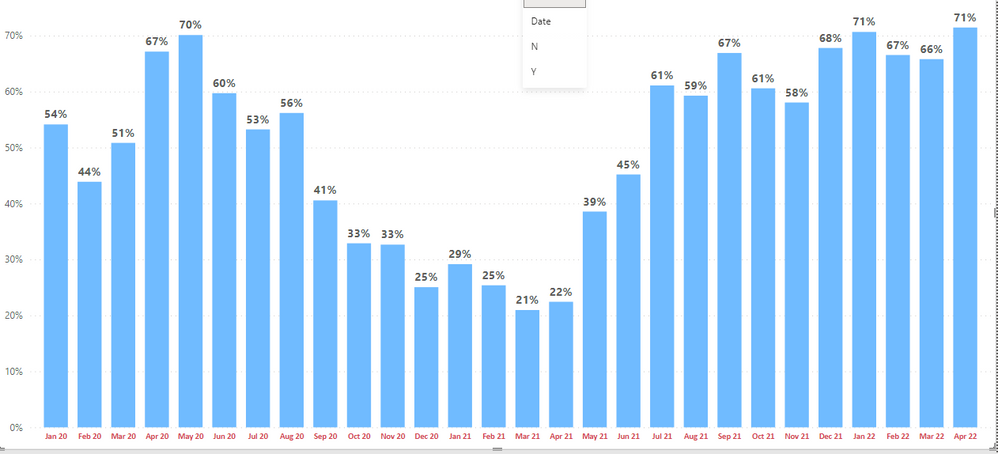
It looks like the new format is not sorting in date order; instead, it is sorting out everything alphebitically.
Below screenshot is posted for illustiration:

Thanks again for your support.
Regards,
Mo
Helpful resources

Power BI Monthly Update - November 2025
Check out the November 2025 Power BI update to learn about new features.

Fabric Data Days
Advance your Data & AI career with 50 days of live learning, contests, hands-on challenges, study groups & certifications and more!

FabCon Atlanta 2026
Join us at FabCon Atlanta, March 16-20, for the ultimate Fabric, Power BI, AI and SQL community-led event. Save $200 with code FABCOMM.


