
Join us at FabCon Atlanta from March 16 - 20, 2026, for the ultimate Fabric, Power BI, AI and SQL community-led event. Save $200 with code FABCOMM.
Register now!The Power BI Data Visualization World Championships is back! Get ahead of the game and start preparing now! Learn more
Morning,
I have an issue about data source changing.
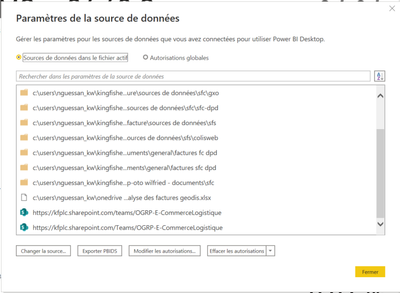
I have change data source from local to sharepoint via advance editor and it work properly but in data source parameter, the other local source stay available and when someone want to update or refresh an error occur cause report steal linked to loacl data source.
How can I fix this issue ?
Please need your help !
Thanks
Hi @Anonymous
Make sure you are using the web link of the SharePoint,
after replacing the data source --> close and apply in Power query --> check it load and try refreshing manually in Power BI Desktop.
if all ok then publish into Power B service.
it will work.
Hi @mohammedadnant ,
As you can see below the data source is web link (from sharepoint)
I don't know if it's the same like web
My main issue is to others people refresh or update the report.
Is it possible without premium licence ?
I have design a dashboard from local folder and after change folder to sharepoint to permit my collegues to update report.
When I use, it work properly but when my collegues refresh, it say that it can access to my local file that i already move to sharepoint.
@Anonymous
I believe your colleagues also have access to the same SharePoint folder.
as per your message "It can't access the local file" means still some table(s) are connected to your local drive.
The Power BI Data Visualization World Championships is back! Get ahead of the game and start preparing now!
| User | Count |
|---|---|
| 41 | |
| 38 | |
| 36 | |
| 31 | |
| 28 |
| User | Count |
|---|---|
| 129 | |
| 88 | |
| 79 | |
| 68 | |
| 63 |