
This time we’re going bigger than ever. Fabric, Power BI, SQL, AI and more. We're covering it all. You won't want to miss it.
Learn moreLevel up your Power BI skills this month - build one visual each week and tell better stories with data! Get started
Morning,
I have an issue about data source changing.
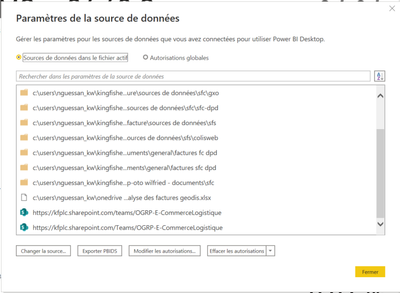
I have change data source from local to sharepoint via advance editor and it work properly but in data source parameter, the other local source stay available and when someone want to update or refresh an error occur cause report steal linked to loacl data source.
How can I fix this issue ?
Please need your help !
Thanks
Hi @Anonymous
Make sure you are using the web link of the SharePoint,
after replacing the data source --> close and apply in Power query --> check it load and try refreshing manually in Power BI Desktop.
if all ok then publish into Power B service.
it will work.
Hi @mohammedadnant ,
As you can see below the data source is web link (from sharepoint)
I don't know if it's the same like web
My main issue is to others people refresh or update the report.
Is it possible without premium licence ?
I have design a dashboard from local folder and after change folder to sharepoint to permit my collegues to update report.
When I use, it work properly but when my collegues refresh, it say that it can access to my local file that i already move to sharepoint.
@Anonymous
I believe your colleagues also have access to the same SharePoint folder.
as per your message "It can't access the local file" means still some table(s) are connected to your local drive.
Check out the April 2026 Power BI update to learn about new features.
Sign up to receive a private message when registration opens and key events begin.
If you have recently started exploring Fabric, we'd love to hear how it's going. Your feedback can help with product improvements.
| User | Count |
|---|---|
| 36 | |
| 29 | |
| 29 | |
| 21 | |
| 18 |
| User | Count |
|---|---|
| 68 | |
| 45 | |
| 33 | |
| 24 | |
| 23 |