Join us at FabCon Atlanta from March 16 - 20, 2026, for the ultimate Fabric, Power BI, AI and SQL community-led event. Save $200 with code FABCOMM.
Register now!Learn from the best! Meet the four finalists headed to the FINALS of the Power BI Dataviz World Championships! Register now
I need to have Button/Filter on top of page, which should contain Year, Quarter and Month
Based on the selection in Button/Filter data in below chart should change accordingly.
Consider X axis as sales and Y axis as Days (Year/Quarter/Month)
For Example:
1. When I select Year in Button/Filter, chart should show sales in year wise
2. When I select Quarter in Button/Filter, chart should show sales in Quarter wise
3. When I select Month in Button/Filter, chart should show sales in Month wise
NOTE: This changes should happen in same chart
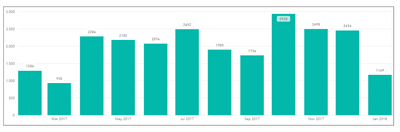
Below chart shows representation for Example 3: Monthwise
Appreciate your help to acheive this.
Thanks you.
Hi @Anonymous ,
Please refer the below link to the desired results.
https://powerpivotpro.com/2018/01/dynamic-attributes-power-bi-report/
Please mark it answered, if you got what you are looking for, so that it will be helpful to the others.
Regards,
Pavan Vanguri.
Share feedback directly with Fabric product managers, participate in targeted research studies and influence the Fabric roadmap.
Check out the February 2026 Power BI update to learn about new features.
| User | Count |
|---|---|
| 61 | |
| 58 | |
| 42 | |
| 18 | |
| 15 |
| User | Count |
|---|---|
| 105 | |
| 99 | |
| 38 | |
| 29 | |
| 29 |