cancel
Showing results for 
Search instead for 
Did you mean: 

July 7 - July 17 | Round 2 of the Power BI Dataviz World Championships. Don't miss your chance! Learn more

Reply
gauravnarchal
Post Prodigy
Post Prodigy

Change Row Header based on SelectedValue (Dynamic)

Is it possible to change the row header name of a table or a matrix based on a selectedvalue measure?


For eg:- I have a measure create for selectedvalue "Identifier - CY & Identifier - PY"


I wanted when i select Identifier - PY row header should also show Identifier - PY instead of Identifier - CY


ValidationIdentifier - CY
UniqueU2M
UniqueU2Q
UniqueU2U
UniqueU2Y
UniqueU6A
UniqueU6E
UniqueU6O
UniqueU6P
UniqueU6S
UniqueU6V
UniqueU6W
UniqueUKA
UniqueULB
UniqueULC
UniqueULD
UniqueULE
UniqueULH
UniqueULI
UniqueULK
UniqueULL
UniqueULM
UniqueULN
UniqueULO
UniqueULP
1 ACCEPTED SOLUTION
Anonymous
Not applicable

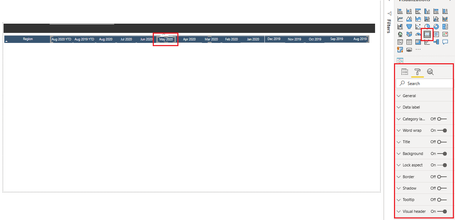
hi @gauravnarchal - A method that I have used to achieve this is to overlay your table headers with the Card visual and assign the visual a measure which dynamically calculates the required dynamic title as seen in the below screen grab. 


All columns in the table are individual card visuals overlaying the table/matrix visual - you have manually take care of the alignment though. 

Sumanth_23_0-1600175390768.png


Please mark the post as a solution if my comment helped with solving your issue. Thanks! 


View solution in original post

3 REPLIES 3
PaulDBrown
Community Champion
Community Champion

@gauravnarchal 

I would think you can. Can you show a mockup of the expected output and a sample dataset?


Did I answer your question? Mark my post as a solution!
In doing so, you are also helping me. Thank you!

Proud to be a Super User!
Paul on Linkedin.


Anonymous
Not applicable

hi @gauravnarchal - A method that I have used to achieve this is to overlay your table headers with the Card visual and assign the visual a measure which dynamically calculates the required dynamic title as seen in the below screen grab. 


All columns in the table are individual card visuals overlaying the table/matrix visual - you have manually take care of the alignment though. 

Sumanth_23_0-1600175390768.png


Please mark the post as a solution if my comment helped with solving your issue. Thanks! 


Greg_Deckler
Community Champion
Community Champion

@gauravnarchal Probably not, but check this out to see if there might be a way: https://community.powerbi.com/t5/Quick-Measures-Gallery/Dynamic-EVERYTHING-measures-axis-legend-titl...


Maybe use buttons and bookmarks?


Follow on LinkedIn
@ me in replies or I'll lose your thread!!!
Instead of a Kudo, please vote for this idea
Become an expert!: Enterprise DNA
External Tools: MSHGQM
YouTube Channel!: Microsoft Hates Greg
Latest book!:
DAX For Humans

DAX is easy, CALCULATE makes DAX hard...

Helpful resources

Announcements
FabCon and SQLCon Barcelona 2026

FabCon & SQLCon – Barcelona 2026

Join us in Barcelona for FabCon and SQLCon, the Fabric, Power BI, SQL, and AI community event. Save €200 with code FABCMTY200.

60 days of Data Days Carousel

Data Days 2026

Join Fabric Data Days 2026: 60 days of free live/on-demand sessions, challenges, study groups, and certification opportunities.

Power BI DataViz World Championships carousel

Power BI DataViz World Championships - June 2026

A new Power BI DataViz World Championship is coming this June! Don't miss out on submitting your entry.