

cancel
Showing results for 
Search instead for 
Did you mean: 

July 7 - July 17 | Round 2 of the Power BI Dataviz World Championships. Don't miss your chance! Learn more

Reply
Krp
Helper I
Helper I

Change Published Data Set Model

Hello Experts,

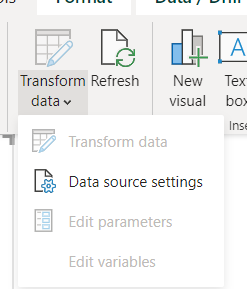
I have one data set which is published and when i download it to PBI desktop "Transform Data" is disabled. Cant view the query or details. How can I change published data set ? I dont want to change the published one, want to make sure the changes stay local to my copy ?

Thank You

5 REPLIES 5
mussaenda
Community Champion
Community Champion

Hi @Krp ,


You will not see the queries behind a published bi dataset.

You can only access the data itself.


JoeBarry
Solution Sage
Solution Sage

I think the "dataset" you downloaded is Report built on another Dataset. If there is a message bottom right of the dashboard like the screenshot below, then you will see the Name of the dataset it's connected to and the Workspace the Dataset is saved in. 


JoeBarry_0-1693564077382.png


Thanks

Joe


If this post helps, then please Accept it as the solution

@JoeBarry ,

Thanks you for your reply.

Am aware of where the dataset is reside - the workspace and in which reports it is been used.

The problem is since it is published data set and am not hte owner, not able to view data model or change it.

This was my question - is there a way to view all details and data model, the queries etc ?

Thank You

Hi @Krp 

as @mussaenda  mentioned this isn't pssible, it would be too much of a security risk if the data is sensitive. Best ask the dataset owner to share a copy of the PBIX if possible.


Sorry I couln't help further

Thank You Joe for reply. 

Krp_0-1693564311000.pngKrp_1-1693564380465.png


Helpful resources

Announcements
FabCon and SQLCon Barcelona 2026

FabCon & SQLCon – Barcelona 2026

Join us in Barcelona for FabCon and SQLCon, the Fabric, Power BI, SQL, and AI community event. Save €200 with code FABCMTY200.

60 days of Data Days Carousel

Data Days 2026

Join Fabric Data Days 2026: 60 days of free live/on-demand sessions, challenges, study groups, and certification opportunities.

Power BI DataViz World Championships carousel

Power BI DataViz World Championships - June 2026

A new Power BI DataViz World Championship is coming this June! Don't miss out on submitting your entry.