cancel
Showing results for 
Search instead for 
Did you mean: 

The Power BI Data Visualization World Championships is back! Get ahead of the game and start preparing now! Learn more

Reply
asebes
Frequent Visitor

Change MMM-YY Format to a Date Format

Seems like this should be easy but can't quite get it.  Have text in the following format that needs to be converted to a date format (last day of the month).  Thank you!


Current Format (MMM-YY)                     Desired Output

Dec-19                                                     12/31/19

Jan-20                                                      1/31/20

Feb-20                                                      2/28/20

1 ACCEPTED SOLUTION
DataZoe
Microsoft Employee
Microsoft Employee

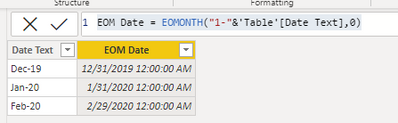
@asebes and to add to @mahoneypat 's reponse, here is a DAX calculated column version:


EOM Date = EOMONTH("1-"&'Table'[Date Text],0)
 
DataZoe_0-1618534755769.png


Respectfully,
Zoe Douglas (DataZoe)


Follow me on LinkedIn at https://www.linkedin.com/in/zoedouglas-data
See my reports and blog at https://www.datazoepowerbi.com/

View solution in original post

3 REPLIES 3
ac-pbi
Frequent Visitor

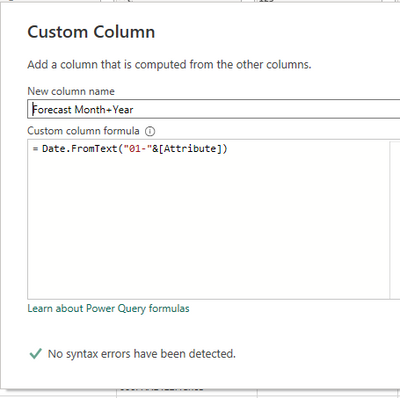
I wanted to do this in Power Query instead of DAX and creating a Custom Column with this formula worked for me (credit to ChatGPT for the assist):


=Date.FromText("01-"&[YourTextColumnHere])

acpbi_0-1682432857155.png


DataZoe
Microsoft Employee
Microsoft Employee

@asebes and to add to @mahoneypat 's reponse, here is a DAX calculated column version:


EOM Date = EOMONTH("1-"&'Table'[Date Text],0)
 
DataZoe_0-1618534755769.png


Respectfully,
Zoe Douglas (DataZoe)


Follow me on LinkedIn at https://www.linkedin.com/in/zoedouglas-data
See my reports and blog at https://www.datazoepowerbi.com/

mahoneypat
Microsoft Employee
Microsoft Employee

You can add a custom column in the query editor with this formula to get your desired result.


= Date.EndOfMonth(Date.From([Current Format]))


Pat


Did I answer your question? Mark my post as a solution! Kudos are also appreciated!

To learn more about Power BI, follow me on Twitter or subscribe on YouTube.


@mahoneypa HoosierBI on YouTube


Helpful resources

Announcements
Power BI DataViz World Championships

Power BI Dataviz World Championships

The Power BI Data Visualization World Championships is back! Get ahead of the game and start preparing now!

December 2025 Power BI Update Carousel

Power BI Monthly Update - December 2025

Check out the December 2025 Power BI Holiday Recap!

FabCon Atlanta 2026 carousel

FabCon Atlanta 2026

Join us at FabCon Atlanta, March 16-20, for the ultimate Fabric, Power BI, AI and SQL community-led event. Save $200 with code FABCOMM.