Share feedback directly with Fabric product managers, participate in targeted research studies and influence the Fabric roadmap.
Sign up nowGet Fabric certified for FREE! Don't miss your chance! Learn more
Hi Everyone,
In a project for work, I'm tasked with pulling weather data from an IBM service called WSI. Specifically, I'm trying to find data on Heading Degree Days (HDD) for various weather stations in the USA.
When I send a request to the web service, it sends me the data in CSV format as below
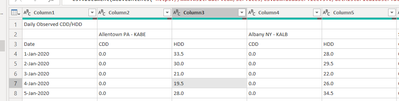
unfortunately, the weather station name is only in every second column, and the column name doesn't include CDD / HDD (Cooling Degree Days, Heating Degree Days). Ideally, I would like the header to concatenate the rows 2 and 3 (e.g. column headers saying
| Allentown PA - KABE - CDD | Allentown PA - KABE - HDD | Albany NY - KALB - CDD | Albany NY - KALB - HDD |
Ideally I would like to make a change in the query editor screen in Power BI; however, I'm currently unable to find a solution. Any help would really be appreciated. Below is what my query editor currently shows.
Thanks so much
Peter
Solved! Go to Solution.
Try this mcode:
let
Source = Table.FromRows(Json.Document(Binary.Decompress(Binary.FromText("i45WcknMzKlU8E8qTi0qS01RcHZx0fdwcVHSUUKgWJ1oEO2Yk5OaV5JfnqcQ4Kigq+Dt6OQKUeCYk5SYV6ngFwkW9XGC6XFxDAGpcAYbBzEUwQYpMNT1cvTTNTIACoGwsbGOKZRpZAFWYISmAMYwsgSqBCkwRlVgZAhjGCnFxgIA", BinaryEncoding.Base64), Compression.Deflate)), let _t = ((type nullable text) meta [Serialized.Text = true]) in type table [Column1 = _t, Column2 = _t, Column3 = _t, Column4 = _t, Column5 = _t]),
#"Changed Type" = Table.TransformColumnTypes(Source,{{"Column1", type text}, {"Column2", type text}, {"Column3", type text}, {"Column4", type text}, {"Column5", type text}}),
#"Removed Top Rows" = Table.Skip(#"Changed Type",1),
#"Transposed Table" = Table.Transpose(#"Removed Top Rows"),
#"Replaced Value" = Table.ReplaceValue(#"Transposed Table","",null,Replacer.ReplaceValue,{"Column1"}),
#"Filled Down" = Table.FillDown(#"Replaced Value",{"Column1"}),
#"Merged Columns" = Table.CombineColumns(#"Filled Down",{"Column1", "Column2"},Combiner.CombineTextByDelimiter(" ", QuoteStyle.None),"Header"),
#"Transposed Table1" = Table.Transpose(#"Merged Columns"),
#"Promoted Headers" = Table.PromoteHeaders(#"Transposed Table1", [PromoteAllScalars=true]),
#"Changed Type1" = Table.TransformColumnTypes(#"Promoted Headers",{{" DATE", type date}, {"Allentown PA - KABE CDD", Int64.Type}, {"Allentown PA - KABE HDD", type number}, {"Albany NY - KALB CDD", Int64.Type}, {"Albany NY - KALB HDD", type number}})
in
#"Changed Type1"
Try this mcode:
let
Source = Table.FromRows(Json.Document(Binary.Decompress(Binary.FromText("i45WcknMzKlU8E8qTi0qS01RcHZx0fdwcVHSUUKgWJ1oEO2Yk5OaV5JfnqcQ4Kigq+Dt6OQKUeCYk5SYV6ngFwkW9XGC6XFxDAGpcAYbBzEUwQYpMNT1cvTTNTIACoGwsbGOKZRpZAFWYISmAMYwsgSqBCkwRlVgZAhjGCnFxgIA", BinaryEncoding.Base64), Compression.Deflate)), let _t = ((type nullable text) meta [Serialized.Text = true]) in type table [Column1 = _t, Column2 = _t, Column3 = _t, Column4 = _t, Column5 = _t]),
#"Changed Type" = Table.TransformColumnTypes(Source,{{"Column1", type text}, {"Column2", type text}, {"Column3", type text}, {"Column4", type text}, {"Column5", type text}}),
#"Removed Top Rows" = Table.Skip(#"Changed Type",1),
#"Transposed Table" = Table.Transpose(#"Removed Top Rows"),
#"Replaced Value" = Table.ReplaceValue(#"Transposed Table","",null,Replacer.ReplaceValue,{"Column1"}),
#"Filled Down" = Table.FillDown(#"Replaced Value",{"Column1"}),
#"Merged Columns" = Table.CombineColumns(#"Filled Down",{"Column1", "Column2"},Combiner.CombineTextByDelimiter(" ", QuoteStyle.None),"Header"),
#"Transposed Table1" = Table.Transpose(#"Merged Columns"),
#"Promoted Headers" = Table.PromoteHeaders(#"Transposed Table1", [PromoteAllScalars=true]),
#"Changed Type1" = Table.TransformColumnTypes(#"Promoted Headers",{{" DATE", type date}, {"Allentown PA - KABE CDD", Int64.Type}, {"Allentown PA - KABE HDD", type number}, {"Albany NY - KALB CDD", Int64.Type}, {"Albany NY - KALB HDD", type number}})
in
#"Changed Type1"
Thanks so much, this is exactly what I was looking for. This is extremely helpful.
If you love stickers, then you will definitely want to check out our Community Sticker Challenge!
Check out the January 2026 Power BI update to learn about new features.
| User | Count |
|---|---|
| 65 | |
| 64 | |
| 49 | |
| 21 | |
| 18 |
| User | Count |
|---|---|
| 119 | |
| 117 | |
| 38 | |
| 36 | |
| 29 |