cancel
Showing results for 
Search instead for 
Did you mean: 

The Power BI Data Visualization World Championships is back! Get ahead of the game and start preparing now! Learn more

Reply
GunnerJ
Post Patron
Post Patron

Change Filter Value names

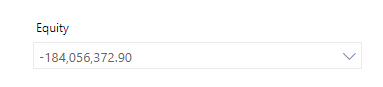
I have a set of filters that I'm hoping the end user can use to select values to be used in a calculation. The values are for certain years so I'd like to show the year instead of the value as it may not make sense to see a random number and to know what year it corresponds with.


Here's an example. This value is for the year 2018 and I'd like my filter to show "2018" instead of the number but still be able to use the number in a calculation. 

Filter Names.PNG

1 ACCEPTED SOLUTION
KBO
Memorable Member
Memorable Member

Example.png

Hi,

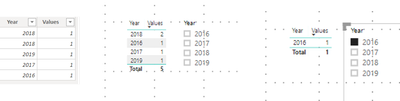
here you see the original Table with the data. In the second picture you see the table visual with the values and the years also a slicer with the years. In the third picture you see how I activate the filter and you see it works. The visual only shows the value for 2016. 


Best,

Kathrin

View solution in original post

5 REPLIES 5
KBO
Memorable Member
Memorable Member

Hi,

do you have a date column in your table or instead a date dimension in your model? Than you can use this instead of the value.


Best Kathrin

@KBO 

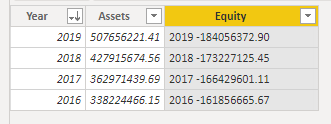
Here's the table in question. I do have a date column for the year. In the Equity Column you can ignore the year I put in before the number. I was just experimenting.

Asset table.PNG

KBO
Memorable Member
Memorable Member

Than its easy - put the years as value in the filterpane or in the slicer and you can filter after the Values in one specific year 🙂


Best Kathrin

@KBO I guess I'm a bit confused on how to use the selectedvalue function to grab a value not shown in the filter. I understand they're on the same line so there's a connection there but do you have an example of that being used?

KBO
Memorable Member
Memorable Member

Example.png

Hi,

here you see the original Table with the data. In the second picture you see the table visual with the values and the years also a slicer with the years. In the third picture you see how I activate the filter and you see it works. The visual only shows the value for 2016. 


Best,

Kathrin

Helpful resources

Announcements
Power BI DataViz World Championships

Power BI Dataviz World Championships

The Power BI Data Visualization World Championships is back! Get ahead of the game and start preparing now!

December 2025 Power BI Update Carousel

Power BI Monthly Update - December 2025

Check out the December 2025 Power BI Holiday Recap!

FabCon Atlanta 2026 carousel

FabCon Atlanta 2026

Join us at FabCon Atlanta, March 16-20, for the ultimate Fabric, Power BI, AI and SQL community-led event. Save $200 with code FABCOMM.