Get certified for free when you join Fabric Data Days 2026 and dive into Fabric, Power BI, SQL, AI, and other essential data skills.
Join nowJuly 28 - August 9 | Final Round of the Power BI Dataviz World Championships. This is your chance. Learn more
Hello, please help.
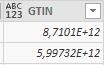
I need to change the column type to letter and number simultaneously. Like on picture. How can I do this?
Thank you for your help.
Solved! Go to Solution.
Hi,
An easy way to get the generic any type would be to change the data type of the column and replace the type in the code like below for an example
= Table.TransformColumnTypes(#"Removed Columns",{{"Column1", Int64.Type}})To
= Table.TransformColumnTypes(#"Removed Columns",{{"Column1", type any}})
Hi @Anonymous ,
Have you solved your problem?
If you have solved, please always accept the replies making sense as solution to your question so that people who may have the same question can get the solution directly.
If you still need help, please feel free to ask.
From the image, it seems that the data type of your column GTIN is number type.
What is your desired output?
Best Regards,
Cherry
Hi,
An easy way to get the generic any type would be to change the data type of the column and replace the type in the code like below for an example
= Table.TransformColumnTypes(#"Removed Columns",{{"Column1", Int64.Type}})To
= Table.TransformColumnTypes(#"Removed Columns",{{"Column1", type any}})
Join us in Barcelona for FabCon and SQLCon, the Fabric, Power BI, SQL, and AI community event. Save €200 with code FABCMTY200.
If you love stickers, then you will definitely want to check out our community sticker challenge, Barcelona edition!
Check out the July 2026 Power BI update to learn about new features.
| User | Count |
|---|---|
| 30 | |
| 28 | |
| 25 | |
| 24 | |
| 16 |
| User | Count |
|---|---|
| 46 | |
| 32 | |
| 17 | |
| 17 | |
| 16 |