FabCon is coming to Atlanta
Join us at FabCon Atlanta from March 16 - 20, 2026, for the ultimate Fabric, Power BI, AI and SQL community-led event. Save $200 with code FABCOMM.
Register now!- Power BI forums
- Get Help with Power BI
- Desktop
- Service
- Report Server
- Power Query
- Mobile Apps
- Developer
- DAX Commands and Tips
- Custom Visuals Development Discussion
- Health and Life Sciences
- Power BI Spanish forums
- Translated Spanish Desktop
- Training and Consulting
- Instructor Led Training
- Dashboard in a Day for Women, by Women
- Galleries
- Data Stories Gallery
- Themes Gallery
- Contests Gallery
- QuickViz Gallery
- Quick Measures Gallery
- Visual Calculations Gallery
- Notebook Gallery
- Translytical Task Flow Gallery
- TMDL Gallery
- R Script Showcase
- Webinars and Video Gallery
- Ideas
- Custom Visuals Ideas (read-only)
- Issues
- Issues
- Events
- Upcoming Events
The Power BI Data Visualization World Championships is back! Get ahead of the game and start preparing now! Learn more
- Power BI forums
- Forums
- Get Help with Power BI
- Desktop
- Re: Change Bar Chart Colour based on slicer select...
- Subscribe to RSS Feed
- Mark Topic as New
- Mark Topic as Read
- Float this Topic for Current User
- Bookmark
- Subscribe
- Printer Friendly Page

- Mark as New
- Bookmark
- Subscribe
- Mute
- Subscribe to RSS Feed
- Permalink
- Report Inappropriate Content
Change Bar Chart Colour based on slicer selection
Hi Experts
This should be easy but, as the measures are written in SSAS. How could i as a work around change the bar chart colour based on what selection is made on a particular slicer - field selected...
So if i select:
1. banana - bar chart change to Yellow
2. orange - bar chart changes to Orange etc.....
Solved! Go to Solution.


- Mark as New
- Bookmark
- Subscribe
- Mute
- Subscribe to RSS Feed
- Permalink
- Report Inappropriate Content
@Anonymous
I know how to get 3 different colors for 3 different categories but nor more than that 
Basically you can use the Color Saturation Property of the Chart to define colors. Sample PBIX File is attached
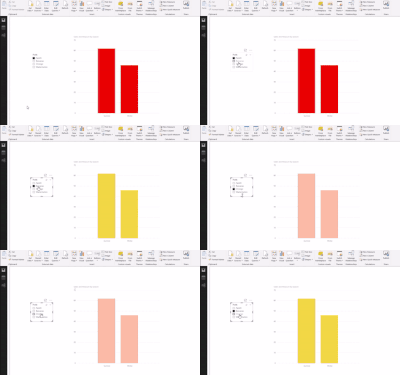
Regards
Zubair
Please try my custom visuals

- Mark as New
- Bookmark
- Subscribe
- Mute
- Subscribe to RSS Feed
- Permalink
- Report Inappropriate Content
Hello,
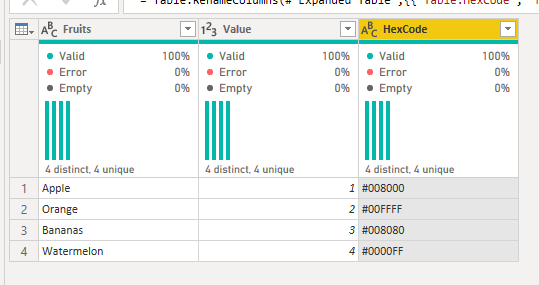
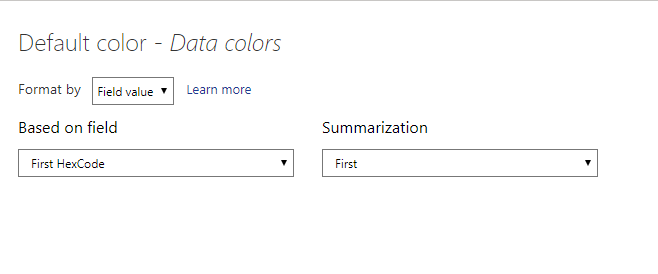
Alternatively, if the slicer is based on a table, you could add the hex codes of the colors you want to the table. Then set the data colors > Default color format to the column. This avoids the limit of 3 like the previous solution but does come with its own caveat. You can only have one slicer option chosen at a time.


- Mark as New
- Bookmark
- Subscribe
- Mute
- Subscribe to RSS Feed
- Permalink
- Report Inappropriate Content
I love this tip, @BlueTeam1 . I noticed, though, that the setup doesn't work for the background color of the slicer that holds the values responsible for the color change. Bit of a bummer, but not the end of the world. Thanks for this!
- Mark as New
- Bookmark
- Subscribe
- Mute
- Subscribe to RSS Feed
- Permalink
- Report Inappropriate Content
Hey, thanks for this input. Where did you find this panel to input choices for default colour? I couldn't find it anywhere. Also, do you know if this also works for line graphs?
- Mark as New
- Bookmark
- Subscribe
- Mute
- Subscribe to RSS Feed
- Permalink
- Report Inappropriate Content
This is based off of a relatively new feature of conditional formatting they rolled out for charts. At this time, I have not found it to work for line charts.
If you hover over the title of the "Default Color" section of the "Data Colors" title, there should be a set of three dots to the right of the title that open up the conditional menu (see below screenshot). They only show up if you hover over the title so kind of hidden. I hope they make it more prominent in the future. Hope this helps.

- Mark as New
- Bookmark
- Subscribe
- Mute
- Subscribe to RSS Feed
- Permalink
- Report Inappropriate Content
@Anonymous
I know how to get 3 different colors for 3 different categories but nor more than that
Basically you can use the Color Saturation Property of the Chart to define colors. Sample PBIX File is attached
Regards
Zubair
Please try my custom visuals
- Mark as New
- Bookmark
- Subscribe
- Mute
- Subscribe to RSS Feed
- Permalink
- Report Inappropriate Content
Thanks Zubair
Helpful resources

Power BI Dataviz World Championships
The Power BI Data Visualization World Championships is back! Get ahead of the game and start preparing now!

Power BI Monthly Update - December 2025
Check out the December 2025 Power BI Holiday Recap!

FabCon Atlanta 2026
Join us at FabCon Atlanta, March 16-20, for the ultimate Fabric, Power BI, AI and SQL community-led event. Save $200 with code FABCOMM.

| User | Count |
|---|---|
| 38 | |
| 37 | |
| 33 | |
| 32 | |
| 29 |


| User | Count |
|---|---|
| 132 | |
| 88 | |
| 82 | |
| 68 | |
| 64 |


