Join us at FabCon Atlanta from March 16 - 20, 2026, for the ultimate Fabric, Power BI, AI and SQL community-led event. Save $200 with code FABCOMM.
Register now!The Power BI Data Visualization World Championships is back! Get ahead of the game and start preparing now! Learn more
Hello folks,
My data source comes from an oracle DB which I'm using as a direct query.
The column I need to use is a decimal number type of data, which I cannot change in Power Query.
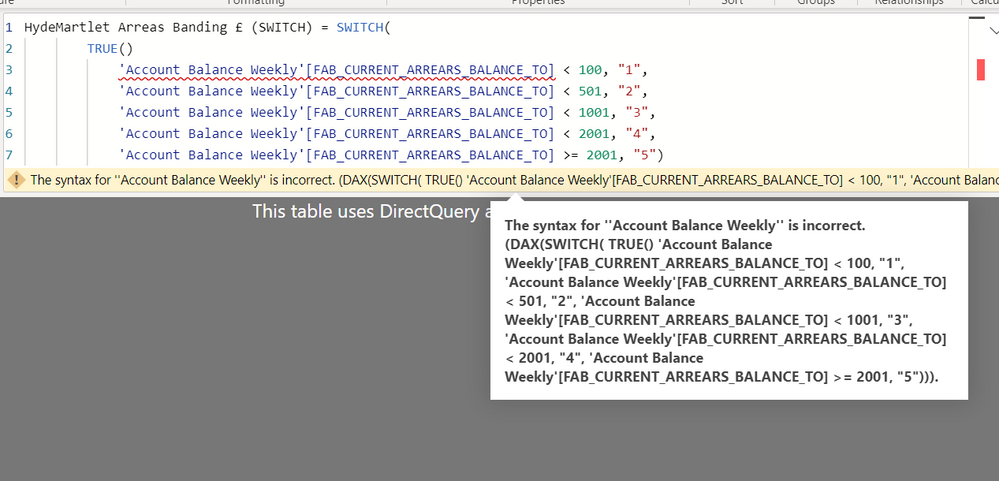
I need to create a new column with the range below, but I'm not sure how as I've tried creating a calculated column using SWITCH and a measure using IF. I'm also, not sure if I should change the data type within the measure from decimal to whole number.
If you could tell me how I can create a case statement to have a new column with the range below, it would be incredibly helpful. Many thanks!
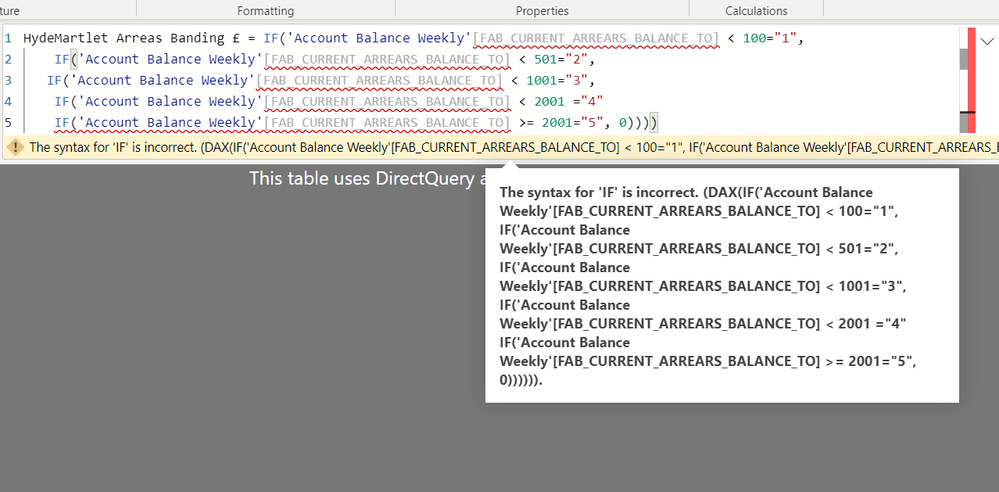
Below is a measure that I tried using the 'IF' statement, but it's wrong.
Solved! Go to Solution.
@Anonymous , Please give comma(,) after True()
Also if this is a measure, It will take measure
The Power BI Data Visualization World Championships is back! Get ahead of the game and start preparing now!
| User | Count |
|---|---|
| 38 | |
| 37 | |
| 33 | |
| 32 | |
| 29 |
| User | Count |
|---|---|
| 132 | |
| 88 | |
| 82 | |
| 68 | |
| 64 |