cancel
Showing results for 
Search instead for 
Did you mean: 

The Power BI Data Visualization World Championships is back! Get ahead of the game and start preparing now! Learn more

Reply
BSM1985
Helper IV
Helper IV

Case Statement with Over Partition By

Hello @amitchandak ,


I would need your help again.

As per your guidance, I have created the DAX calculation as below. But I see wrong results meaning it shows the maximum for each record (COLUMNB), instead of group of fields (COLUMNC and COLUMND). Below is the SQL Vs DAX. Kindly help.


SQL:

SELECT CASE WHEN COLUMN A = 'A' THEN
Max(COLUMN B) OVER ( partition BY COLUMN C, COLUMN D) END AS Cal
FROM TABLE
WHERE COLUMN A IN ( 'A', 'B' )


DAX:

calculate(max(COLUMN B),allexcept(TABLE, COLUMN C,COLUMN D),filter(TABLE,COLUMN A="A"))

1 ACCEPTED SOLUTION

@BSM1985 


The formula  that I shared can be used as a measure. If you need to see zero if the result is a blank then just add +0 at end to my formula. 

________________________

If my answer was helpful, please consider Accept it as the solution to help the other members find it

Click on the Thumbs-Up icon if you like this reply 🙂

YouTube  LinkedIn

Did I answer your question? Mark my post as a solution! and hit thumbs up


Subscribe and learn Power BI from these videos

Website LinkedIn PBI User Group

View solution in original post

4 REPLIES 4
Fowmy
Super User
Super User

@BSM1985 

Can you this Measure?

Measure = 
calculate(
    max(COLUMN B),
    COLUMN A="A",
    allexcept(TABLE, COLUMN A, COLUMN C,COLUMN D)
    
)


________________________

If my answer was helpful, please consider Accept it as the solution to help the other members find it

Click on the Thumbs-Up icon if you like this reply 🙂

YouTube  LinkedIn

Did I answer your question? Mark my post as a solution! and hit thumbs up


Subscribe and learn Power BI from these videos

Website LinkedIn PBI User Group

Hello @Fowmy 


Thanks for taking your time to look into it.

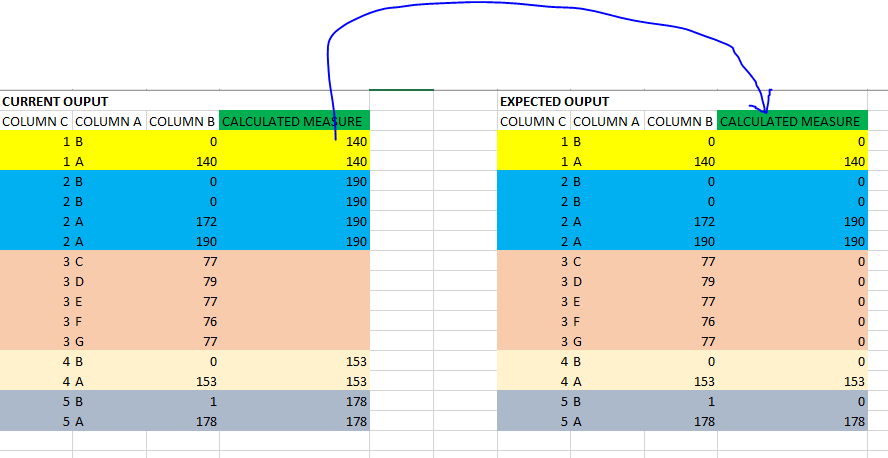
I'm almost there, I would like to see the 0s if condition does not match COLUMN=A. I added the screesnhot below. Please refer CALCULATED MEASURE field in the below screenshot.


Request: can this be done thru calculated measure becasue if I use calculated column I see the message 'Out of memory..' due to the size of the model?


DAX:

CALCULATED MEASURE =
calculate(
max(COLUMN B),
COLUMN A="A",
allexcept(TABLE, COLUMN A, COLUMN C,COLUMN D)
)


0s Output.PNG

@BSM1985 


The formula  that I shared can be used as a measure. If you need to see zero if the result is a blank then just add +0 at end to my formula. 

________________________

If my answer was helpful, please consider Accept it as the solution to help the other members find it

Click on the Thumbs-Up icon if you like this reply 🙂

YouTube  LinkedIn

Did I answer your question? Mark my post as a solution! and hit thumbs up


Subscribe and learn Power BI from these videos

Website LinkedIn PBI User Group

Thanks much @Fowmy 

Helpful resources

Announcements
Power BI DataViz World Championships

Power BI Dataviz World Championships

The Power BI Data Visualization World Championships is back! Get ahead of the game and start preparing now!

December 2025 Power BI Update Carousel

Power BI Monthly Update - December 2025

Check out the December 2025 Power BI Holiday Recap!

FabCon Atlanta 2026 carousel

FabCon Atlanta 2026

Join us at FabCon Atlanta, March 16-20, for the ultimate Fabric, Power BI, AI and SQL community-led event. Save $200 with code FABCOMM.