Learn from the best! Meet the four finalists headed to the FINALS of the Power BI Dataviz World Championships! Register now
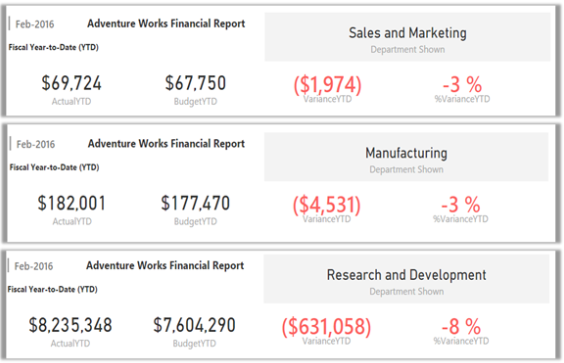
What kind of visualization can i use for the second visualization visualization? It looks like a card but i don’t which one it is, I am particularly interested in the date on it, I want to be able to add a date on the first visuaalization that auto-generates the current date, previos date, current week and previous week and puts the dates on the first visualization, this is not possible using "Advance Card" since that is what i used for the first visualization (At least that's what I'm assuming). The second visualization is close enough to what I'm looking for but i do not know what visualization to use. lease advice, thanks.
FIRST CHART (What I have)
SECOND CHART (What I want)
Solved! Go to Solution.
Hi @Anonymous
The second one seems like several cards were grouped together, I believe you can create several cards and the group them to achieve the requirement.
Related documents: https://docs.microsoft.com/en-us/power-bi/create-reports/desktop-grouping-visuals
https://docs.microsoft.com/en-us/power-bi/visuals/power-bi-visualization-card
Hi @Anonymous
The second one seems like several cards were grouped together, I believe you can create several cards and the group them to achieve the requirement.
Related documents: https://docs.microsoft.com/en-us/power-bi/create-reports/desktop-grouping-visuals
https://docs.microsoft.com/en-us/power-bi/visuals/power-bi-visualization-card
| User | Count |
|---|---|
| 57 | |
| 43 | |
| 32 | |
| 16 | |
| 13 |
| User | Count |
|---|---|
| 84 | |
| 70 | |
| 38 | |
| 27 | |
| 24 |