Don't miss your chance to take the Fabric Data Engineer (DP-700) exam on us!
Learn moreWe've captured the moments from FabCon & SQLCon that everyone is talking about, and we are bringing them to the community, live and on-demand. Starts on April 14th. Register now
Thanks to all who respond.
I need help creating this measure: I have 3 cards showing totals for 2021, 2020, 2019. I would like to have the font color change to red or green based on the previous year total. So if year 2020 amount was greater than 2021 change to 'red', if less than change to 'green'.
Table name = 'Sheet1'
Field name = 'Amount'
Field name = 'YEAR'
Any ideas?
Thanks-BLD
Solved! Go to Solution.
You'll need to use a different KPI Card visual. There are a few options in AppSource.
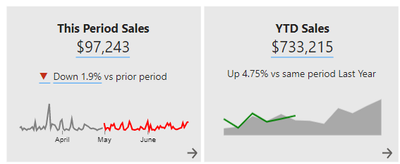
You could create your own card visual using Smart Narratives:
And change the colour of the font using this trick:
Smart Narratives and Conditional Formatting in Power BI? Yes please! - Guy in a Cube
Proud to be a Super User!
You'll need to use a different KPI Card visual. There are a few options in AppSource.
You could create your own card visual using Smart Narratives:
And change the colour of the font using this trick:
Smart Narratives and Conditional Formatting in Power BI? Yes please! - Guy in a Cube
Proud to be a Super User!
Thank you, great idea.
BLD
@Anonymous HI,
We cant dynamically change the font colour using Card, instaed use table for each value and you need to create 3 different measures where you need to use switch statement dax1 > dax2 then "Hex code of Red" like that..
Regards,
John Basha Mattipati,
https://www.linkedin.com/in/john-basha-mattipati-06812980/
If you have recently started exploring Fabric, we'd love to hear how it's going. Your feedback can help with product improvements.
A new Power BI DataViz World Championship is coming this June! Don't miss out on submitting your entry.
Share feedback directly with Fabric product managers, participate in targeted research studies and influence the Fabric roadmap.
| User | Count |
|---|---|
| 55 | |
| 34 | |
| 32 | |
| 19 | |
| 17 |
| User | Count |
|---|---|
| 75 | |
| 72 | |
| 38 | |
| 35 | |
| 25 |