This time we’re going bigger than ever. Fabric, Power BI, SQL, AI and more. We're covering it all. You won't want to miss it.
Learn moreLevel up your Power BI skills this month - build one visual each week and tell better stories with data! Get started
Hi all
Not sure if I am missing something, but I can not for the life of me apply conditional formatting to a measure I have displayed on a card... I have the below measure
KPI 1 Met % = FORMAT(DIVIDE(SUM('KPI 1 - Vacancy Distribution'[KPI Met?]),COUNT('KPI 1 - Vacancy Distribution'[KPI Met?])),"0.00%")
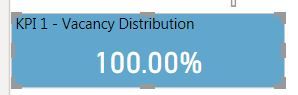
In my data I have a 1 if KPI met, 0 if KPI failed. So the sum divided by the count gives me percentage of KPI passed, and then formats it as a percentage, works great when displaying as a card
What I want to do is change the background depending on the percentage value on the card, but when I go to apply conditonal formatting, I am not able to select the measure, but I am able to select any other field from the current table
Is there any way I can apply condtional formatting to the background of this card, or am I missing something blindingly obvious?
Thank you
Josh
Solved! Go to Solution.
First, create a measure that returns color based in %
Measure = if([KPI %]<50,"red","green")
In card Go to the background color and hover, you will see three dots, click and choose conditional formatting.
Then choose field in the selection and this measure
Appreciate your Kudos. In case, this is the solution you are looking for, mark it as the Solution. In case it does not help, please provide additional information and mark me with @
Thanks. My Recent Blog -
Winner-Topper-on-Map-How-to-Color-States-on-a-Map-with-Winners , HR-Analytics-Active-Employee-Hire-and-Termination-trend
Power-BI-Working-with-Non-Standard-Time-Periods And Comparing-Data-Across-Date-Ranges
Connect on Linkedin
First, create a measure that returns color based in %
Measure = if([KPI %]<50,"red","green")
In card Go to the background color and hover, you will see three dots, click and choose conditional formatting.
Then choose field in the selection and this measure
Appreciate your Kudos. In case, this is the solution you are looking for, mark it as the Solution. In case it does not help, please provide additional information and mark me with @
Thanks. My Recent Blog -
Winner-Topper-on-Map-How-to-Color-States-on-a-Map-with-Winners , HR-Analytics-Active-Employee-Hire-and-Termination-trend
Power-BI-Working-with-Non-Standard-Time-Periods And Comparing-Data-Across-Date-Ranges
Connect on Linkedin
Dear amitchandak,
I am quite newbie, I am starting Power BI since 7 days ago and I am using Power BI Desktop, September 2022 update.
Suppose if I want to apply conditional formatting in a card, how to do that? if the % of "Open" issues >=25% then font color will be in red, else font color is green.
I have a mesure to find the percentage of "Open" issues, as below: the current number is 47%
Open percent =
FORMAT(DIVIDE([Count Open item],[Count total item]),"0%")And I have another measure as your suggestion above, for conditional coloring background.
Condition format open =
IF([Open percent]>=25,"red","green")
What the next step should I do?
Thank you very much.
Prima Indonesia
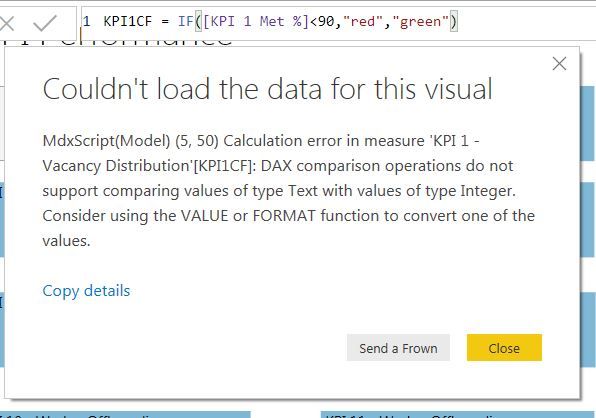
Thank you for the prompt reply! I have done exactly as you said, but when I go to put the new measure in the conditonal format it won't let me select it. So I attempted to add the measure to the card just to test what it returns and get the below error
Thank you 🙂
You are a saint!
Thank you very much
Check out the April 2026 Power BI update to learn about new features.
Sign up to receive a private message when registration opens and key events begin.
If you have recently started exploring Fabric, we'd love to hear how it's going. Your feedback can help with product improvements.
| User | Count |
|---|---|
| 35 | |
| 32 | |
| 25 | |
| 22 | |
| 18 |
| User | Count |
|---|---|
| 65 | |
| 35 | |
| 32 | |
| 25 | |
| 23 |