Join us at FabCon Atlanta from March 16 - 20, 2026, for the ultimate Fabric, Power BI, AI and SQL community-led event. Save $200 with code FABCOMM.
Register now!The Power BI Data Visualization World Championships is back! Get ahead of the game and start preparing now! Learn more
Hi all,
I created a simple data flow in PBI service and with manual refresh it succeeds.
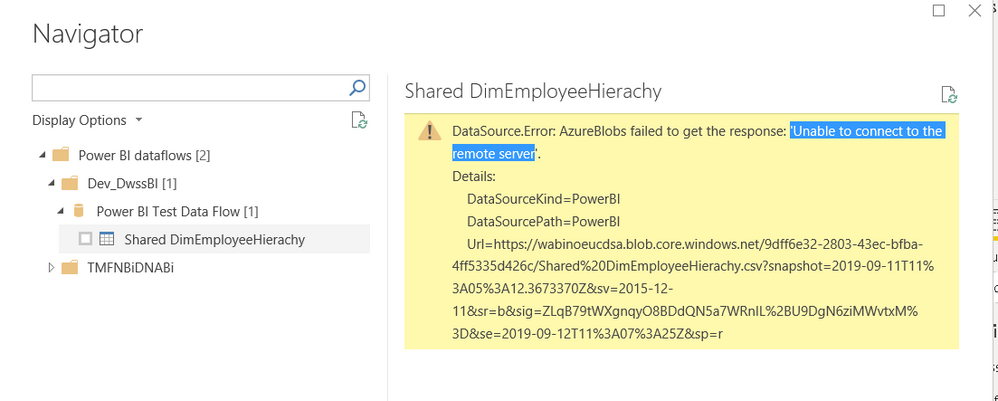
My problem is, when i try connect to this data flow in desktop, i get the following error?
Solved! Go to Solution.
Hi @Anonymous ,
Here are two suggestions.
1. Different accounts.
It may because you saved the Power BI dataflows permissions information of another account in Power BI Desktop, the connect information may not be the same as the Power BI Desktop account.
We can try to use “Files” – “Options and settings” – “data source Settings”, then find “Power BI Dataflows” in “Global Permission”, then clear Permissions of it.
Connect the Power BI Dataflows again and sign in as the current user, then you can see the Dataflows of your current account.
2. Firewall configuration.
Please check your Azure Blob storage firewall configuration, the firewall setting of the azure storage account need to whitelist the IP address of the Power BI Service. If these IP address are not whitelisted, the access will not succeed.
Hi @Anonymous ,
Here are two suggestions.
1. Different accounts.
It may because you saved the Power BI dataflows permissions information of another account in Power BI Desktop, the connect information may not be the same as the Power BI Desktop account.
We can try to use “Files” – “Options and settings” – “data source Settings”, then find “Power BI Dataflows” in “Global Permission”, then clear Permissions of it.
Connect the Power BI Dataflows again and sign in as the current user, then you can see the Dataflows of your current account.
2. Firewall configuration.
Please check your Azure Blob storage firewall configuration, the firewall setting of the azure storage account need to whitelist the IP address of the Power BI Service. If these IP address are not whitelisted, the access will not succeed.
The Power BI Data Visualization World Championships is back! Get ahead of the game and start preparing now!
Check out the November 2025 Power BI update to learn about new features.
| User | Count |
|---|---|
| 59 | |
| 46 | |
| 42 | |
| 23 | |
| 18 |
| User | Count |
|---|---|
| 193 | |
| 123 | |
| 99 | |
| 67 | |
| 49 |