Get Fabric or SQL Certified for Free.
Get certified for free when you join Fabric Data Days 2026 and dive into Fabric, Power BI, SQL, AI, and other essential data skills.
Join now- Power BI forums
- Get Help with Power BI
- Desktop
- Service
- Report Server
- Power Query
- Mobile Apps
- Developer
- DAX Commands and Tips
- Custom Visuals Development Discussion
- Health and Life Sciences
- Power BI Spanish forums
- Translated Spanish Desktop
- Training and Consulting
- Instructor Led Training
- Dashboard in a Day for Women, by Women
- Galleries
- Data Stories Gallery
- Themes Gallery
- Contests Gallery
- QuickViz Gallery
- Quick Measures Gallery
- Visual Calculations Gallery
- Notebook Gallery
- Translytical Task Flow Gallery
- TMDL Gallery
- R Script Showcase
- Webinars and Video Gallery
- Ideas
- Custom Visuals Ideas (read-only)
- Issues
- Issues
- Events
- Upcoming Events
July 7 - July 17 | Round 2 of the Power BI Dataviz World Championships. Don't miss your chance! Learn more
- Power BI forums
- Forums
- Get Help with Power BI
- Desktop
- Re: Cant display Clustering visual - R script erro...
- Subscribe to RSS Feed
- Mark Topic as New
- Mark Topic as Read
- Float this Topic for Current User
- Bookmark
- Subscribe
- Printer Friendly Page

- Mark as New
- Bookmark
- Subscribe
- Mute
- Subscribe to RSS Feed
- Permalink
- Report Inappropriate Content
Cant display Clustering visual - R script error.
hi , i had Import from store Clustering visual , when i am trying to use it - i get the err :
R script error.
Loading required package: XML
Loading required package: methods
Warning message:
package 'XML' was built under R version 3.3.3
Loading required package: htmlwidgets
Loading required package: nloptr
Loading required package: seriation
Loading required package: NbClust
Loading required package: cluster
Loading required package: car
Loading required package: scales
Loading required package: fpc
Loading required package: mclust
Package 'mclust' version 5.4
Type 'citation("mclust")' for citing this R package in publications.
Loading required package: apcluster .........
i manage to install.packages("XML") and most of the other package BUT still the error message remain ..
Any hope for solution ? THANKS.

- Mark as New
- Bookmark
- Subscribe
- Mute
- Subscribe to RSS Feed
- Permalink
- Report Inappropriate Content
@yanivvl,
Please check if you install the right version of R in your machine. In my scenario, I can successfully import the clustering visual when I have R 3.3.0 or R 3.4.0 installed.
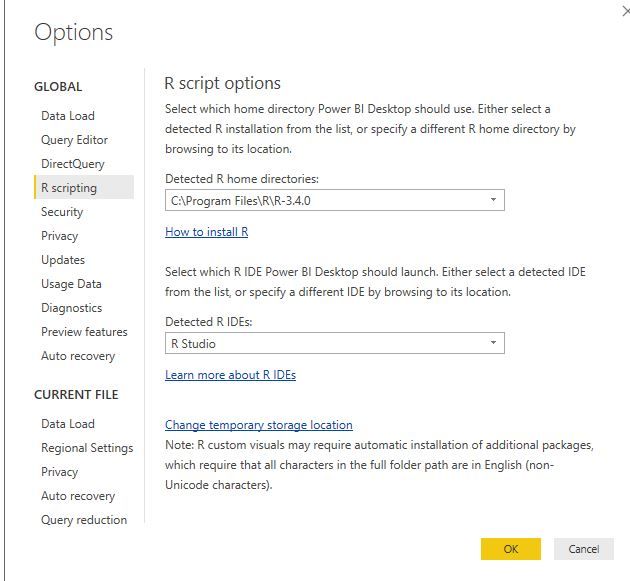
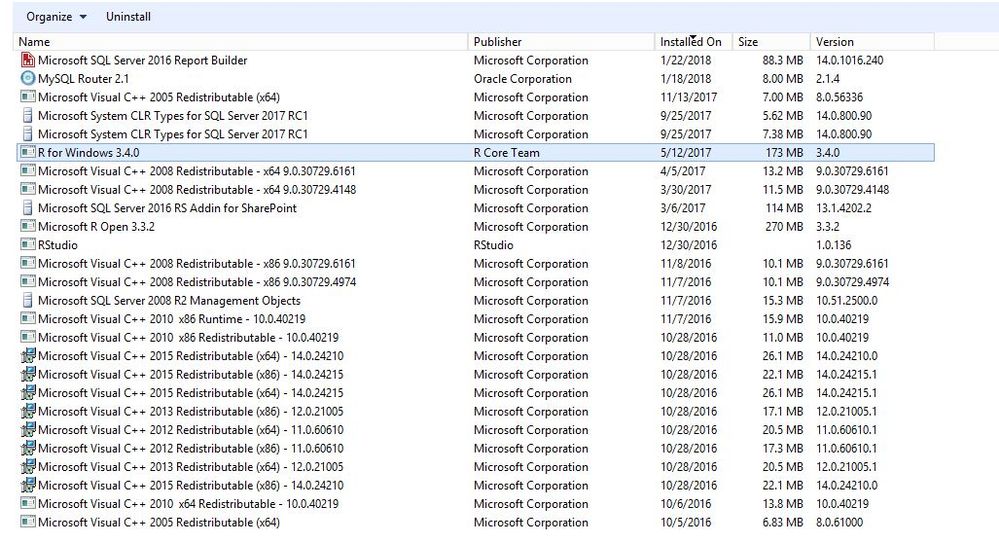
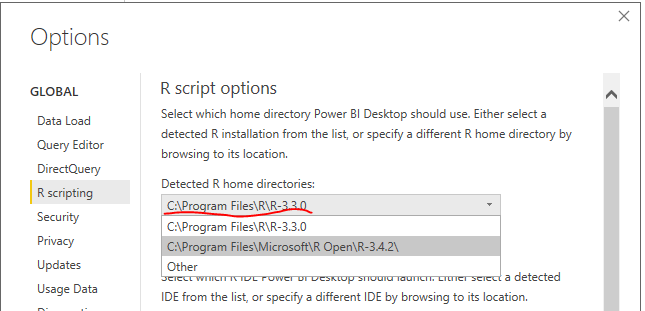
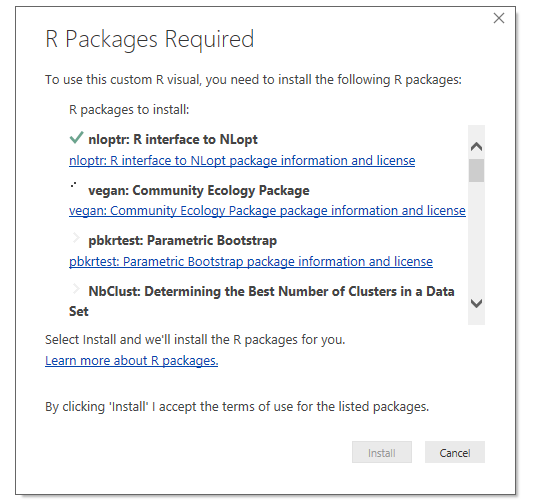
when importing the clustering visual, the R package dependencies should be auto-installed, please make sure all the packages have been installed completely. It should pop up a window as below when you first to use the clustering visual.
In addition, make sure that you use the latest version of Power BI Desktop(2.54.4970.961).
Regards,
Lydia
- Mark as New
- Bookmark
- Subscribe
- Mute
- Subscribe to RSS Feed
- Permalink
- Report Inappropriate Content
hi lydia , i had 2.53 version so i down load 2.54.4970.961 v,
my r packages installed on other machine so i point the "temporary storage location" :

all the packages are there but it seems that it cant find them , and i steel get same error message :
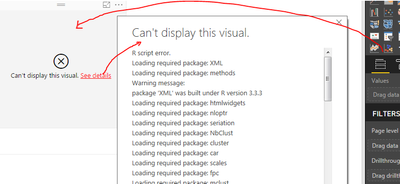
am i missing something ? THANKS!
- Mark as New
- Bookmark
- Subscribe
- Mute
- Subscribe to RSS Feed
- Permalink
- Report Inappropriate Content
@yanivvl,
From the error message, it seems that your pre-installed packages are not compatible with the installed R on your current machine.
Have you tried to install higher version R(3.3.0 Or 3.4.0)?
Regards,
Lydia
- Mark as New
- Bookmark
- Subscribe
- Mute
- Subscribe to RSS Feed
- Permalink
- Report Inappropriate Content
MY Version 3.3.2 - comes after 3.3 .
- Mark as New
- Bookmark
- Subscribe
- Mute
- Subscribe to RSS Feed
- Permalink
- Report Inappropriate Content
@yanivvl,
How is the issue going? What is the result after you install 3.3.0 or 3.4.0 R?
Regards,
Lydia
- Mark as New
- Bookmark
- Subscribe
- Mute
- Subscribe to RSS Feed
- Permalink
- Report Inappropriate Content
hi , the same , no progress , i'm stack.
3.3,2 isnt good ?
- Mark as New
- Bookmark
- Subscribe
- Mute
- Subscribe to RSS Feed
- Permalink
- Report Inappropriate Content
@yanivvl,
Would you mind sharing the pre-downloaded packages to me? I will test it in my environment.
Regards,
Lydia
- Mark as New
- Bookmark
- Subscribe
- Mute
- Subscribe to RSS Feed
- Permalink
- Report Inappropriate Content
Of course, how can I deliver the packages to you?
- Mark as New
- Bookmark
- Subscribe
- Mute
- Subscribe to RSS Feed
- Permalink
- Report Inappropriate Content
@yanivvl,
You can upload these packages to OneDrive, and send me the shared link via Private Message.
Regards,
Lydia
- Mark as New
- Bookmark
- Subscribe
- Mute
- Subscribe to RSS Feed
- Permalink
- Report Inappropriate Content
hi Lydia ,
here is the link :
https://1drv.ms/f/s!AjgXaWBMO1sGdGt2nmC8Wh9Ui3Y
hope the upload done and complete ,
if you see any thng missing , pls alert me , thanks.
Helpful resources

FabCon & SQLCon – Barcelona 2026
Join us in Barcelona for FabCon and SQLCon, the Fabric, Power BI, SQL, and AI community event. Save €200 with code FABCMTY200.

Data Days 2026
Join Data Days 2026: 60 days of free live/on-demand sessions, challenges, study groups, and certification opportunities.

Power BI DataViz World Championships - June 2026
A new Power BI DataViz World Championship is coming this June! Don't miss out on submitting your entry.

| User | Count |
|---|---|
| 27 | |
| 23 | |
| 18 | |
| 18 | |
| 15 |


| User | Count |
|---|---|
| 62 | |
| 44 | |
| 42 | |
| 37 | |
| 37 |


