cancel
Showing results for 
Search instead for 
Did you mean: 

The Power BI Data Visualization World Championships is back! Get ahead of the game and start preparing now! Learn more

Reply
ansa_naz
Continued Contributor

Cannot use USERELATIONSHIP function - keep getting an error?

Hi all, hopefully soneone can help me out with this!

For some reason I keep getting the following error when trying to use the USERELATIONSHIP function:

USERELATIONSHIP function can only use the two columns references participating in relationship.

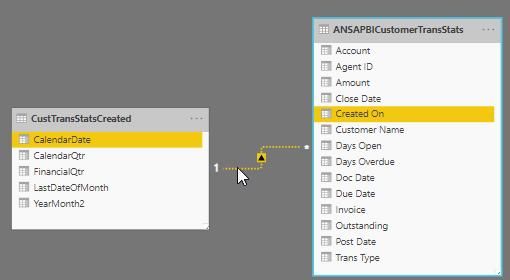
My relevant data is modelled as:

USERELATIONSHIP.jpg


And my measure is:


Amount Running Total Date = 
var startPeriod = EOMONTH(TODAY(),-13)+1
var endPeriod=Today()
RETURN
if(
SELECTEDVALUE(CustTransStatsCreated[CalendarDate])>=startPeriod && 
SELECTEDVALUE(CustTransStatsCreated[CalendarDate])<=endPeriod,
CALCULATE(
SUM('ANSAPBICustomerTransStats'[Amount]),ALLEXCEPT(ANSAPBICustomerAndAgent,ANSAPBICustomerAndAgent[Customer Name],ANSAPBICustomerAndAgent[Agent Name])
    ,USERELATIONSHIP(CustTransCreatedOn[CalendarDate],ANSAPBICustomerTransStats[Created On])
    ,	FILTER(
		ALL('ANSAPBICustomerTransStats'[Created On]),
		ISONORAFTER('ANSAPBICustomerTransStats'[Created On], MAX('ANSAPBICustomerTransStats'[Created On]), DESC) 
	)
),BLANK()
)

Am I missing something really obvious here?

Cheers for all help

1 ACCEPTED SOLUTION
MartynRamsden
Solution Sage
Solution Sage

Hi @ansa_naz 


One of the table names quoted in USERELATIONSHIP is incorrect.

You had 'CustTransStatsCreatedOn' - it should be 'CustTransStatsCreated' 


Try this:

Amount Running Total Date =
VAR startPeriod = EOMONTH ( TODAY (), -13 ) + 1
VAR endPeriod = TODAY ()
RETURN
    IF (
        SELECTEDVALUE ( CustTransStatsCreated[CalendarDate] ) >= startPeriod
            && SELECTEDVALUE ( CustTransStatsCreated[CalendarDate] ) <= endPeriod,
        CALCULATE (
            SUM ( 'ANSAPBICustomerTransStats'[Amount] ),
            ALLEXCEPT (
                ANSAPBICustomerAndAgent,
                ANSAPBICustomerAndAgent[Customer Name],
                ANSAPBICustomerAndAgent[Agent Name]
            ),
            USERELATIONSHIP ( CustTransCreated[CalendarDate], ANSAPBICustomerTransStats[Created On] ),
            FILTER (
                ALL ( 'ANSAPBICustomerTransStats'[Created On] ),
                ISONORAFTER (
                        'ANSAPBICustomerTransStats'[Created On], MAX ( 'ANSAPBICustomerTransStats'[Created On] ), DESC
                )
            )
        ),
        BLANK ()
    )


Best regards,

Martyn


If I answered your question, please help others by accepting it as a solution.

View solution in original post

4 REPLIES 4
MartynRamsden
Solution Sage
Solution Sage

Hi @ansa_naz 


One of the table names quoted in USERELATIONSHIP is incorrect.

You had 'CustTransStatsCreatedOn' - it should be 'CustTransStatsCreated' 


Try this:

Amount Running Total Date =
VAR startPeriod = EOMONTH ( TODAY (), -13 ) + 1
VAR endPeriod = TODAY ()
RETURN
    IF (
        SELECTEDVALUE ( CustTransStatsCreated[CalendarDate] ) >= startPeriod
            && SELECTEDVALUE ( CustTransStatsCreated[CalendarDate] ) <= endPeriod,
        CALCULATE (
            SUM ( 'ANSAPBICustomerTransStats'[Amount] ),
            ALLEXCEPT (
                ANSAPBICustomerAndAgent,
                ANSAPBICustomerAndAgent[Customer Name],
                ANSAPBICustomerAndAgent[Agent Name]
            ),
            USERELATIONSHIP ( CustTransCreated[CalendarDate], ANSAPBICustomerTransStats[Created On] ),
            FILTER (
                ALL ( 'ANSAPBICustomerTransStats'[Created On] ),
                ISONORAFTER (
                        'ANSAPBICustomerTransStats'[Created On], MAX ( 'ANSAPBICustomerTransStats'[Created On] ), DESC
                )
            )
        ),
        BLANK ()
    )


Best regards,

Martyn


If I answered your question, please help others by accepting it as a solution.

Ok im an idiot!

amitchandak
Super User
Super User

Your Relation is disabled. Double click on that and try to enable that. See if, it gives any error. After enable it should work.


Typically when we have more than one relationship between two tables, it is fine to have disabled relations.  But why the single one is disabled needs to be checked.


Appreciate your Kudos. In case, this is the solution you are looking for, mark it as the Solution. In case it does not help, please provide additional information and mark me with @
Thanks. My Recent Blog -
https://community.powerbi.com/t5/Community-Blog/Winner-Topper-on-Map-How-to-Color-States-on-a-Map-wi...
https://community.powerbi.com/t5/Community-Blog/HR-Analytics-Active-Employee-Hire-and-Termination-tr...
https://community.powerbi.com/t5/Community-Blog/Power-BI-Working-with-Non-Standard-Time-Periods/ba-p...
https://community.powerbi.com/t5/Community-Blog/Comparing-Data-Across-Date-Ranges/ba-p/823601

Share with Power BI Enthusiasts: Full Power BI Video (20 Hours) YouTube
Microsoft Fabric Series 60+ Videos YouTube
Microsoft Fabric Hindi End to End YouTube
ansa_naz
Continued Contributor

I can enable the relationship with no error

I cannot leave it enabled as it would affect other visuals

Helpful resources

Announcements
Power BI DataViz World Championships

Power BI Dataviz World Championships

The Power BI Data Visualization World Championships is back! Get ahead of the game and start preparing now!

December 2025 Power BI Update Carousel

Power BI Monthly Update - December 2025

Check out the December 2025 Power BI Holiday Recap!

FabCon Atlanta 2026 carousel

FabCon Atlanta 2026

Join us at FabCon Atlanta, March 16-20, for the ultimate Fabric, Power BI, AI and SQL community-led event. Save $200 with code FABCOMM.