Join us at FabCon Atlanta from March 16 - 20, 2026, for the ultimate Fabric, Power BI, AI and SQL community-led event. Save $200 with code FABCOMM.
Register now!The Power BI Data Visualization World Championships is back! Get ahead of the game and start preparing now! Learn more
Hello all 🙂
I'm having an issue with calculated columns and I was hoping you could help me.
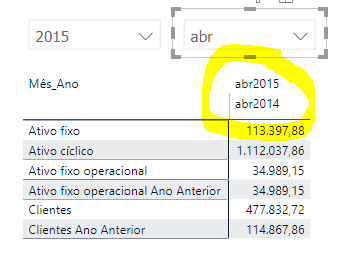
When I select a date in the slicer, i want two columns to show in my matrix: the selected date and the same period last year. I have calculated columns to do this, but when I select them, this is what happens:
Instead of having 2 columns, one stays above the other. Does anyone know why this happens? How can I change it?
Thank you so much in advance.
Sílvia
Solved! Go to Solution.
Hi, @Anonymous
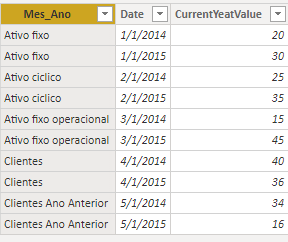
Based on your desciption, I created data to reproduce your scenario.
Table:
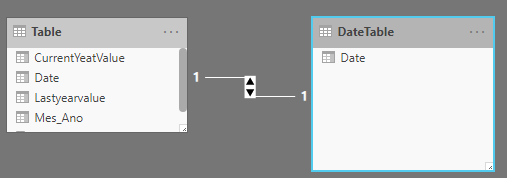
You may create a calculated table and create a one-to-one relationship between two tables as follows.
DateTable = CALENDARAUTO()
Then you may create a calculated column in 'Table' as below.
Lastyearvalue =
CALCULATE(
SUM('Table'[CurrentYeatValue]),
SAMEPERIODLASTYEAR(DateTable[Date])
)
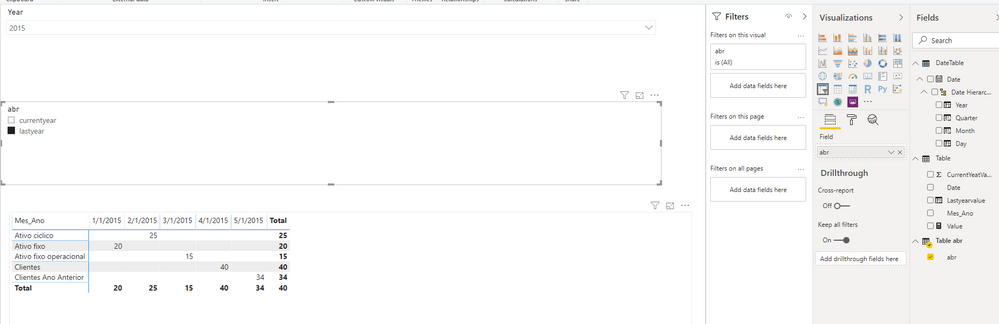
Then you may create a table by 'Enter Date' as the screenshot.
Table abr:
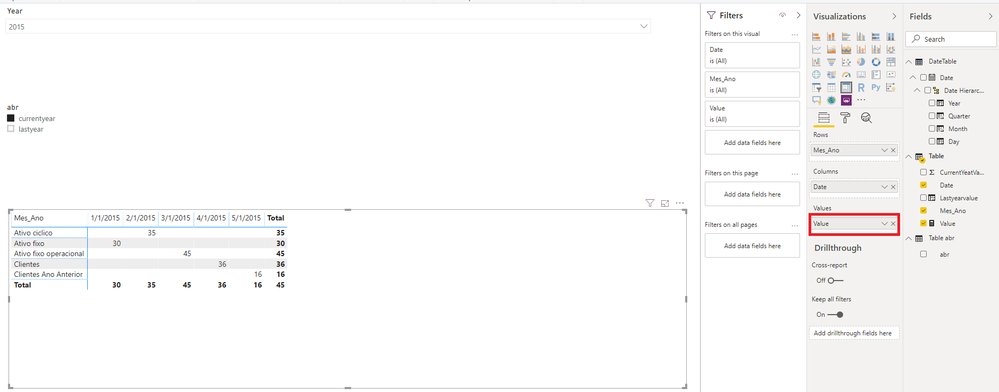
Finally you can create a measure as follows and put it in the 'Values' area of the matrix visual.
Value =
var _abr = SELECTEDVALUE('Table abr'[abr])
return
IF(
_abr = "currentyear",
MAX('Table'[CurrentYeatValue]),
IF(
_abr = "lastyear",
MAX('Table'[Lastyearvalue]),
BLANK()
)
)
Result:
If I misunderstand your thought, please show me your smaple data and expected result. Do mask sensitive data before uploading. Thanks.
Best Regards
Allan
If this post helps, then please consider Accept it as the solution to help the other members find it more quickly.
Hi, @Anonymous
Based on your desciption, I created data to reproduce your scenario.
Table:
You may create a calculated table and create a one-to-one relationship between two tables as follows.
DateTable = CALENDARAUTO()
Then you may create a calculated column in 'Table' as below.
Lastyearvalue =
CALCULATE(
SUM('Table'[CurrentYeatValue]),
SAMEPERIODLASTYEAR(DateTable[Date])
)
Then you may create a table by 'Enter Date' as the screenshot.
Table abr:
Finally you can create a measure as follows and put it in the 'Values' area of the matrix visual.
Value =
var _abr = SELECTEDVALUE('Table abr'[abr])
return
IF(
_abr = "currentyear",
MAX('Table'[CurrentYeatValue]),
IF(
_abr = "lastyear",
MAX('Table'[Lastyearvalue]),
BLANK()
)
)
Result:
If I misunderstand your thought, please show me your smaple data and expected result. Do mask sensitive data before uploading. Thanks.
Best Regards
Allan
If this post helps, then please consider Accept it as the solution to help the other members find it more quickly.
Hi, Allan!
Thank you so much for your help, this solution worked perfectly! 😄
Thank you for your time! Have a great day!
Best regards,
Sílvia
I am not sure why two rows are there at column header.
Simple create two measure for two years
one is for selected year and another for sameperiodLAstYEar and add them into matrix.
Thanks & regards,
Pravin Wattamwar
www.linkedin.com/in/pravin-p-wattamwar
If I resolve your problem Mark it as a solution and give kudos.
Thank you so much for your reply!
I have already tried to do that, but matrices don't accept measures as columns nor rows... That's why I created calculated columns. Do you have any other suggestion, please?
Thanks!!
The Power BI Data Visualization World Championships is back! Get ahead of the game and start preparing now!
| User | Count |
|---|---|
| 63 | |
| 55 | |
| 42 | |
| 41 | |
| 23 |
| User | Count |
|---|---|
| 171 | |
| 136 | |
| 119 | |
| 79 | |
| 54 |