Get certified for free when you join Fabric Data Days 2026 and dive into Fabric, Power BI, SQL, AI, and other essential data skills.
Join nowData Days is here! Join us now for 60+ days of learning, challenges, and connection. Learn more
Hi,
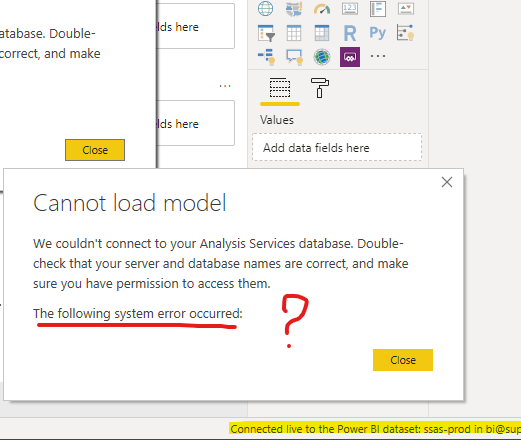
Trying to connecto to a PowerBI data source (gateway, SSAS), I'm getting "Cannot load model" followed by a blank error message:
After that, I can't do anything, the message reappears over and over and I have to kill the process to close the app.
I tried running as an administrator, uninstalling and doing a fresh install of the latest version, logging out and back in... I'm lost.
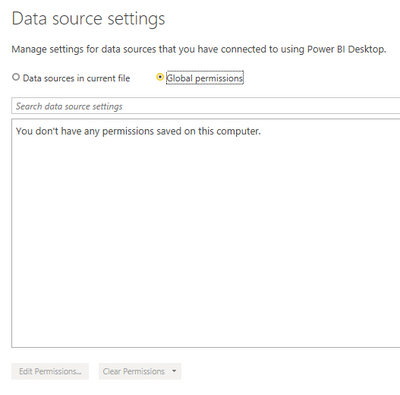
The cache is empty and no credentials are stored locally:
Also I doubled checked the permissions, and my account is the owner of the datasource in the PowerBI Service.
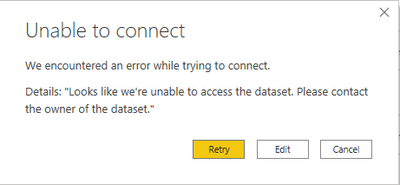
If I open a report, ot try to create one from scratch, I get this, with the same result (had to kill the app):
Any help would be appreciated.
Thanks.
I have the same error, someone has solution if from the power bi desktop, I select as source power dataset whose source is an SSAS, it stays pasted with the same message, can not load the model and the window gets stuck
Hi @SBPFA ,
As the online document: https://docs.microsoft.com/en-us/power-bi/desktop-report-lifecycle-datasets#limitations-and-consider...
If you delete the shared dataset in the Power BI service, then other reports based on that dataset will no longer work properly or display their visuals.
So Please have a check whether the dataset has been deleted or not.
Hi, the dataset was not deleted, in fact, Desktop shows it is connected live:
Hi @SBPFA ,
Seemed that you have no access to the dataset any more. Could you please check with the owner of the dataset?
I am the owner of the dataset, that's what makes it weird.
Not sure this is an issue with Desktop itself.
I was hoping for some troubleshooting.
Thanks.
Don't miss out on Data Days, June 15 through August 7. Learn Fabric, Power BI, SQL, AI and more.
Check out the May 2026 Power BI update to learn about new features.
| User | Count |
|---|---|
| 22 | |
| 21 | |
| 20 | |
| 19 | |
| 13 |
| User | Count |
|---|---|
| 58 | |
| 52 | |
| 37 | |
| 31 | |
| 27 |