Don't miss your chance to take the Fabric Data Engineer (DP-700) exam on us!
Learn moreWe've captured the moments from FabCon & SQLCon that everyone is talking about, and we are bringing them to the community, live and on-demand. Starts on April 14th. Register now
I'm using a premium license and I have a medium sized dataset that I use to generate several other reports through a live connection.
I really want to use this for consistency and in order to avoid having to refresh all these reports manually.
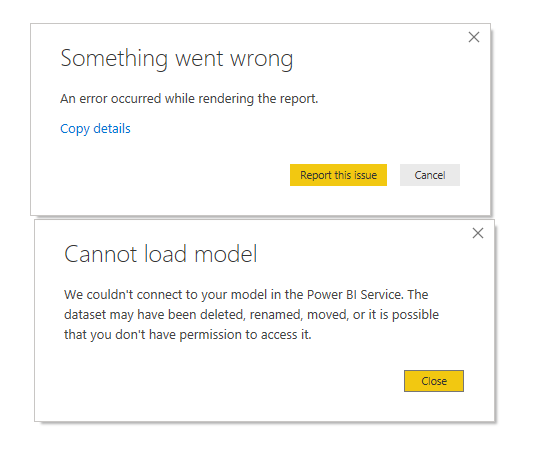
My issue is that I'm usually getting this error:
Sometimes it works after restarting the computer, sometimes after trying to open it 5 or 6 times.
Is there anything I can do?
Thanks in advance
Solved! Go to Solution.
Hi @setis
Which version do you use?
Please use the lastest version,
Then launch Power BI Desktop as administrator.
In addition, if error persists, please check if it meets any limitation here.
Hi @setis
Which version do you use?
Please use the lastest version,
Then launch Power BI Desktop as administrator.
In addition, if error persists, please check if it meets any limitation here.
Dear @v-juanli-msft I've been currently using 2.73.5586.1101 64-bit (september 2019)
Running it as administrator present some issues, since it's only our IT team that's allowed to run applications as such.
If you have recently started exploring Fabric, we'd love to hear how it's going. Your feedback can help with product improvements.
A new Power BI DataViz World Championship is coming this June! Don't miss out on submitting your entry.
Share feedback directly with Fabric product managers, participate in targeted research studies and influence the Fabric roadmap.
| User | Count |
|---|---|
| 56 | |
| 39 | |
| 35 | |
| 19 | |
| 17 |
| User | Count |
|---|---|
| 73 | |
| 70 | |
| 37 | |
| 35 | |
| 26 |