cancel
Showing results for 
Search instead for 
Did you mean: 

The Power BI Data Visualization World Championships is back! Get ahead of the game and start preparing now! Learn more

Reply
repsol
Frequent Visitor

Calculated Measure Total Incorrect

Hi All,


I have a measure which calculates commission for products based on sales amount on weekly basis. The commission is based on a scale which varies based on sales amount. 


Sample Data:

Start DateEnd DateProductSales Amt
1/1/20191/7/2019Product 11500
1/1/20191/7/2019Product 22000
1/1/20191/7/2019Product 32500
1/8/20191/14/2019Product 12250
1/8/20191/14/2019Product 23200
1/8/20191/14/2019Product 31800
1/8/20191/14/2019Product 4800


Commission % =
SWITCH (
    TRUE  (),
    [SAMT]<=2000,(.30),
    [SAMT]>2000 && [SAMT]<=2500,(.40),
    [SAMT]>2500 && [SAMT]<=4000,(.50),
    [SAMT]>4000,(.60)
    
   )
 
SAMT is the Sales amount.
 
I have two other measures:
Commission = [Commission %] * [SAMT]
Net Profit = [SAMT] - [Commission]
 
 
When i select a given week in date range my calculations look accurate. If i select data range which includes both
weeks, my Commission and Net Profit are inaccurate. The commission is being calculated based on commission % which is taking cumulative sales amount for both weeks into consideration.
 
What formula should i use for Net Profit and Commission so that the Commission and Net Profit aggregates the individual weekly calculations when the two week date ranmge is selected? 
 
Thanks
 
 
5 REPLIES 5
Nathaniel_C
Community Champion
Community Champion

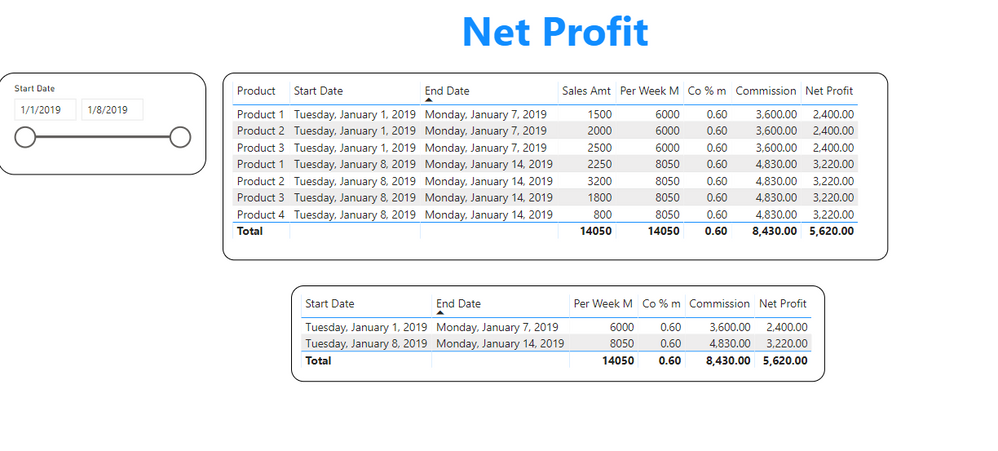
One more... and the pbix Net ProfitCommish1.PNG


Did I answer your question? Mark my post as a solution!

Proud to be a Super User!


Hi,

Thanks for helping me. I dont have start and end dates as part of actual table. Date is just a slicer. Minute we remove date from table and push to slicer we see only one instance of the product for the entire time span. This is where the calculations are messing up. 


Thanks

repsol
Frequent Visitor

 Should I create a new table for commsion and commission percentage and join to sales table for this to work? As of now in my model i just have the sales table and date table. 

Nathaniel_C
Community Champion
Community Champion

Hi @repsol ,

Note the totals are all correct.

Let me know if you have any questions.

If this solves your issues, please mark it as the solution, so that others can find it easily. Kudos are nice too.
Nathaniel

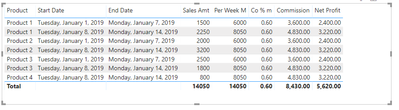
Commish.PNG


Co % m = SWITCH (
    TRUE  (),   
    [Per Week m]>4000,.60,
    [Per Week m]>2500 ,.50,
    [Per Week m]>2000, .40,
    [Per Week m]<=2000,.30)
Note this may be simpler, as the value is decided when the test is true.

--------------------------
Per Week M = CALCULATE(Sum(Commish[Sales Amt]),FILTER(ALLEXCEPT(Commish,Commish[Start Date]),MAX(Commish[Start Date])))

--------------------------

Net Profit = [Per Week M]-Commish[Commission]


Did I answer your question? Mark my post as a solution!

Proud to be a Super User!


Nathaniel_C
Community Champion
Community Champion

Hi @repsol ,


Let me know if you have any questions.

If this solves your issues, please mark it as the solution, so that others can find it easily. Kudos are nice too.
Nathaniel


Per Week = CALCULATE(Sum(Commish[Sales Amt]),FILTER(ALLEXCEPT(Commish,Commish[Start Date]),MAX(Commish[Start Date])))*


Did I answer your question? Mark my post as a solution!

Proud to be a Super User!


Helpful resources

Announcements
Power BI DataViz World Championships

Power BI Dataviz World Championships

The Power BI Data Visualization World Championships is back! Get ahead of the game and start preparing now!

December 2025 Power BI Update Carousel

Power BI Monthly Update - December 2025

Check out the December 2025 Power BI Holiday Recap!

FabCon Atlanta 2026 carousel

FabCon Atlanta 2026

Join us at FabCon Atlanta, March 16-20, for the ultimate Fabric, Power BI, AI and SQL community-led event. Save $200 with code FABCOMM.