cancel
Showing results for 
Search instead for 
Did you mean: 

The Power BI Data Visualization World Championships is back! Get ahead of the game and start preparing now! Learn more

Reply
Jos13
Helper III
Helper III

Cannot format measure

Hi All,
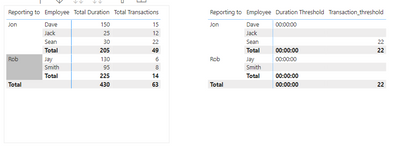
I was trying to format total duration in hh:mm:ss format in a matrix visual.

Jos13_0-1622021399472.png

I wanted to show those employees with duration>100 sec or transactions>20. 
I could create a measure for duration logic but when I format it to hh:mm:ss, it gives me 0.
I also want to exclude employees with blank in both duration and transaction.

Please help me on this.

Power bi file
https://drive.google.com/file/d/1MrKuxlT-hocLWRQK5kMujW3J-RRd2-Za/view?usp=sharing


1 ACCEPTED SOLUTION
Anonymous
Not applicable

Hi @Jos13 ,


Please try this:

Measure = 
var _hour=TRUNC([Total Duration]/3600)
var _min= TRUNC(  MOD([Total Duration],3600)  /60)
var _sec=MOD( MOD([Total Duration],3600),60)
return IF([Total Duration]>100 || [Total Transactions]>20 , TIME(_hour,_min,_sec),BLANK())

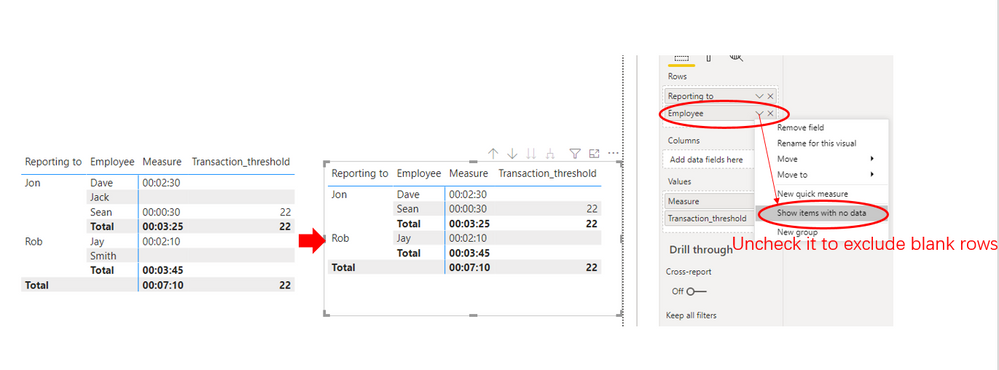
After uncheck the Show items with no data options, the final output is shown below:

Duration to time.PNG

Best Regards,
Eyelyn Qin
If this post helps, then please consider Accept it as the solution to help the other members find it more quickly.

View solution in original post

2 REPLIES 2
Anonymous
Not applicable

Hi @Jos13 ,


Please try this:

Measure = 
var _hour=TRUNC([Total Duration]/3600)
var _min= TRUNC(  MOD([Total Duration],3600)  /60)
var _sec=MOD( MOD([Total Duration],3600),60)
return IF([Total Duration]>100 || [Total Transactions]>20 , TIME(_hour,_min,_sec),BLANK())

After uncheck the Show items with no data options, the final output is shown below:

Duration to time.PNG

Best Regards,
Eyelyn Qin
If this post helps, then please consider Accept it as the solution to help the other members find it more quickly.

amitchandak
Super User
Super User

@Jos13 , for duration first have measure


Total duration = sum(Table[duration])


Duration as Duration =Quotient([Total duration ],3600) &":" & Quotient(mod([Total duration ],3600),60) &":" & mod(mod([Total duration ],3600),60)


Filter > 100


Sumx(filter(summarize(Table, Table[reporting to] , Table[Employee], "_Duration" , [Total duration],"_trans",[Total Transactions] ) , _Duration >100 && _trans >20),[_Duration])


Again use the duration code

Share with Power BI Enthusiasts: Full Power BI Video (20 Hours) YouTube
Microsoft Fabric Series 60+ Videos YouTube
Microsoft Fabric Hindi End to End YouTube

Helpful resources

Announcements
Power BI DataViz World Championships

Power BI Dataviz World Championships

The Power BI Data Visualization World Championships is back! Get ahead of the game and start preparing now!

December 2025 Power BI Update Carousel

Power BI Monthly Update - December 2025

Check out the December 2025 Power BI Holiday Recap!

FabCon Atlanta 2026 carousel

FabCon Atlanta 2026

Join us at FabCon Atlanta, March 16-20, for the ultimate Fabric, Power BI, AI and SQL community-led event. Save $200 with code FABCOMM.